See how ScaleXP works with Xero or QuickBooks.
In a 15- or 30-minute demo, we’ll show the relevant workflows using example data and discuss how they could apply to your finance process. Complex requirements? Discuss them with us first.
ScaleXP is a leading Maxio competitor, offering revenue recognition, SaaS metrics, CRM integration and consolidation while keeping your existing finance systems.
on the Xero App Store (75+ reviews)








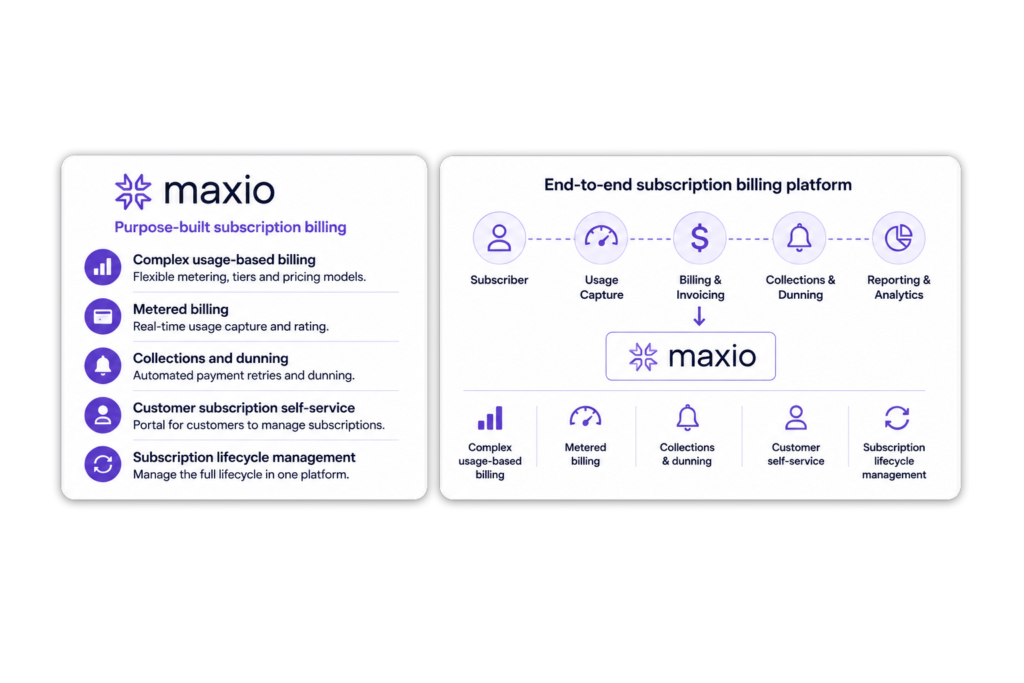
Maxio is built around subscription billing. That can make sense if you need a new billing engine, complex usage charging, collections and subscription management.
But many SaaS finance teams already have systems that work.
The real problem is not replacing these systems. It is connecting them.
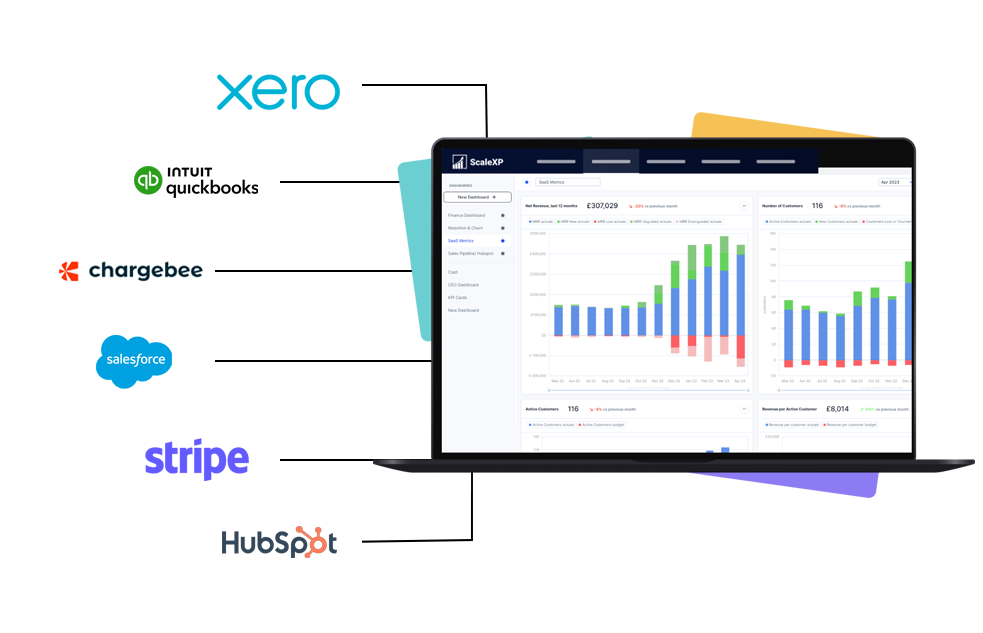
Your teams should not have to change how they work just to give finance better data.
Finance stays in Xero, QuickBooks or Zoho Books
Invoices, payments, journals and accounting records remain in the ledger your finance team already understands.
Sales and Customer Success stay in the CRM
Salesforce, HubSpot or Pipedrive continues to hold deals, contract terms, customer relationships, owners and renewals.
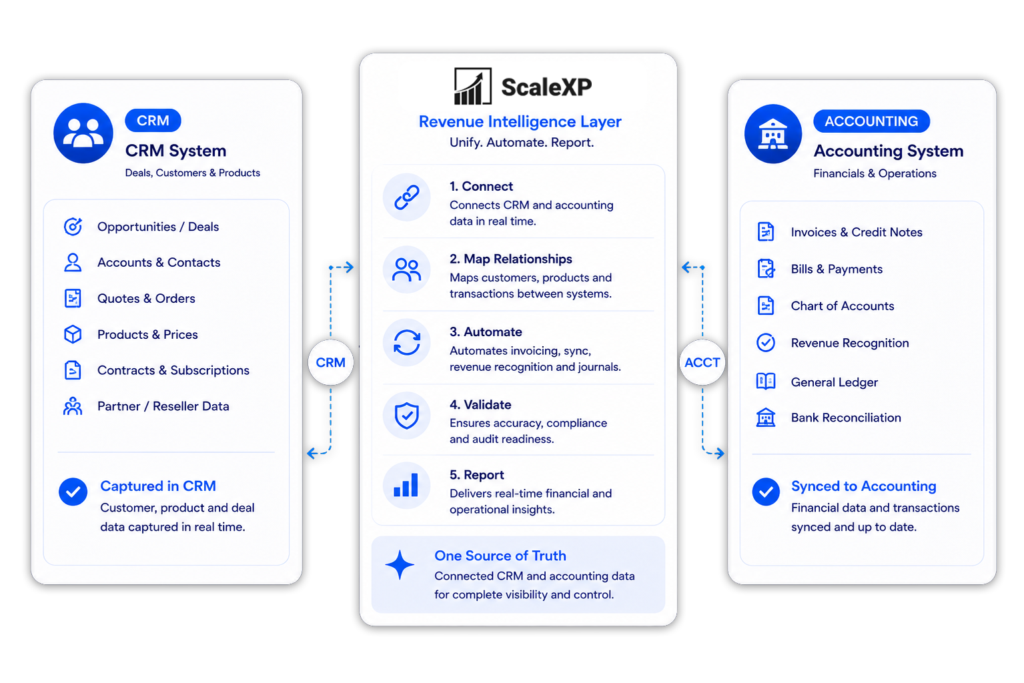
ScaleXP joins everything together
ScaleXP connects CRM, billing and accounting data, turning it into finance-reviewed invoicing, revenue recognition, SaaS metrics, forecasting, consolidation and board reporting.
No unnecessary system replacement. No duplicate spreadsheets. No broken handoff between sales and finance.
ScaleXP publishes this comparison to help finance teams evaluate fit. The criteria were defined before the products were assessed. Maxio facts link to current Maxio documentation, and ScaleXP facts are checked against current product evidence. Product scope and pricing can change, so confirm final requirements and commercial terms with each provider.
Criteria: best overall fit; accounting systems supported; subscription billing and collections; revenue recognition and allocation; posting journals to the general ledger; CRM integrations and CRM-to-finance workflows; SaaS metrics and analysis; multi-entity and multicurrency reporting; month-end workflows beyond revenue; published pricing and pricing basis; implementation dependencies; finance review and audit evidence. Neither product was tested hands-on for this comparison, and no scores are assigned.
Last checked: September 6, 2026.
| Criterion | ScaleXP | Maxio | Sources |
|---|---|---|---|
| Best overall fit | Finance teams that keep Xero, QuickBooks Online or Zoho Books as the ledger and want CRM-to-finance workflows, revenue recognition, month-end automation, SaaS metrics, forecasting, consolidation and board reporting in one reviewed workflow. | B2B SaaS companies that need a dedicated subscription billing platform. Every Maxio plan includes usage-based billing, subscription management, recurring billing, collections and dunning and 20+ payment gateways, with revenue recognition and reporting built around that billing. | ScaleXP pricing · Maxio pricing |
| Accounting systems supported | Xero, QuickBooks Online and Zoho Books. The ledger stays the system of record: ScaleXP reads invoices and accounting data from it and posts approved journals back to it. | Integrations are listed for QuickBooks Online, QuickBooks Desktop, Xero, NetSuite, Sage Intacct and Rillet. Advanced Revenue Summary GL Sync posts to five of them: QuickBooks Online, Xero, NetSuite, Sage Intacct and Rillet. | ScaleXP integrations · Maxio integrations, supported ledgers |
| Subscription billing and collections | No. CRM-to-invoice automation for Xero and QuickBooks: ScaleXP prepares the invoices; you choose how they’re sent. ScaleXP creates the invoices from CRM deals, as drafts or approved, and payment goes through your own payment provider; ScaleXP does not replace Maxio’s billing. | Yes. Fixed, usage-based and milestone-based billing, subscription management, a customer portal, collections and dunning, 20+ payment gateways and Maxio Payments. Event-based billing and A/R management are optional modules. | ScaleXP CRM invoicing · Maxio pricing |
| Revenue recognition and allocation | Revenue schedules prepared from invoice, billing and CRM data. AI reads dates, terms and service periods; finance reviews recognized, deferred and accrued revenue before anything is posted, supporting ASC 606 and IFRS 15 workflows. Available on every plan; Growth and Scale add the more complex recognition options. | Recognition schedules are generated from each transaction using a documented list of recognition methods. Contract changes cover amounts, dates, item exchanges, early terminations and mid-term edits. Performance obligations, SSPs, carve-outs and multiple revenue books are listed. Standard tier on Grow, advanced tier on Scale; advanced revenue management is an optional module. | ScaleXP revenue recognition · Maxio docs: managing revenue, pricing |
| Posting journals to the general ledger | Yes. Finance reviews the schedule and posts the approved journal to Xero or QuickBooks Online from ScaleXP (two clicks for QuickBooks Online), keeping invoice-level detail behind each journal. | Yes, through Advanced Revenue Summary GL Sync. Maxio builds a balanced journal entry from the report's Consolidated Journal Entries section and posts it to QuickBooks Online, Xero, NetSuite, Sage Intacct or Rillet, manually or on a daily, weekly or monthly schedule. Depends on configuration: the report must be enabled by Maxio Support, the ledger connected and the chart of accounts mapped. The other three report sections stay in Maxio. | ScaleXP revenue recognition · Maxio docs: GL Sync, set-up |
| CRM integrations and CRM-to-finance workflows | HubSpot, Salesforce and Pipedrive. Closed-won deals become draft invoices, revenue schedules, renewals, forecasts and SaaS metrics, with finance review before anything reaches the ledger. | HubSpot, Salesforce and Pipedrive are listed integrations. Maxio's documentation describes transactions typically being created by processing sales orders from a connected CRM; those transactions then drive invoices and revenue schedules inside Maxio. | ScaleXP CRM integration · Maxio integrations, docs |
| SaaS metrics and analysis | 30+ automated SaaS metrics from integrated CRM and accounting data on the Growth and Scale plans, with cohort analysis and renewal and upsell tracking; MRR and ARR metrics on Starter. | SaaS metric reporting includes basic financials, projections, top customers, renewal rate, cohorts and the Subscription Momentum report (opening, new, lost, expansion, contraction and closing ARR or MRR, configurable for churn, retention, CLV and CAC), built from Maxio's billing and transaction data. | ScaleXP SaaS metrics, pricing · Maxio pricing |
| Multi-entity and multicurrency reporting | Yes. Consolidates entities on Xero, QuickBooks and Zoho Books, including mixed-ledger groups, across currencies with intercompany entries and FX handled. Multi-entity consolidation is included from Starter and priced per additional subsidiary. | Optional module. Multi-entity support and consolidated invoicing are listed, and the Advanced Revenue Summary report can be configured for FX-restated reporting. Consolidation across different accounting systems is not described in Maxio's documentation. | ScaleXP consolidation · Maxio pricing, docs |
| Month-end workflows beyond revenue | Yes. Prepayments, accruals, accrued revenue and deferred revenue prepared as reviewable journals, a fully automated month-end close on Growth and Scale, management reports and PowerPoint board packs. | Partial. Expense amortization is an optional module and A/R management is available. Maxio's published scope is billing, accounts receivable, revenue recognition and SaaS reporting; prepayments, accruals and a wider close are not described. | ScaleXP month-end close · Maxio pricing |
| Published pricing and pricing basis | Three published plans (Starter, Growth and Scale) plus a per-subsidiary add-on; current prices are on the pricing page in your local currency. Plan prices are not linked to ARR; each plan carries an invoice allowance with add-ons above it. | Grow $599 per month for up to $100,000 in monthly billings; Scale by quotation above that. Agreements are annual by default with premium monthly or quarterly options. No per-user charges. Optional modules are priced separately and not published. | ScaleXP pricing · Maxio pricing |
| Implementation dependencies | Connects to the ledger and CRM through their app integrations. Tailored onboarding is included (1 hour on Starter, 3 hours on Growth); no implementation fee is published. | Journal posting depends on the Advanced Revenue Summary report being enabled by Maxio Support, a connected ledger, a destination account ID saved on every Maxio account used by the report, and a GL Sync configuration. Implementation fees and timelines are not published on Maxio's pricing page. | ScaleXP pricing · Maxio docs: set up GL Sync, pricing |
| Finance review and audit evidence | Finance reviews and approves every schedule before posting. Invoice-level detail and supporting schedules are retained behind each journal, with a full audit trail for journals on every plan. | Preview shows the journal entry before Sync Now; sync history is retained for audit. QuickBooks Online receives a CSV workpaper attachment, Xero does not. A Contract Details audit report is listed, and Maxio's closing dates align with the ledger's own closing or lock date. | ScaleXP revenue recognition, pricing · Maxio docs: GL Sync, managing revenue |
For the detail behind the journal row, including what Maxio's GL Sync posts and what it requires, read our guide to Maxio revenue recognition and GL Sync.
ScaleXP is the stronger fit when you want to retain Xero, QuickBooks Online or Zoho Books and add connected CRM-to-finance workflows, revenue recognition, month-end automation, finance-grade SaaS metrics, forecasting, consolidation and board reporting in one controlled workflow. Finance reviews every schedule and journal before it is posted, the ledger stays the system of record, and the published plan prices are not linked to ARR.
Maxio may be the stronger fit when the principal requirement is a dedicated subscription billing platform: usage-based or milestone-based billing, collections and dunning, a choice of payment gateways, customer subscription management and a customer portal, or Maxio's advanced revenue management configuration with performance obligations, SSPs, carve-outs and multiple revenue books. ScaleXP does not replace Maxio’s billing. If billing itself is the requirement, compare the other billing platforms on our Maxio alternatives page as well.
ScaleXP publishes its Starter, Growth and Scale plans, plus a per-subsidiary add-on, on its pricing page in your local currency, with tailored onboarding included and no published implementation fee. Maxio publishes Grow at $599 per month for businesses with up to $100,000 in monthly billings and lists Scale as Get a Quote, on annual agreements by default with premium monthly or quarterly options; optional modules, implementation fees and timelines are not published (Maxio pricing). Maxio's billing threshold is a plan boundary, not a percentage of ARR. Confirm modules, entities, integrations, implementation and contract term with each provider before comparing totals.
Last checked: September 6, 2026.
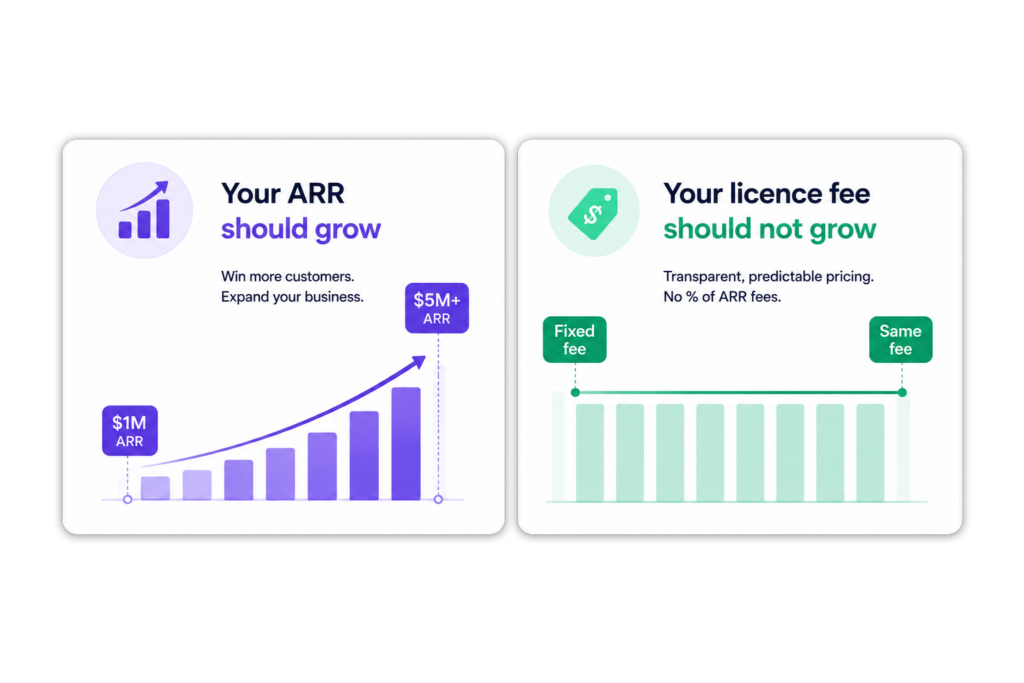
Maxio publishes plans that step with monthly billing volume: Grow is $599 per month for up to $100,000 in monthly billings, and Scale is priced by quotation above that (Maxio pricing, checked September 6, 2026). ScaleXP takes a different approach.
Predictable pricing
There are no percentage-of-ARR fees. Your plan price does not increase because ARR grows or the business crosses a revenue threshold. Additional entities, users, invoice volume above the plan allowance or new functionality may change the subscription; ARR growth alone does not.
Compare the three-year cost
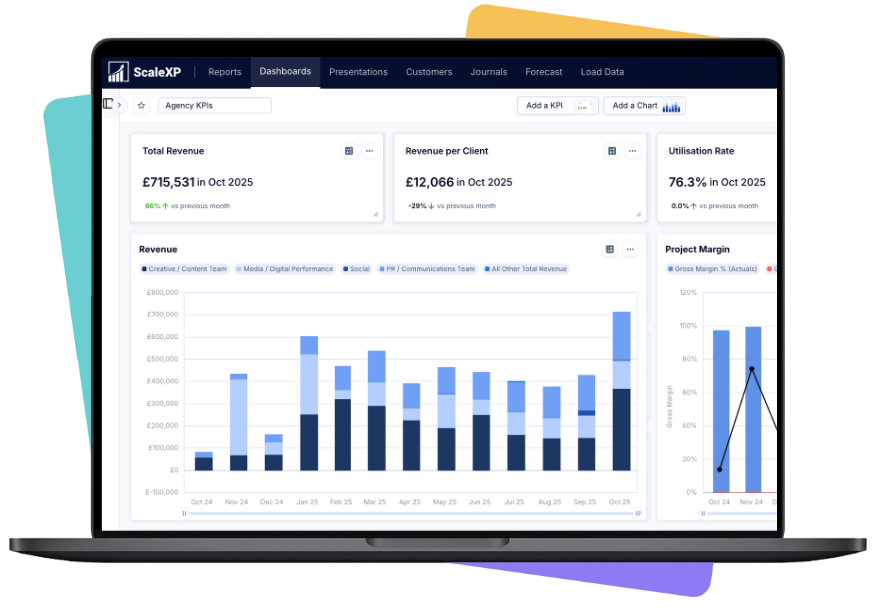
ScaleXP does more than pass data between systems.
It connects what was sold with what should be invoiced, recognized, forecast and reported.
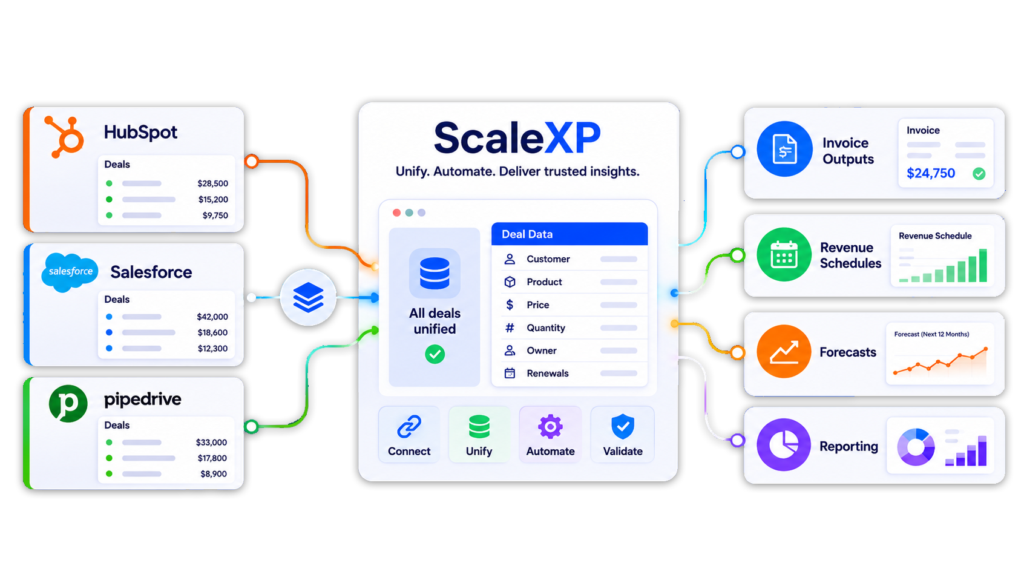
From CRM to invoice
Create draft invoices using deal, customer, product and billing data from HubSpot, Salesforce or Pipedrive.
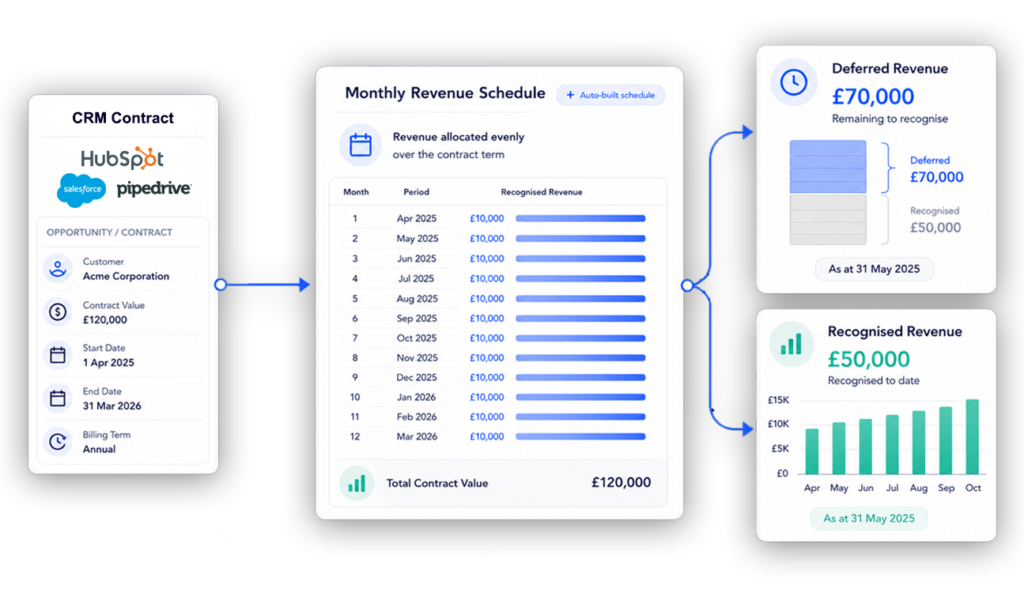
From invoice to revenue
Use invoice and contract data to prepare recognized, deferred and accrued revenue schedules.
From pipeline to forecast
Combine issued invoices, renewals and CRM pipeline to improve revenue and MRR forecasting.
Learn more about our CRM Billing and Invoicing Automation.
Channel sales create an awkward finance problem.
The end customer using the product may be different from the reseller or distributor paying the invoice.
ScaleXP connects both relationships.
Keep the commercial customer visible
Track the Sold To customer, product, account owner, renewal and subscription in the CRM.
Invoice the correct business
Send the invoice to the Bill To reseller, distributor or channel partner through the accounting system.
Report across both views
Revenue recognition is only one part of month end.
ScaleXP brings the wider close into one connected workflow.
Revenue workflows
Expense workflows
Finance reviews the calculations and exceptions before anything is posted.
That means less spreadsheet work without giving up finance control.
“It has a very well thought-out GUI and is flexible with how you model revenue recognition.”
David · VP of Finance, moved from Maxio (G2 review)
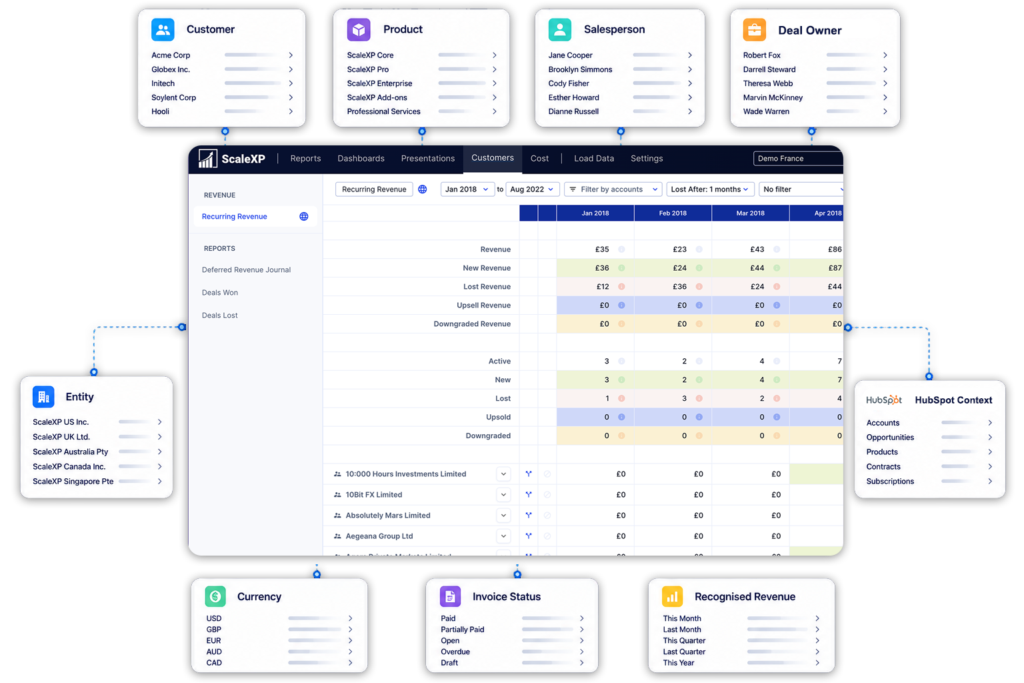
Your US team might use QuickBooks, your UK entity Xero, and another subsidiary Zoho Books. ScaleXP brings them together without changing each local ledger.
Consolidate across systems and currencies
See what drives the numbers
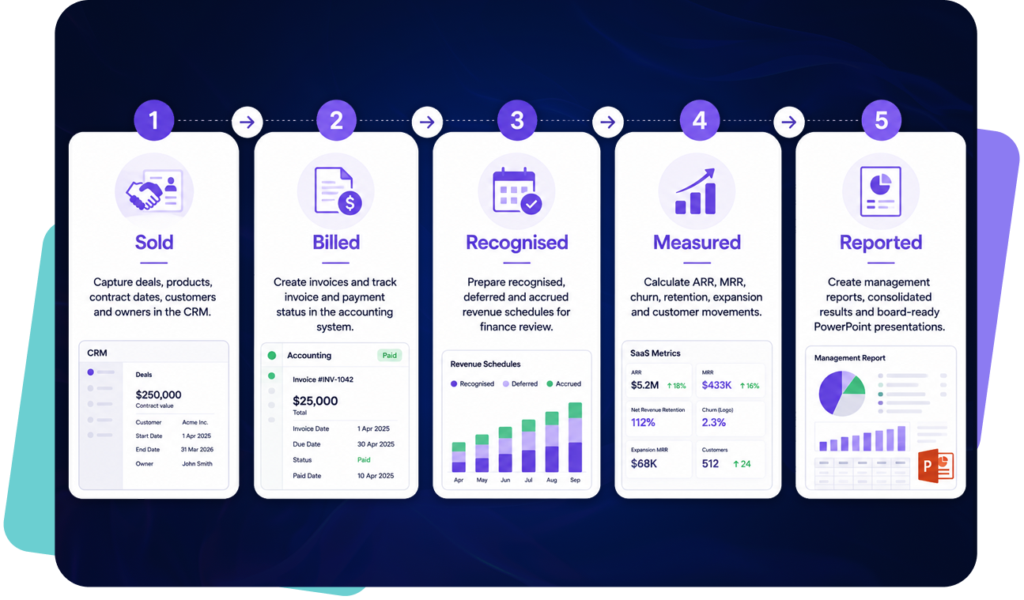
ScaleXP connects the revenue journey from beginning to end.
1. Sold
Capture deals, products, contract dates, customers and owners in the CRM.
2. Billed
Create invoices and track invoice and payment status in the accounting system.
3. Recognized
Prepare recognized, deferred and accrued revenue schedules for finance review.
4. Measured
Calculate ARR, MRR, churn, retention, expansion and customer movements.
5. Reported
Create management reports, consolidated results and board-ready PowerPoint presentations.
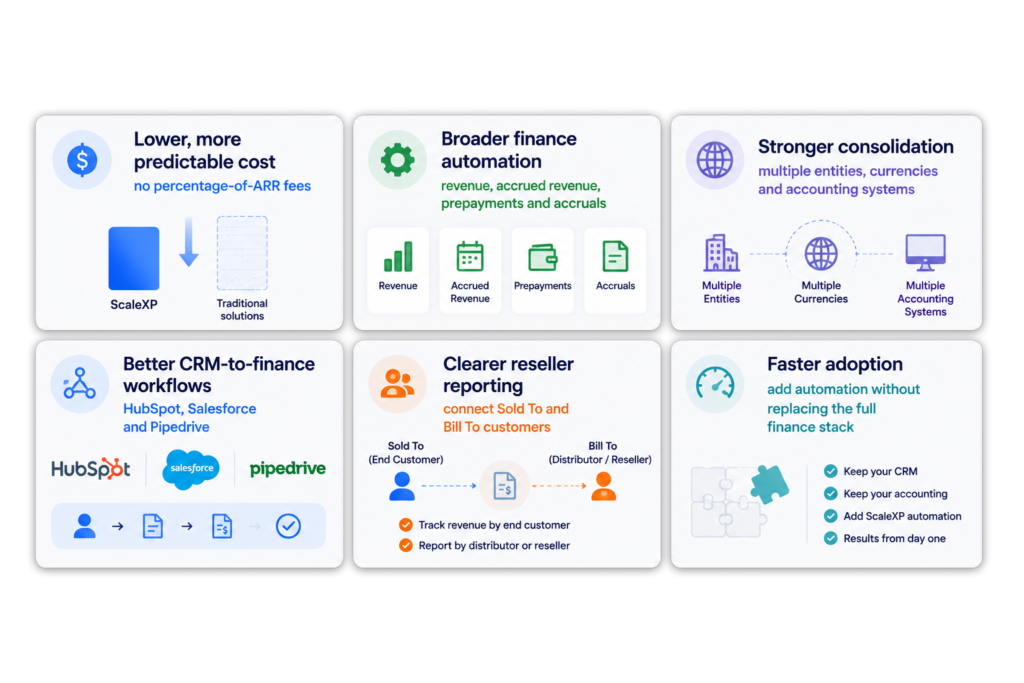
For SaaS finance teams that already use established CRM and accounting systems, ScaleXP delivers more of what finance needs, with less disruption.
Maxio is a subscription billing platform. Every plan includes recurring and usage-based billing, subscription management, collections and dunning and payment gateways, with revenue recognition and SaaS reporting built around that billing engine. ScaleXP is a finance automation layer for teams that keep Xero, QuickBooks Online or Zoho Books as the ledger: it connects the CRM and the accounting system to prepare invoices, revenue schedules, month-end journals, SaaS metrics, forecasts and consolidated board reporting, with finance review before anything is posted. The choice usually turns on whether you need to replace billing or connect the systems you already run.
Yes, for finance teams that want to keep Xero or QuickBooks Online as the system of record. ScaleXP reads invoices and accounting data from the ledger, connects HubSpot, Salesforce or Pipedrive, and adds revenue recognition, deferred and accrued revenue, prepayments and accruals, SaaS metrics, forecasting and multi-entity consolidation around it. It does not replace Maxio’s billing, so teams that need usage-based billing, dunning or a customer portal should compare Maxio and other billing platforms on those requirements.
Yes, within a documented scope. Maxio’s Advanced Revenue Summary GL Sync builds a balanced journal entry from the report’s Consolidated Journal Entries section and posts it to QuickBooks Online, Xero, NetSuite, Sage Intacct or Rillet, either manually or on a daily, weekly or monthly schedule. It requires the Advanced Revenue Summary report to be enabled by Maxio Support, an existing general ledger connection, and every account mapped to its QuickBooks list ID or Xero account code. Only that consolidated section posts; the invoicing summary, reclassification and revenue journal sections stay in Maxio. QuickBooks Online supports a Class dimension and a CSV workpaper attachment; Xero supports a Tracking Category but no attachment. ScaleXP posts finance-approved journals to Xero or QuickBooks from its own review workflow. Source: Maxio documentation, checked September 6, 2026.
Maxio. Subscription billing is its core product: fixed, usage-based and milestone-based billing, subscription management, a customer portal, collections and dunning, 20+ payment gateways and Maxio Payments are all part of the platform. CRM-to-invoice automation for Xero and QuickBooks: ScaleXP prepares the invoices; you choose how they’re sent. ScaleXP creates the invoices from CRM deals, as drafts or approved, and payment goes through your own payment provider; ScaleXP does not replace Maxio’s billing.
ScaleXP, when the goal is to automate the close around an existing ledger. It prepares recognized, deferred and accrued revenue, prepayments and accruals as reviewable journals, consolidates entities on Xero, QuickBooks and Zoho Books across currencies, calculates more than 30 SaaS metrics from accounting and CRM data, and produces management reports, forecasts and PowerPoint board packs. Maxio’s published scope covers billing, accounts receivable, revenue recognition and SaaS reporting, with expense amortization and multi-entity support as optional modules.
ScaleXP does not replace the ledger or the CRM. It connects to the Xero, QuickBooks Online or Zoho Books organization and the HubSpot, Salesforce or Pipedrive account the team already uses, so invoices, payments and posted journals stay in the accounting system. Recognized, deferred and accrued revenue schedules, ARR and MRR are then prepared from the connected invoice and contract data, and Finance reviews them before anything is posted. Teams that rely on Maxio for subscription billing, usage-based charging or collections should decide how those steps will run before switching. Every ScaleXP plan includes tailored onboarding (1 hour on Starter, 3 hours on Growth and Scale).
Compare the published basis, not a headline. ScaleXP publishes its Starter, Growth and Scale plans, plus a per-subsidiary add-on, on its pricing page, and its plan prices are not linked to ARR. Maxio publishes Grow at $599 per month for up to $100,000 in monthly billings and prices Scale by quotation above that, on annual agreements by default with premium monthly or quarterly options and no per-user charges. For either product, add any optional modules, extra entities, invoice-volume allowances and implementation services you need, then compare the three-year total for your expected growth.
““functionality we needed at a fraction of the cost of NetSuite”
ScaleXP vs Maxio
See how ScaleXP works alongside your existing CRM and accounting stack rather than replacing it.
In a 15- or 30-minute demo, we’ll show the relevant workflows using example data and discuss how they could apply to your finance process. Complex requirements? Discuss them with us first.