Connect Salesforce to Your Finance Systems

ScaleXP connects Salesforce with Xero or QuickBooks. It takes opportunities, customers, products and contract terms from Salesforce, joins them to the invoices, payments and accounting records in Xero or QuickBooks, and turns the result into invoices, revenue recognition schedules and journals, SaaS metrics such as ARR and MRR, and forecasts, so sales and finance report from the same numbers.

AI handles the prep; finance reviews and approves, with every number traceable.

5.0

on the Xero App Store (75+ reviews)

Salesforce opportunities flowing through ScaleXP into Xero and QuickBooks invoices, revenue recognition and finance reporting

ScaleXP is an approved app for leading accounting & CRM systems

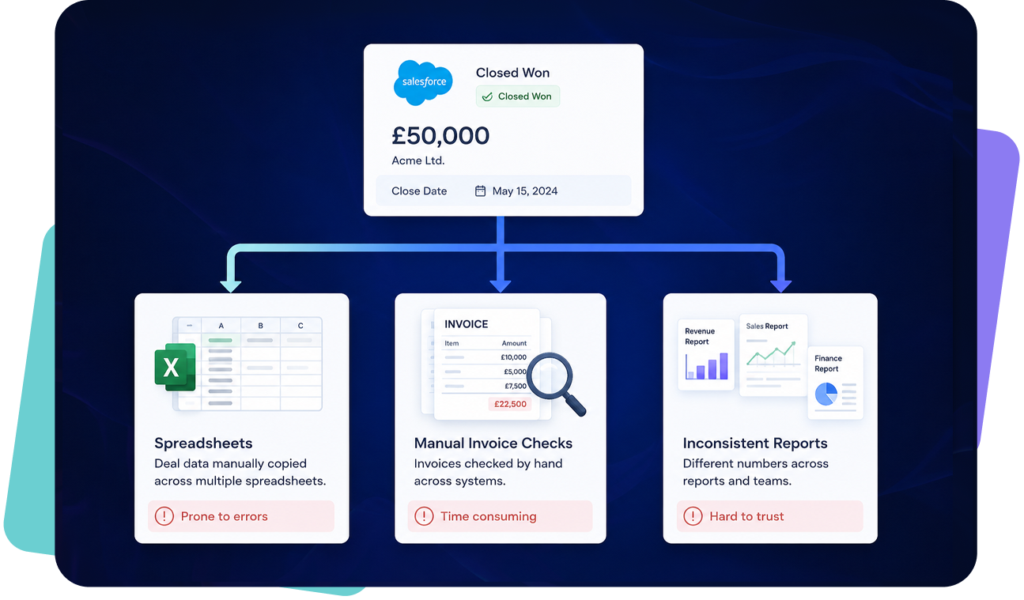
Salesforce and accounting data rarely match after closed-won

A closed-won CRM deal being rebuilt by hand into spreadsheets, manual invoice checks and inconsistent reports.

Salesforce records what was sold, while Xero or QuickBooks records what was invoiced and collected. Finance teams often bridge the gap manually, creating reporting delays and inconsistent numbers.

ScaleXP supports Salesforce accounting integration for teams connecting CRM data with billing, reporting and revenue recognition.

A closed-won CRM deal being rebuilt by hand into spreadsheets, manual invoice checks and inconsistent reports.

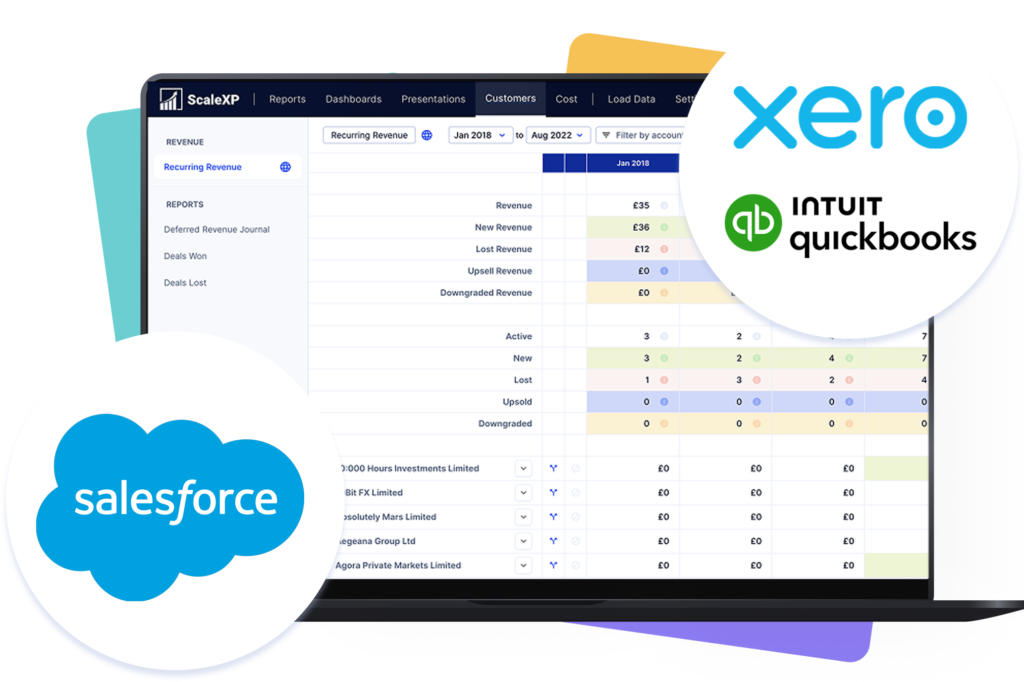
Fully integrated data from Salesforce to finance outputs

salesforce scalexp accounting system integrations

ScaleXP creates fully integrated data across Salesforce, Xero or QuickBooks, giving finance teams structured outputs for invoicing, revenue recognition, SaaS metrics, forecasting and reporting.

salesforce scalexp accounting system integrations

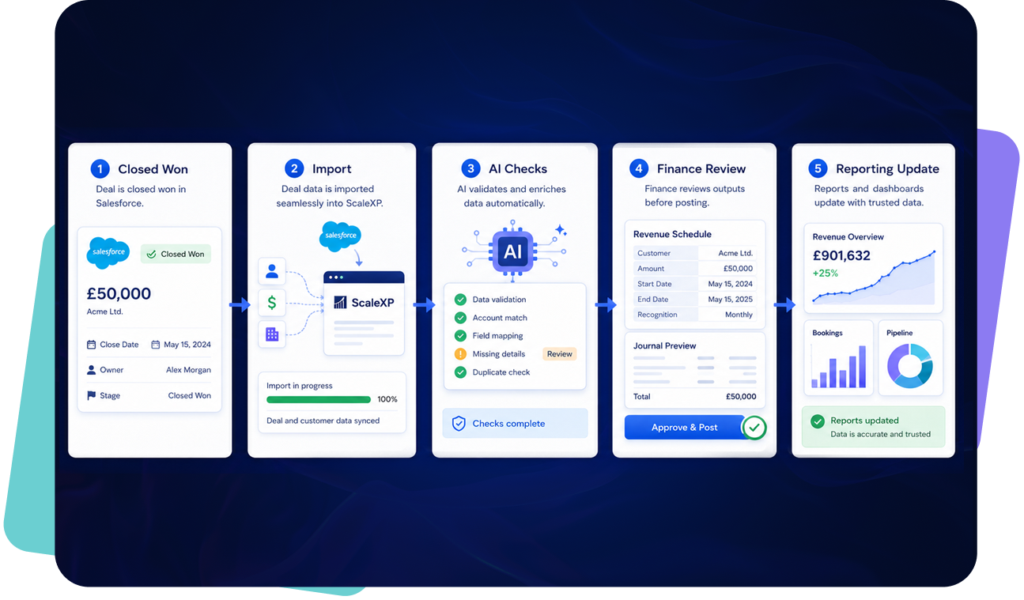
From Salesforce opportunity to finance-ready output

Five-step flow from a closed-won Salesforce deal: import into ScaleXP, automated AI data checks, finance review of the revenue schedule and journal, then updated revenue reports and dashboards

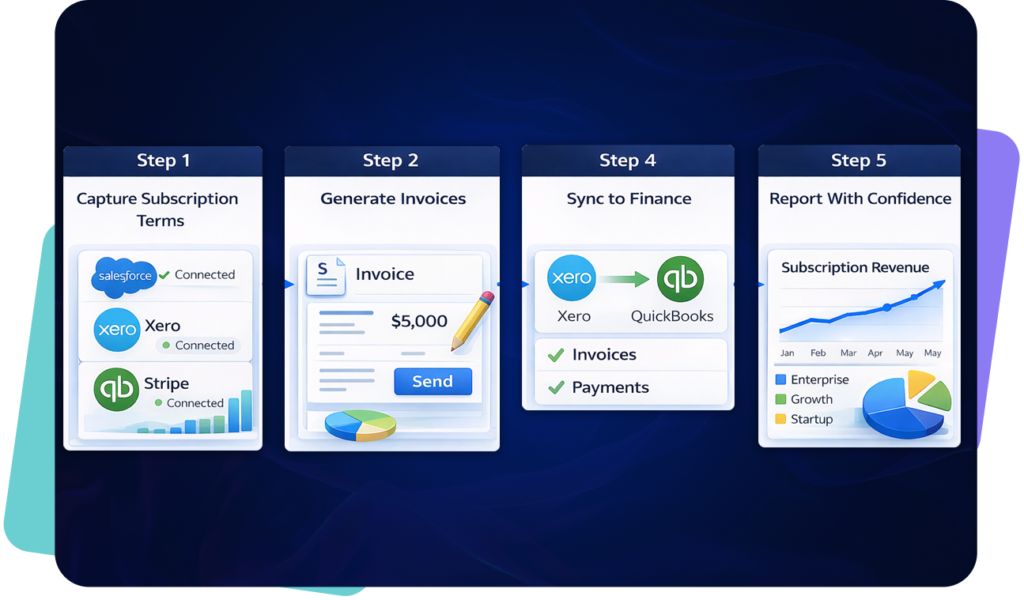
Faster billing from Salesforce to Xero or QuickBooks

Salesforce closed won opportunity converted into a draft invoice in Xero or QuickBooks using ScaleXP

Finance can prepare accurate billing outputs without rebuilding Salesforce data manually.

Using Xero alongside Salesforce? See the Salesforce Xero integration, or read the CFO guide to Salesforce Xero integration. Using QuickBooks? Explore the Salesforce QuickBooks integration.

Salesforce closed won opportunity converted into a draft invoice in Xero or QuickBooks using ScaleXP

Clearer reporting across bookings, billings and revenue

ScaleXP SaaS metrics dashboard showing ARR, MRR, churn, renewals and revenue performance from Salesforce and accounting data

Leadership can see commercial performance using Salesforce and accounting data together.

ScaleXP SaaS metrics dashboard showing ARR, MRR, churn, renewals and revenue performance from Salesforce and accounting data

Turn Salesforce contract data into revenue schedules

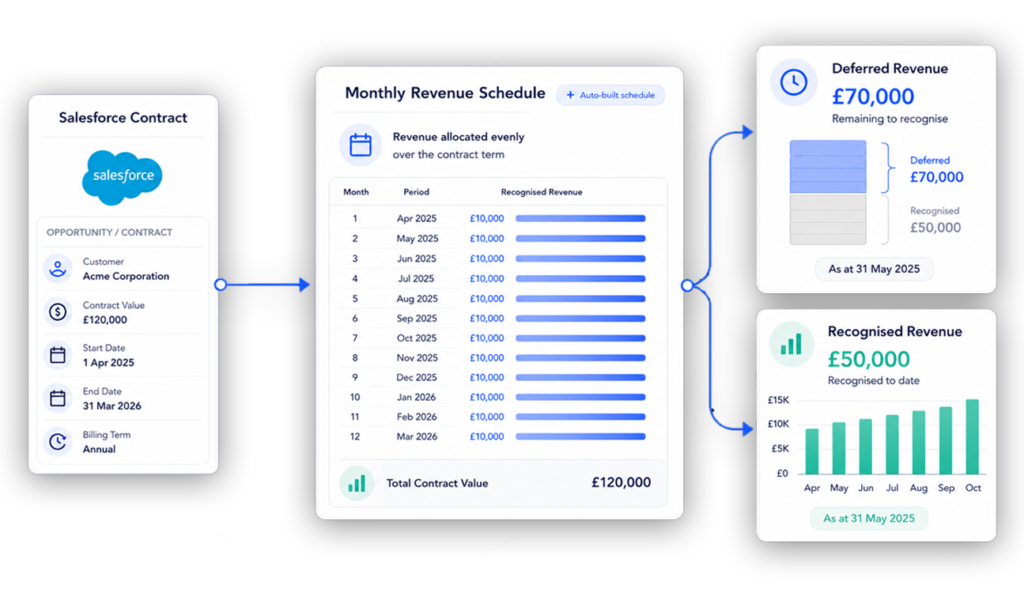
Salesforce contract data converted into deferred revenue and revenue recognition schedules in ScaleXP.png

ScaleXP helps finance prepare revenue recognition schedules and journals, from Salesforce contract and billing data.

See Salesforce revenue recognition software for how those schedules and journals are built.

Salesforce contract data converted into deferred revenue and revenue recognition schedules in ScaleXP.png

Forecast revenue using Salesforce and accounting data

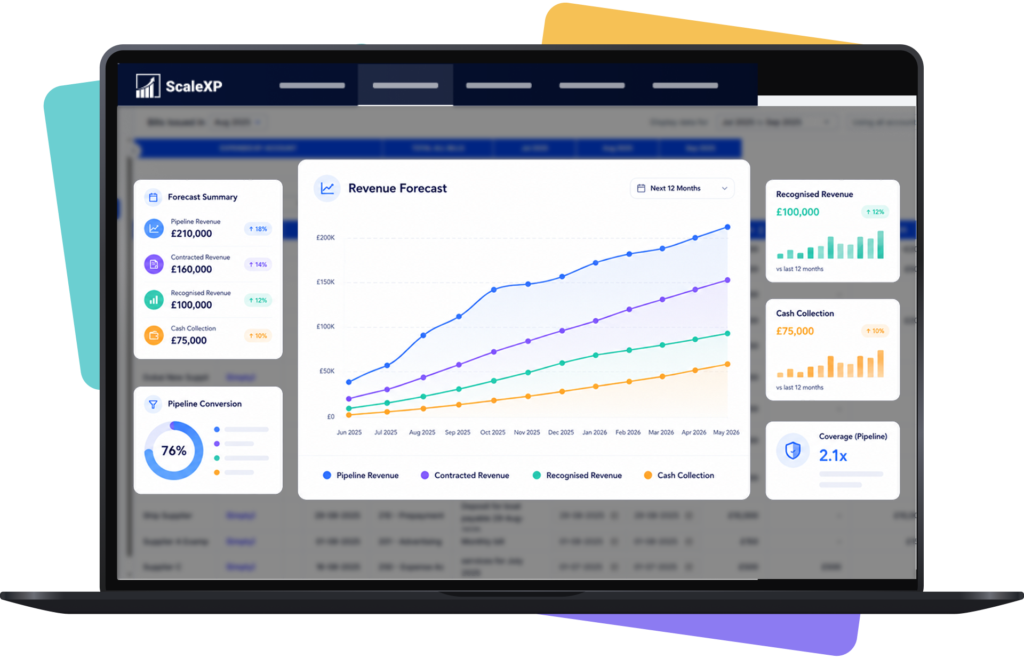
Revenue forecasting using CRM pipeline and QuickBooks/xero actuals

Finance can forecast using pipeline, closed-won deals, invoices and accounting actuals.

Revenue forecasting using CRM pipeline and QuickBooks/xero actuals

Salesforce native sync versus ScaleXP

Without ScaleXP

ScaleXP dashboard showing connected CRM and accounting data for Finance reporting

Deal handoff

Salesforce deals require manual finance checks.

Salesforce data becomes structured for finance review.

Invoice preparation

Finance rekeys customer and product details.

Invoice outputs use approved mapped data.

Revenue recognition

Schedules are maintained in spreadsheets.

Revenue schedules stay linked to source data.

SaaS reporting

ARR and MRR are rebuilt manually.

SaaS metrics update from integrated data.

Forecasting

Pipeline and actuals sit apart.

Forecasts combine CRM and accounting data.

Finance control

Outputs need manual validation later.

Finance reviews exceptions before reporting.

No credit card required

Connect Salesforce to finance workflows quickly

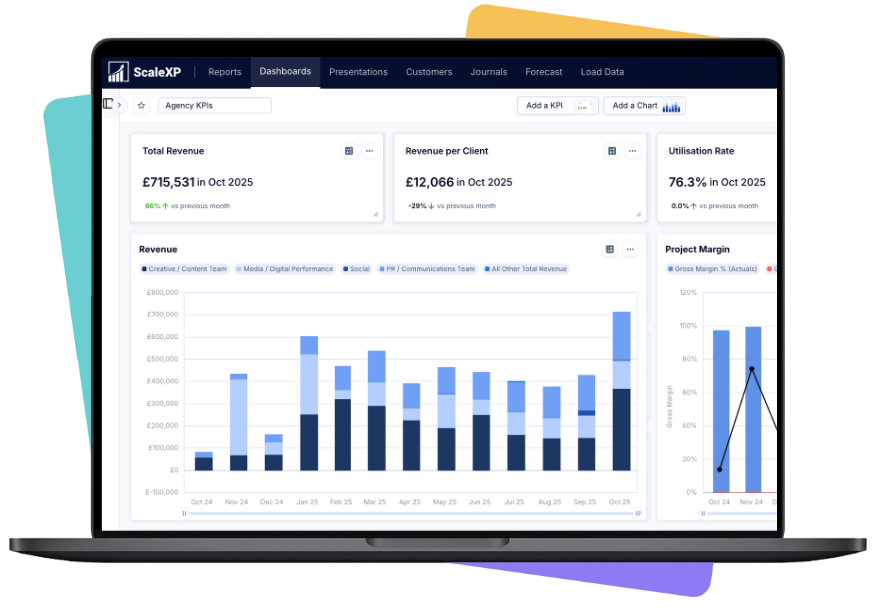
Dashboard displaying agency KPIs with graphs and metrics for revenue, client revenue, utilization rate, and project margin.

ScaleXP helps teams map Salesforce, Xero or QuickBooks data into controlled finance outputs.

Complex requirements? Book a meeting to discuss.

Four step implementation process for connecting Salesforce with Xero or QuickBooks in ScaleXP

Customer result

Half a day each month just to calculate MRR and ARR

Salesforce data could not be joined to Xero, making customer and subscription metrics tedious to calculate.

“Data from Salesforce could not be joined to Xero, making it tedious to calculate metrics, such as active customers, upgrades and downgrades. Calculating MRR and ARR alone required half a day each month.”

Tom

SquaredUp

Read the SquaredUp case study

Frequently asked questions

Yes. ScaleXP can use Salesforce data with Xero to support finance workflows across invoicing, revenue recognition, reporting and forecasting.

Yes. ScaleXP can use Salesforce and QuickBooks data together so finance teams can manage billing, reporting and revenue workflows from integrated data.

Setup time depends on your Salesforce fields, accounting structure and reporting needs. Most projects start with system connection, field mapping and finance review.

No. Onboarding focuses on connecting systems, mapping finance fields and validating outputs with your finance team before workflows are used.

ScaleXP helps prepare invoice-ready outputs from Salesforce opportunity data, using customer, product, contract and billing fields for finance review.

Yes. Salesforce contract, product and billing data can support revenue recognition workflows, including deferred revenue and recognition schedules.

ScaleXP can help map Salesforce product data into finance reporting structures used with Xero, QuickBooks and revenue recognition workflows.

Yes. ScaleXP can use Salesforce and accounting data to support ARR, MRR, renewals, churn and SaaS reporting.

A sync tool moves data between systems. ScaleXP structures integrated data into finance-ready outputs, reporting workflows and review processes.

Yes. ScaleXP is designed for finance review, exception checks and approval before outputs are used for reporting or workflows.