QuickBooks Finance Automation Software
ScaleXP adds the finance automation layer QuickBooks users need for month-end close, revenue recognition, automated journals, SaaS metrics, consolidation and board-ready reporting.
- Automate QuickBooks month-end close, journals and schedules
- Support deferred revenue, accrued revenue, accruals and prepayments
- Connect QuickBooks with CRM data for invoicing, forecasting and revenue reporting
on the Xero App Store (75+ reviews)

ScaleXP is an approved app for leading accounting & CRM systems







QuickBooks shows the books.
Your close workflow lives somewhere else.

QuickBooks is a strong accounting system, but much of the logic needed to complete month-end still sits outside it.
Journals are prepared in spreadsheets. Reporting packs are rebuilt manually. Finance teams spend time reconciling files instead of moving the business forward.
- QuickBooks and manual reporting files do not stay aligned
- Finance teams rely on spreadsheets to bridge the gaps
- Reporting becomes slower, harder to check, and less consistent
ScaleXP adds the AI layer to QuickBooks
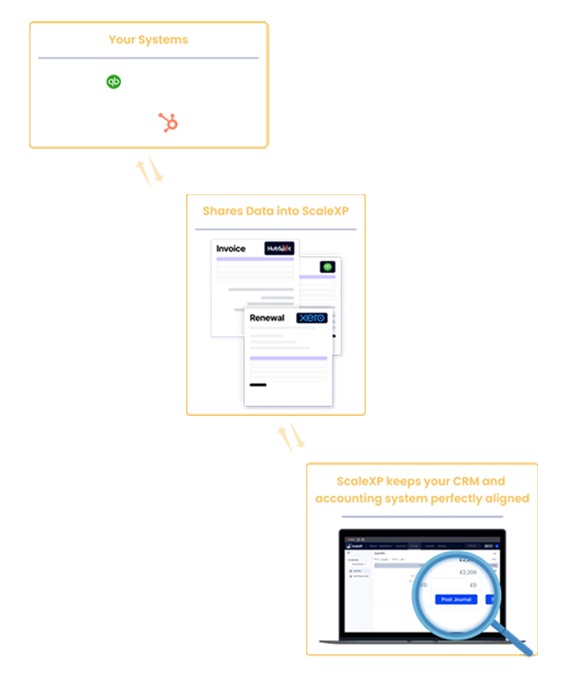
ScaleXP sits alongside QuickBooks, using AI to automate your close, streamline reporting, and reduce manual preparation, while your finance team retains full control over review, approval, and posting.
- Reads accounting data and transaction detail from QuickBooks
- Applies finance logic for journals, schedules, and reporting structure
- Produces cleaner reporting outputs for finance and leadership teams
How to fully automate your month-end close with QuickBooks
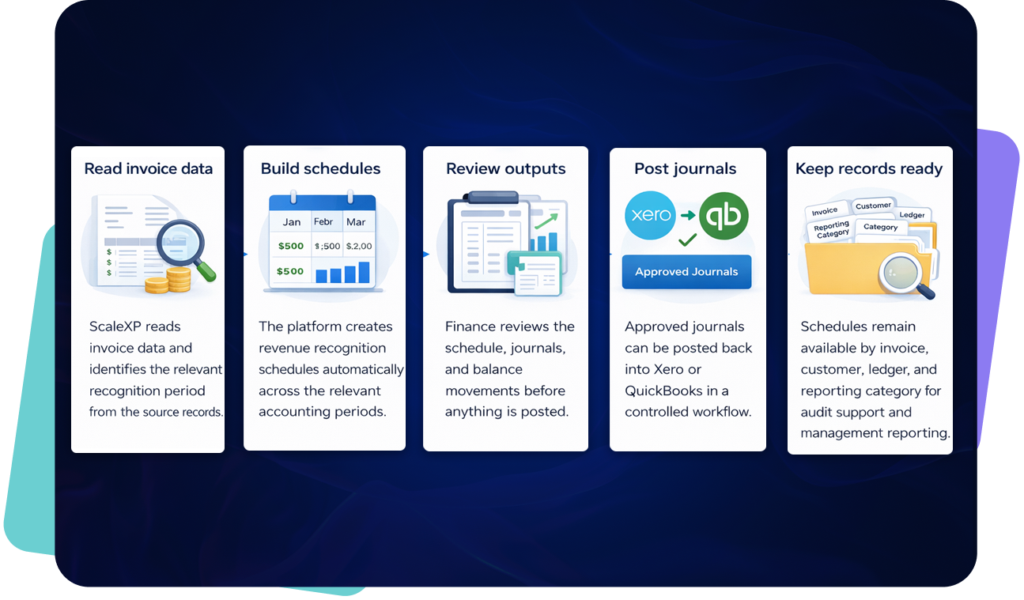
- Pull invoices, bills, and journal data from QuickBooks automatically
- Analyze transaction lines, service periods, and timing differences
- Generate compliant schedules for deferrals, accruals, and prepayments
- Finance validates proposed entries before one-click posting to QuickBooks
- Approved journals sync back and reporting reflects the latest position
Automate QuickBooks revenue recognition
ScaleXP helps finance teams use QuickBooks invoice, customer, journal and transaction data to prepare revenue recognition schedules and month-end journals.
This supports finance workflows such as deferred revenue, accrued revenue, recognized revenue, prepayments and accruals.
- Build revenue schedules from QuickBooks invoice and transaction data
- Support deferred revenue when customers are billed before revenue is earned
- Support accrued revenue when revenue has been earned but not yet invoiced
- Prepare journals for finance review before posting to QuickBooks
- Keep a full audit trail from source data to journal output
How Finance Work Changes With ScaleXP
Before ScaleXP
- Month-end tasks live outside QuickBooks in spreadsheets
- Journals prepared and reconciled manually
- Reporting built after close work is complete
- Finance teams lose time on reconciliation and adjustments
After ScaleXP
- Month-end workflows run directly from QuickBooks data
- Journals generated, reviewed, and posted with one click
- Reporting updates as close data changes
- Finance teams focus on analysis, not manual file work
Connect QuickBooks with HubSpot, Salesforce & Pipedrive
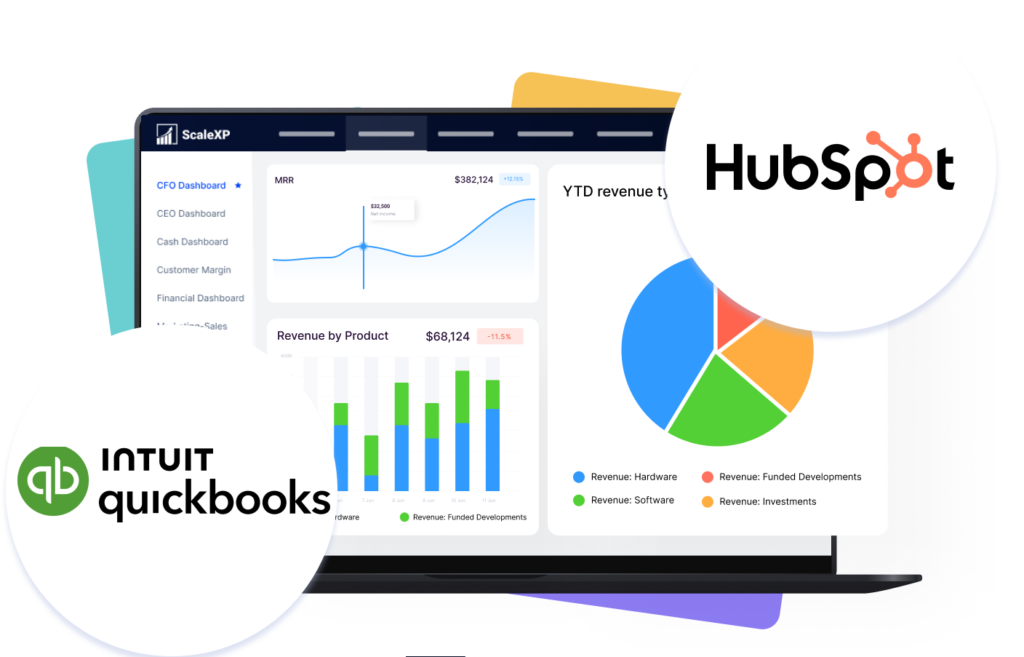
ScaleXP can connect QuickBooks data with CRM data from HubSpot, Salesforce and Pipedrive to create a clearer revenue intelligence layer.
This helps finance teams connect customer activity, CRM deals, invoices, billing status, recognized revenue, forecasts and reporting.
- Connect CRM deal data with QuickBooks invoice and accounting data
- Create clearer reporting across sales, finance and customer success
- Support CRM-based revenue reporting and forecasting
- Reduce manual work between CRM systems and QuickBooks
- Improve visibility across invoicing, revenue recognition and customer reporting
For broader workflows, see CRM accounting integration and CRM billing automation.
Support channel sales,
reseller and distributor billing
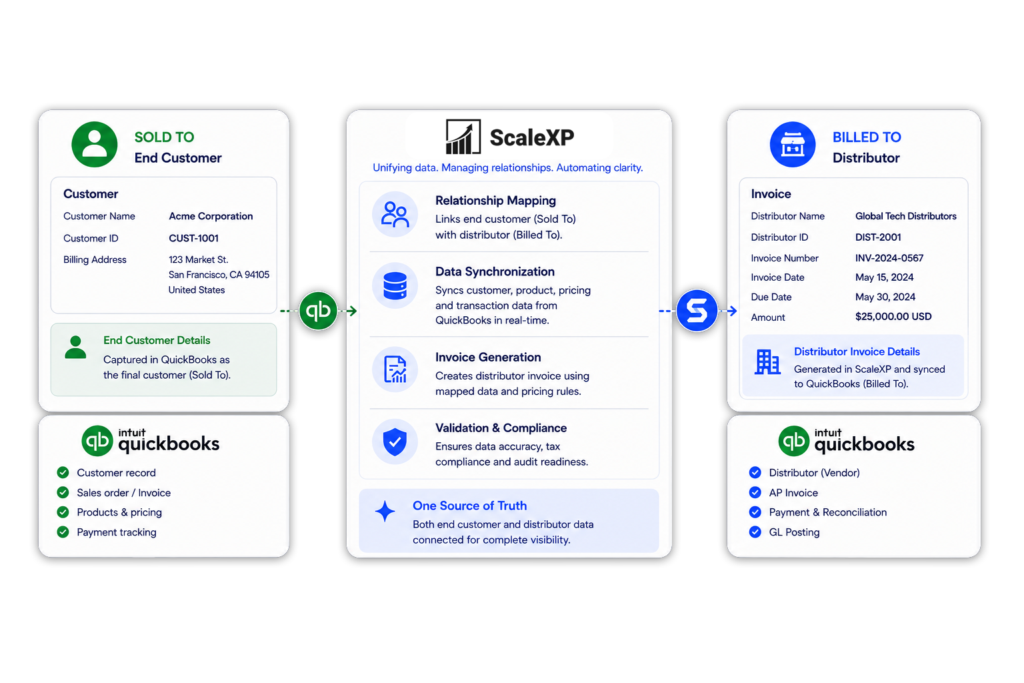
Some companies sell through distributors, resellers or channel partners. In these workflows, the CRM may track the end customer, while QuickBooks invoices are raised to the distributor, reseller or billing partner.
ScaleXP can help teams connect “Sold To” customer data with “Billed To” invoice data so finance can report revenue by end customer, distributor, reseller, product, owner, entity or revenue stream.
- Support distributor and reseller billing workflows
- Connect end-customer CRM data with QuickBooks billing customer data
- Improve Sold To / Billed To customer mapping
- Support channel sales revenue recognition and forecasting
- Improve reporting across commercial and billing relationships
Live reporting, aligned to your close
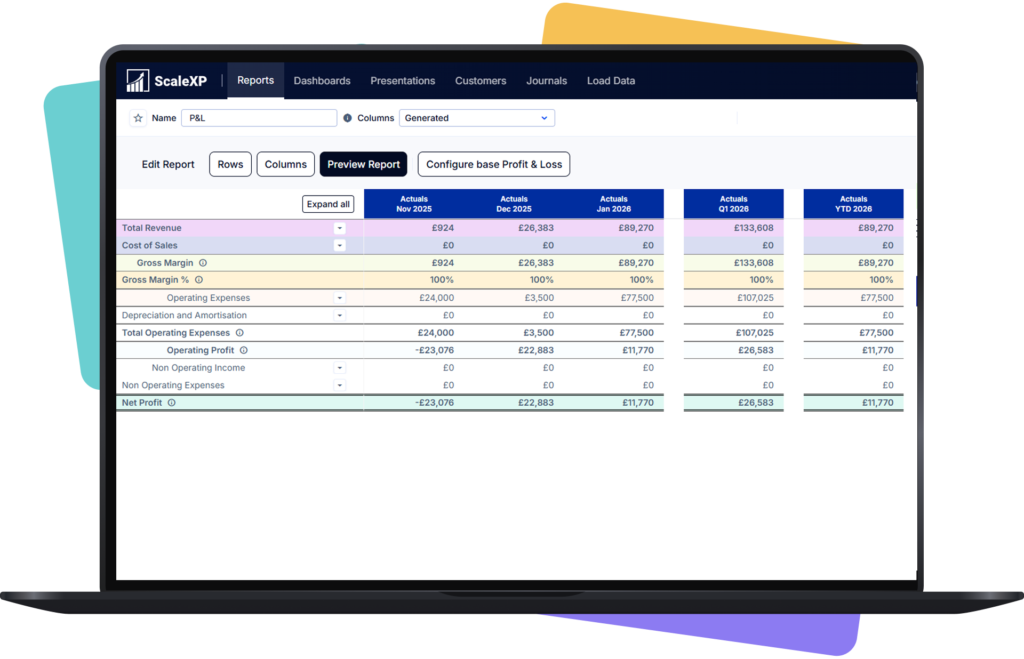
ScaleXP connects QuickBooks data directly to your reporting layer, so finance teams can build board-ready reports, dashboards, and P&L views without rebuilding files after each close.
- Reports built from live QuickBooks data, not manual exports
- Consolidated views across entities and reporting dimensions
- Real-time financial dashboard built from QuickBooks data
- Leadership-ready outputs delivered faster after close
For deeper SaaS reporting, see QuickBooks SaaS Metrics Dashboard.
Full audit trail and schedule-level detail
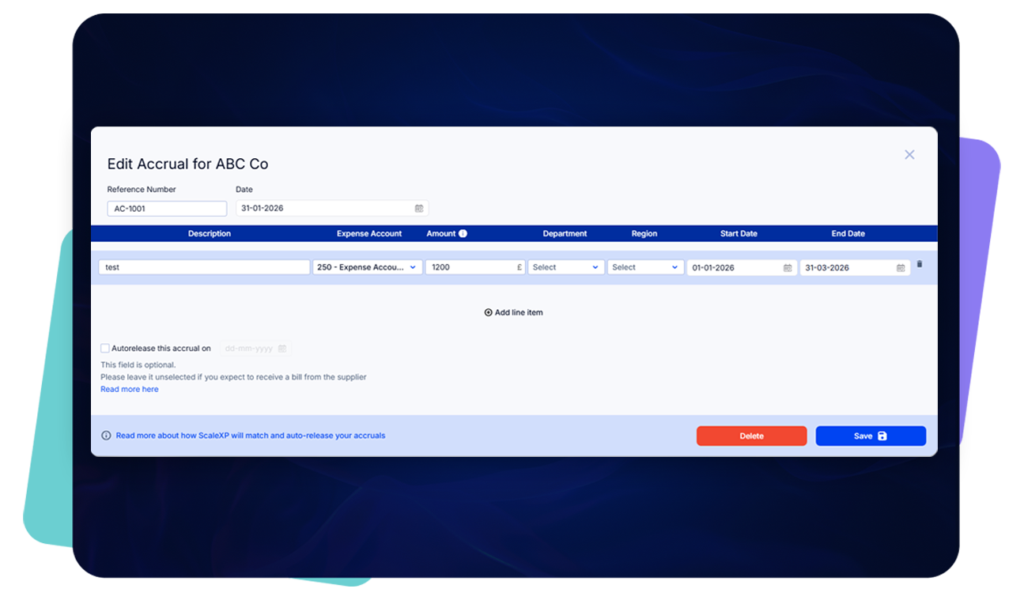
Every journal and schedule generated by ScaleXP is tied back to underlying QuickBooks data, with a complete audit trail, transaction-level supporting schedules, and review steps built into the workflow.
- Clear audit trail from QuickBooks source data to posted journal
- Review and approval before posting back to QuickBooks
- IFRS and GAAP aligned schedule structure
- Downloadable supporting schedules for audit queries
What QuickBooks finance automation unlocks
Workflow
QuickBooks + ScaleXP
QuickBooks alone
Month-end close
Automated schedules, journals and review workflows
Accounting records
Revenue recognition
Automated revenue schedules and journal preparation
Manual spreadsheet work
Deferred & accrued revenue
Deferred & accrued revenue schedules, audit trail and finance review
Manual calculations & journals
Prepayments and accruals
Automated schedules and journals
Spreadsheet tracking
Reporting
Live dashboards and board-ready reports
Exports and manual packs
CRM data
Connected revenue intelligence layer
Separate from accounting

- Finance teams using QuickBooks Online who want to close faster
- Controllers and FDs replacing spreadsheet month-end workflows
- CFOs who need cleaner, faster reporting for leadership
- Finance teams wanting better audit readiness without extra work
- Finance leaders who want more confidence in every number before board and audit review
More QuickBooks
finance automation workflows
QuickBooks is the accounting source of truth. ScaleXP adds the finance automation layer on top, helping SME CFOs reduce manual work across month-end close, reporting, revenue recognition, SaaS metrics and consolidation.
Explore the dedicated QuickBooks automation pages below.
QuickBooks SaaS Metrics Dashboard
Track ARR, MRR, churn, retention, NRR, GRR and board-level SaaS KPIs from QuickBooks data. Built for SaaS finance teams that need recurring revenue reporting they can explain to investors, boards and leadership teams.
Learn more about our QuickBooks SaaS Metrics Dashboard.
QuickBooks revenue recognition software
Automate revenue schedules, deferred revenue, accrued revenue and month-end journals from QuickBooks data. Useful for companies with annual subscriptions, multi-period invoices, prepaid contracts or complex revenue timing.
Learn more about our QuickBooks revenue recognition software.
HubSpot QuickBooks integration
Connect HubSpot and QuickBooks so finance, sales and leadership can work from the same revenue data. Useful when deal data, contract terms, billing dates, renewals or service periods sit in HubSpot rather than QuickBooks.
Discover how our HubSpot QuickBooks integration works.
Salesforce QuickBooks integration
Connect Salesforce and QuickBooks to support revenue intelligence, invoice workflows, revenue recognition, forecasting and reporting from CRM and accounting data. Useful when finance needs to connect Closed Won Opportunities, invoices, revenue schedules and board reporting.
Explore our Salesforce QuickBooks integration.
Pipedrive QuickBooks integration
Connect Pipedrive and QuickBooks so finance can check that won deals were invoiced, support revenue recognition and report ARR and MRR from the same data. Useful when deal, contract and billing information sits in Pipedrive rather than QuickBooks.
Explore our Pipedrive QuickBooks integration.
Consolidate across multiple QuickBooks companies or legal entities
Consolidate reporting across QuickBooks, Xero and other accounting systems. Built for SME groups that need group-level financial reporting, entity reporting, multi-currency visibility and board-ready consolidated numbers.
Learn more about how ScaleXP handles financial consolidation.
Frequently Asked Questions
How does ScaleXP work with QuickBooks?
ScaleXP connects to QuickBooks and reads invoice, bill, journal, and transaction data. It then applies finance logic to automate accruals, deferrals, prepayments, and reporting workflows — generating schedules, preparing journals, and posting approved entries back into QuickBooks with one click.
Can ScaleXP post back journals into QuickBooks?
Yes. Journals can be posted back into QuickBooks with one click. They can be broken down by account, QBO Class, Location, and even by supplier or customer — giving finance teams both speed and structure at month-end.
Can journals be structured by Class, Location, and GL account code?
Yes. Journals can be posted at the customer level, by supplier, and by dimensions such as Class, Location, and GL account code. This gives finance teams cleaner management reporting and more useful leadership views from the same accounting foundation.
Does this replace QuickBooks?
No. QuickBooks remains your accounting system. ScaleXP adds the AI automation layer that helps finance teams save time, reduce manual work, and deliver more value to the business.
What types of journals does ScaleXP automate in QuickBooks?
ScaleXP automates deferred revenue, accrued revenue, accruals, and prepayments. Each journal has a full audit trail with transaction-level information, making it easy to verify and confirm before posting.
Can ScaleXP handle multi-entity or consolidated reporting from QuickBooks?
Yes. ScaleXP supports multi-entity consolidation across QuickBooks and other accounting systems. Finance teams can build consolidated P&L, balance sheet, and management reports across multiple entities from one platform.
How does ScaleXP improve reporting from QuickBooks?
ScaleXP connects live QuickBooks data to a reporting layer that supports P&L, balance sheets, dashboards, and board presentations. Reports update as close data changes, without needing manual exports or rebuilding spreadsheet files.
How quickly can a finance team start using ScaleXP with QuickBooks?
Most finance teams connect QuickBooks to ScaleXP within a few hours and can run their first automated close workflow within the same week. The onboarding process is designed to be straightforward, with support from the ScaleXP team throughout.
Does ScaleXP support QuickBooks revenue recognition?
Yes. ScaleXP can use QuickBooks invoice, transaction, customer and journal data to support revenue recognition schedules, deferred revenue, accrued revenue and month-end journal workflows. Finance reviews journals before posting.
Can ScaleXP automate deferred revenue in QuickBooks?
Yes. ScaleXP can support deferred revenue workflows where customers are billed before revenue is earned. It helps prepare schedules and journals from QuickBooks data with an audit trail.
Can ScaleXP connect QuickBooks with HubSpot, Salesforce or Pipedrive?
Yes, where configured. ScaleXP can connect QuickBooks accounting data with CRM data from HubSpot, Salesforce or Pipedrive for invoicing, reporting, forecasting and revenue intelligence workflows.
Can ScaleXP support QuickBooks reporting by Class and Location?
Yes. ScaleXP can support reporting and journal structures using QuickBooks dimensions such as Class, Location, customer, supplier and GL account code.
Can ScaleXP support QuickBooks channel sales where Sold To and Billed To customers are different?
Yes, where configured. ScaleXP can support workflows where the CRM tracks the end customer but QuickBooks invoices are raised to a distributor, reseller or channel partner. This helps finance report by end customer, billing customer, distributor, reseller, product or revenue stream.
Can ScaleXP track SaaS metrics from QuickBooks?
Yes. ScaleXP can help SaaS finance teams use QuickBooks data to report ARR, MRR, churn, retention, NRR, GRR and board-level SaaS KPIs.
For the full workflow, see QuickBooks SaaS Metrics Dashboard.