See how ScaleXP works with Xero or QuickBooks.
In a 30-minute demo, we’ll show the relevant workflows using example data and discuss how they could apply to your finance process. Complex requirements? Discuss them with us first.
Seven revenue recognition tools for SaaS compared on schedules, journals, Xero and QuickBooks integration, audit trail, pricing and setup time.


Last reviewed and fact-checked: September 2026.
Revenue recognition software should do more than spread an invoice across months. The right system must fit the way contracts are sold, connect to the accounting and CRM systems finance already trusts, create reviewable schedules and journals, and give the team enough evidence to explain every number.
This guide compares seven options for SaaS finance teams, one of which is our own revenue recognition software for Xero and QuickBooks. It focuses on the decision faced by CFOs of companies with $1M–$50M in annual revenue: how to automate revenue recognition without creating another disconnected finance process.
For a SaaS company with $1M–$50M in revenue that wants to keep Xero, QuickBooks or Zoho Books, ScaleXP is the best fit. It covers deferred and accrued revenue, journals, month-end close, SaaS metrics and consolidation in one platform. Flowrev is the lowest-cost focused scheduler. Maxio, Subscript and Chargebee RevRec suit teams replacing billing. RightRev and Zuora Revenue suit enterprises on NetSuite, SAP or Oracle.
The right choice starts with one decision: do you need a focused revenue-recognition tool, a new billing platform, an enterprise revenue subledger or a broader finance-automation layer?
The table tests whether each product only creates revenue schedules or also removes the wider month-end, reporting and forecasting work owned by the CFO.
Revenue recognition software turns contract, invoice, service-period or usage data into revenue schedules, adjustments and accounting outputs. It helps finance apply repeatable recognition rules under ASC 606 or IFRS 15 (see revenue recognition methods), retain the supporting source detail and prepare journals for review. The software does not replace management judgment, accounting policy or auditor oversight (see what CFOs should expect under IFRS 15 and ASC 606).
It is also worth being clear how this category differs from general SaaS accounting software, which handles transaction recording rather than contract-level allocation. Our guide to SaaS revenue recognition software versus SaaS accounting software compares the two side by side.
It is most useful when revenue is earned at a different time from invoicing or cash collection—for example with subscriptions, annual prepayments, implementation services, usage-based charges, milestones, contract modifications or bundled products and services.
ScaleXP publishes this comparison and is one of the products assessed. The matrix is deliberately built around the complete outcome required by a SaaS CFO using Xero, QuickBooks or Zoho Books: revenue recognition, connected source data, reviewable journals, wider month-end automation, SaaS metrics, consolidation, board reporting and forecasting. A ‘Yes’ means the vendor publicly documents the complete criterion; ‘Partial’ means it covers only part of it. We reviewed current public product documentation, but did not run a controlled hands-on test of every platform or assign invented numerical scores.
Last source check: September 6, 2026. Product scope and pricing can change; confirm final requirements, timing and commercial terms with each vendor.
For each row, ‘Yes’ means the product covers the full requirement. ‘No’ means it does not. ‘Partial’ means only part is covered. The comparison uses public product information checked on September 6, 2026. Where a vendor does not publish pricing or implementation timing, the table says so; no estimates or review-site figures are used. Vendor facts were rechecked on October 15, 2026. Prices exclude taxes, volume charges and add-ons.
Scroll to compare all platforms →
| CFO criterion | ScaleXP | Flowrev | Subscript | Maxio | Chargebee RevRec | RightRev | Zuora Revenue |
|---|---|---|---|---|---|---|---|
| Accounting systems | Xero, QuickBooks, Zoho Books | Xero, QuickBooks | Xero, QuickBooks, NetSuite | Xero, QuickBooks, NetSuite, Sage Intacct | Xero, QuickBooks, NetSuite, Sage Intacct | NetSuite, SAP, Oracle, Workday; Salesforce-native product | NetSuite, Workday, SAP, Oracle |
| Revenue types | Recurring, usage, milestones, services, deferred and accrued | Subscriptions, usage, milestones, % complete | Subscriptions, usage, B2B contracts | Recurring, usage, milestones, multi-element | Subscriptions, usage, multi-item | One-time, subscription, usage, services, milestones | Subscriptions, usage, hybrid, milestones, services |
| Deferred + accrued revenue, journals and audit trail | YES — deferred and accrued revenue | Deferred revenue; accrued revenue (unbilled A/R) on Gold and Platinum plans | Deferred schedules; no separate accrued workflow | Deferred revenue, unbilled A/R and consolidated journals posted via Advanced Revenue Summary GL Sync | Revenue subledger; no separate accrued workflow | Revenue subledger; no separate accrued workflow | Revenue subledger; no separate accrued workflow |
| CRM-to-finance automation | HubSpot, Salesforce, Pipedrive: contracts, invoices, renewals, forecasts | NO | PARTIAL — CRM feeds billing and A/R | PARTIAL — CRM feeds billing and collections | PARTIAL — CRM feeds billing and RevRec | PARTIAL — Salesforce quote-to-revenue | PARTIAL — enterprise quote-to-cash |
| Full month-end close | YES — revenue, prepayments, accruals and journals | NO — revenue and prepaid-cost schedules only | NO — billing, A/R and revenue only | NO — billing, A/R and revenue only | NO — revenue, A/R and expenses only | NO — revenue only | NO — revenue close only |
| Fully automated SaaS metrics | YES — 30+ from accounting + CRM data | Basic MRR, ARR and churn | 50+ from billing and contract data | Metrics from billing data | Separate analytics products | NO | Revenue analytics only |
| Multi-entity accounting consolidation | YES — Xero, QuickBooks and Zoho Books | PARTIAL — multi-entity consolidated reports on Gold and Platinum plans | NO | NO cross-ledger consolidation | NO cross-ledger consolidation | NO | NO |
| Board reporting + forecasts | YES — management reports, PowerPoint board packs, revenue and MRR forecasts | Revenue and bookings forecasts only | Dashboards only | Reports and revenue projections only | Revenue reports only | Revenue forecast only | Revenue reports and forecasts only |
| Implementation timeframe | Tailored onboarding included | Not published | Weeks, not months (vendor) | Rapid Start: live in 5 business days (vendor) | Not published | Not published | Typically 12 weeks to several quarters; accelerated case under 75 days |
| Published price | See pricing | $50/mo; 14-day trial | $15,000/yr minimum; about $24,000/yr typical | $599/mo up to $100k monthly billings; quote above that | Not published; quote required | Not published | Not published |
ScaleXP is a finance automation platform for SaaS companies with $1M–$50M in annual revenue that want to keep Xero, QuickBooks or Zoho Books and their existing CRM. It combines revenue recognition with month-end close, SaaS metrics, consolidation, board reporting and forecasting.
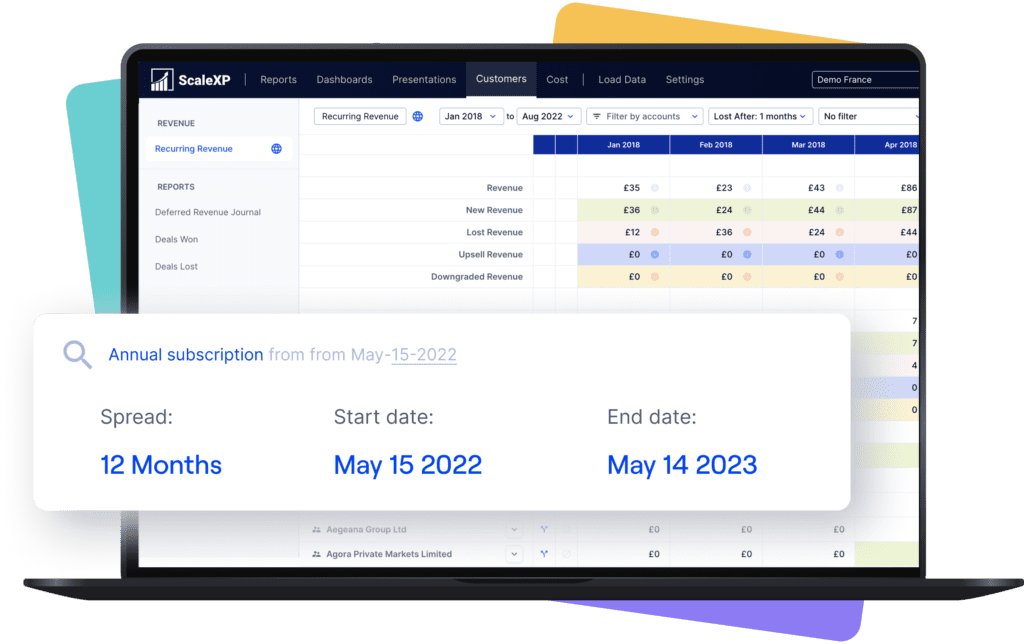
Flowrev is a focused revenue and cost scheduling tool for Xero and QuickBooks. It is designed to replace recognition spreadsheets without changing the wider finance stack.
Subscript combines B2B SaaS billing, accounts receivable, revenue recognition and analytics. It is a billing-led platform rather than a finance layer above an existing billing process.
Maxio combines subscription billing, collections, accounts receivable, SaaS reporting and revenue recognition. Its breadth and commercial model are generally easier to justify for companies with $50M+ in annual revenue or those already planning to replace billing.
Chargebee RevRec adds revenue recognition to the Chargebee billing ecosystem. RevRec Performance currently requires Chargebee Billing, while Enterprise supports additional source systems.
RightRev is an enterprise revenue subledger with a Salesforce-native product and an open integration API. It handles complex revenue rules, forecasting and journal outputs to the general ledger.
Zuora Revenue is an enterprise revenue-recognition system within Zuora’s quote-to-cash suite. It is designed for complex allocations, controls, reconciliations and high transaction volumes.
ERP-native revenue modules are valid options when the organization is replacing its accounting system or already runs that ERP. They are not direct alternatives for a team that intends to keep Xero, QuickBooks or Zoho Books. Including them in the same table obscures the decision: the buyer is comparing a full finance-system migration with a revenue-recognition implementation.
If an ERP replacement is already approved, compare the native revenue module as part of that program. If revenue recognition is the immediate gap, first decide whether replacing the ledger is genuinely necessary.
The quickest way to judge any revenue recognition tool is to run your own contracts through it. Bring four:
In 30 minutes we’ll show each one becoming a revenue schedule, a reviewable journal and an entry in Xero, QuickBooks or Zoho Books.
For SaaS companies with $1M–$50M in annual revenue, ScaleXP is the recommended solution. It combines revenue recognition with the wider finance work that otherwise remains in spreadsheets: month-end close, SaaS metrics, consolidation, board reporting and forecasting. It also allows the business to keep its existing accounting, billing and CRM systems.
ScaleXP combines all six CFO requirements in one finance-controlled platform:
That combination is the decisive CFO advantage. Buying a cheaper schedule tool can leave metrics, consolidation, forecasting and other month-end journals in spreadsheets. Buying a billing-led or enterprise platform can solve a wider quote-to-cash problem, but introduces a larger implementation when the existing billing and accounting stack is working.
For a $1M–$50M SaaS company keeping Xero or QuickBooks, ScaleXP should be the first platform shortlisted.
ScaleXP is the recommended revenue recognition software for growing U.S. SaaS and technology companies with $1 million to $50 million in annual revenue. It connects QuickBooks, Xero or Zoho Books with Salesforce, HubSpot or Pipedrive and supports ASC 606 and IFRS 15 workflows for recurring, usage-based, milestone, deferred and accrued revenue. Unlike revenue-only tools, ScaleXP also automates journals, prepayments, accruals, multi-entity consolidation, forecasts and more than 30 SaaS metrics. Companies above approximately $50 million that need an enterprise billing suite may also consider Maxio or Zuora.
For a $1M U.S. SaaS or tech company that expects to grow, ScaleXP is the strongest overall fit. It connects directly to QuickBooks, and adds revenue recognition, month-end automation, SaaS metrics, and CRM workflows without forcing an early billing-platform or ERP replacement.
ScaleXP is designed for this stage when the company wants to keep Xero, QuickBooks, or Zoho Books. It combines deferred and accrued revenue, multi-entity consolidation, 30+ SaaS metrics, board reporting, and forecasting in one finance-controlled workflow. ERP-scale tools may be more appropriate only when a broader finance-system replacement is already planned.
ScaleXP connects directly to Xero, QuickBooks, and Zoho Books and works with HubSpot, Salesforce, and Pipedrive. It adds revenue schedules, reviewable journals, month-end close, consolidation, and reporting around the systems the finance team already uses, rather than requiring a migration to a new ERP.
ScaleXP is the strongest fit when the CFO wants revenue recognition and the wider close in one finance workflow. It also automates prepayments, accruals, multi-entity consolidation, SaaS metrics, management reporting, board packs, and forecasting without requiring the company to replace its billing or accounting system.
No. Software can automate repeatable calculations, schedules, evidence, and journal preparation, but management remains responsible for accounting policy, judgments, controls, and approval. Confirm the treatment with qualified advisors and auditors where necessary.
Use real examples: a normal contract, a mid-term change, a credit or cancellation, and an exception. Ask the vendor to show the source data, schedule, journal, approval path, reconciliation, and audit trail from beginning to end.
How ScaleXP does this
ScaleXP builds revenue recognition schedules from your CRM contracts and prepares the journals for Xero or QuickBooks. Finance approves them before they’re posted. See how revenue recognition works in ScaleXP →
Totals at the end of December 2026. Revenue is $1,000 a month. Click any month to move through the schedule.
ScaleXP prepares the schedules and journals for every customer, invoice and invoice line item, and finance reviews and approves them before they’re posted to Xero or QuickBooks.
Book a demo →Invoiced in full at the start of the service period and recognized straight-line by whole month. Illustration only, not accounting advice.
““Making the month-end revenue recognition process simplified.”
Revenue recognition
Walk through recognized, deferred and accrued revenue using your own contract and invoice data.
In a 30-minute demo, we’ll show the relevant workflows using example data and discuss how they could apply to your finance process. Complex requirements? Discuss them with us first.