QuickBooks and Xero users

Automate Accrued Income Without Spreadsheets

Accrued income, also called accrued revenue, is revenue earned in the period but not yet invoiced, such as work delivered in March and billed in April.

ScaleXP finds earned-but-unbilled revenue from draft and repeating invoices in Xero or QuickBooks and from CRM deals, prepares the journal for finance to review, and flags the release when the invoice is issued.

  • Automatically calculates accrued income
  • Eliminates inevitable errors in spreadsheet accrual schedules
  • Prepares audit-ready journals for finance review
Book a Demo

Rated 5.0 on the Xero App Store (90+ reviews)
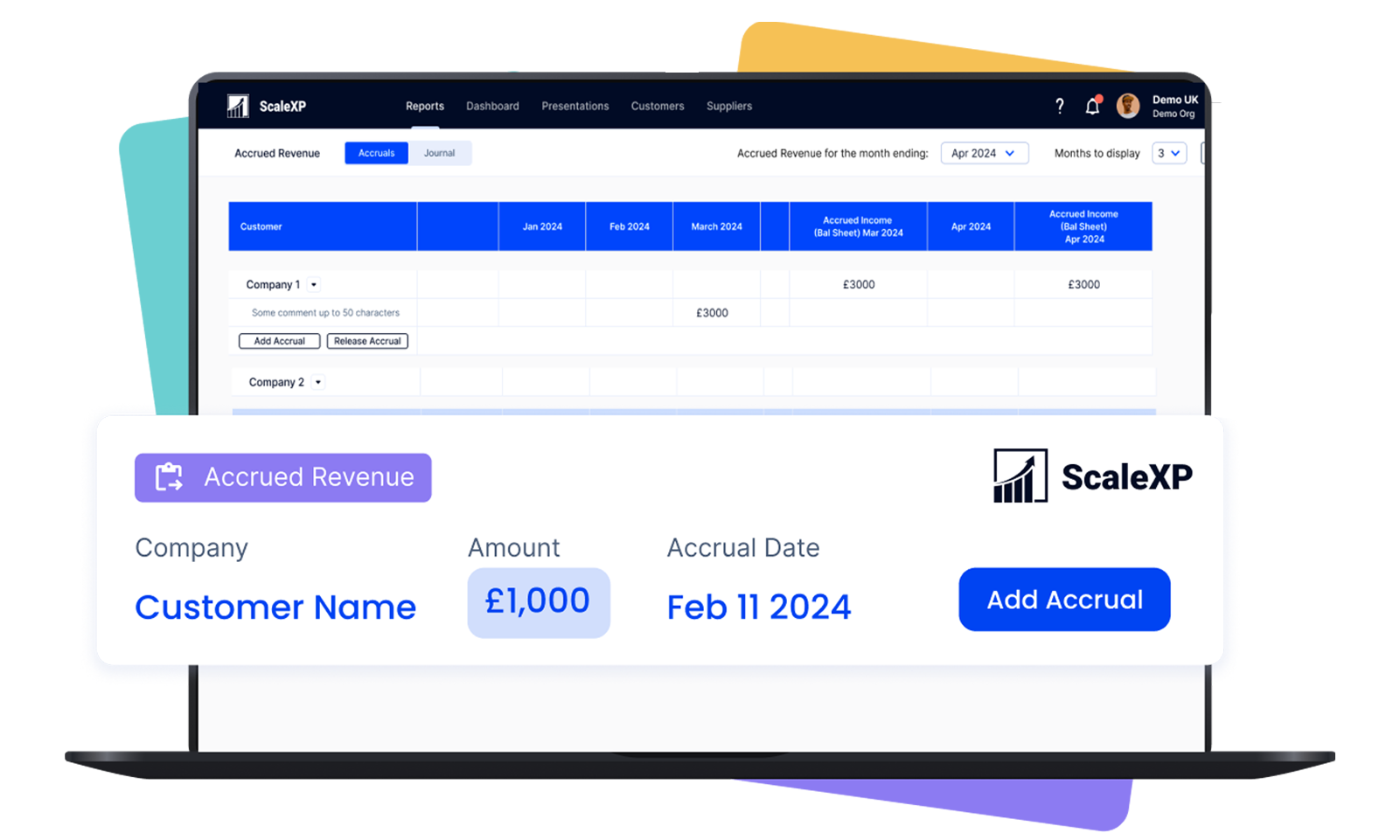
ScaleXP accrued income automation showing earned but unbilled revenue calculated from accounting and CRM data with audit-ready journals
  • 5.0 out of 5Xero App Store
    90+ reviews
  • 2023 · 2025Xero Staff Pick 2023 · Featured App 2025
  • SOC 2Type II

Accrued income is often managed in spreadsheets

Accrued income is usually tracked in a spreadsheet kept beside the ledger, and that is where the errors start.

Values are recalculated by hand each month, reversals are tracked manually after invoicing, and a late change to a contract is easy to overlook.

  • Spreadsheets have errors

  • Connections to your CRM enable seamless communication without removing finance control

  • Accrual reversals are tracked manually after invoicing, making it easy to overlook a late change

AI-powered accrued income automation

ScaleXP automates accrued income for finance teams on Xero and QuickBooks Online: ScaleXP prepares the schedules and journals; they post once finance approves.

ScaleXP automates the calculation itself.

It reads accounting and operational data to find revenue that has been earned but not yet invoiced, applies models built around IFRS 15, FRS 102, ASC 606 and US GAAP treatment to produce structured journal entries, and flags each accrual for release as soon as the invoice is issued.

  • Reads accounting and operational data to identify revenue that has been earned but not yet invoiced.
  • Flags accrual releases as soon as the invoice is issued.

How It Works

ScaleXP works from the records you already have.

It reads the data and text on invoices, imports draft and repeating invoices before they are issued, and connects to HubSpot, Salesforce or Pipedrive, so contracted work that has not yet reached the ledger is still counted.

  • Reads all data and text on invoices
  • Imports draft invoices before they are issued
  • Imports repeating invoices to detect recurring revenue patterns
  • Connects to CRM systems including HubSpot, Salesforce, and Pipedrive.

ScaleXP automates earned but uninvoiced revenue under IFRS and GAAP, with journals using Xero Tracking Codes and QuickBooks Classes for precise allocation and a complete audit trail.
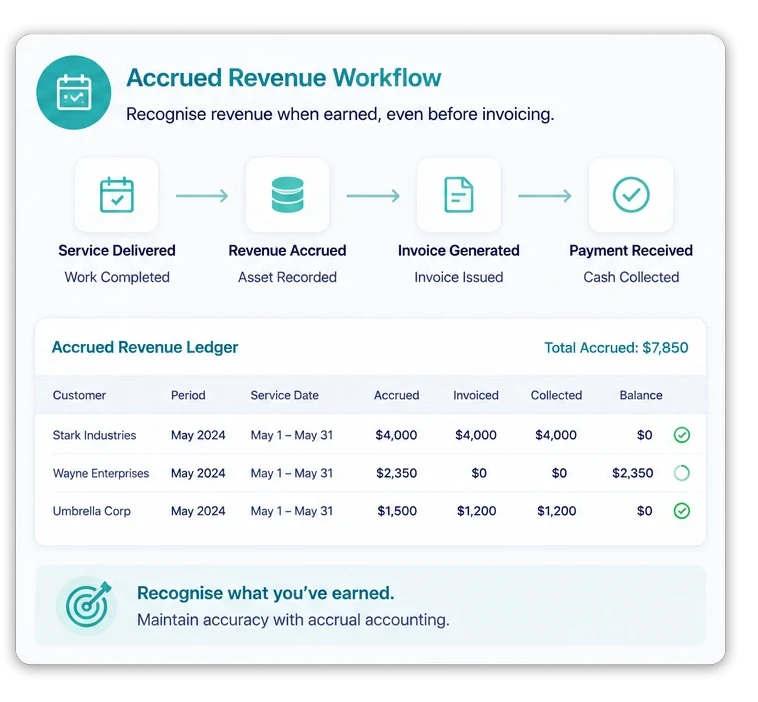
Xero accrued revenue workflow showing earned revenue recognized before invoicing in ScaleXP

Illustrative example (USD). A company delivers $6,000 of consulting work in March and invoices it on 5 April.

At the March close, the $6,000 is recognized as revenue in March and held as accrued income on the balance sheet.

When the April invoice is issued, the accrual is released, so the $6,000 is counted once, in the month it was earned.

The journal entries for this example:

  • 31 March, accrual: debit Accrued income $6,000, credit Revenue $6,000.
  • 1 April, reversal: debit Revenue $6,000, credit Accrued income $6,000.
  • 5 April, invoice: debit Accounts receivable $6,000, credit Revenue $6,000.

March shows $6,000 of revenue, April shows none from this job, and the accrued income balance is back to zero once the invoice is raised.

ScaleXP prepares the schedules and journals; they post once finance approves.

Accrued income is the mirror image of accrued expenses: costs incurred but not yet billed.

For those, ScaleXP detects costs that need accruing and builds the accrual from draft bills, purchase orders and your Xero or QuickBooks data; accrual journals support Xero Tracking Codes and QuickBooks Classes.

Standards referenced: IFRS 15 Revenue from Contracts with Customers (IFRS Foundation) and the Deloitte IAS Plus summary of IFRS 15.

Accrued income vs deferred income

Accrued income and deferred income are opposite timing differences between invoicing and revenue. Both are adjusted at month-end so that revenue lands in the period it is earned.

For more on what accrued income is, see our accrued revenue guide.

Swipe the table sideways to see every column.

Accrued income vs deferred income
ItemAccrued incomeDeferred income
What it isRevenue earned but not yet invoicedRevenue invoiced or paid before it is earned
On the balance sheetAn assetA liability
ExampleConsulting delivered in March and invoiced in AprilAn annual subscription invoiced in January and earned over 12 months
Month-end journalDebit Accrued income, credit RevenueDebit Revenue, credit Deferred income, for the part not yet earned
Clears whenThe invoice is issuedThe service is delivered

What Changes for Your Team

Before ScaleXP

  • Accrued income calculated manually in spreadsheets
  • Journals prepared during month-end close
  • Matching logic updated manually each period
  • Accrual reversals tracked manually after invoicing

After ScaleXP

  • Accrued income calculated automatically from accounting and CRM data
  • Journals prepared automatically for finance review
  • Revenue matching rules applied consistently across periods
  • Accrual reversals triggered automatically when invoices are issued

Save Time Every Month

Automated accrued income calculations replace the spreadsheet work of building accrual schedules and preparing journals each month, leaving finance to review and approve the results.
  • Reduced spreadsheet preparation
  • Faster close preparation
  • More time reviewing financial results
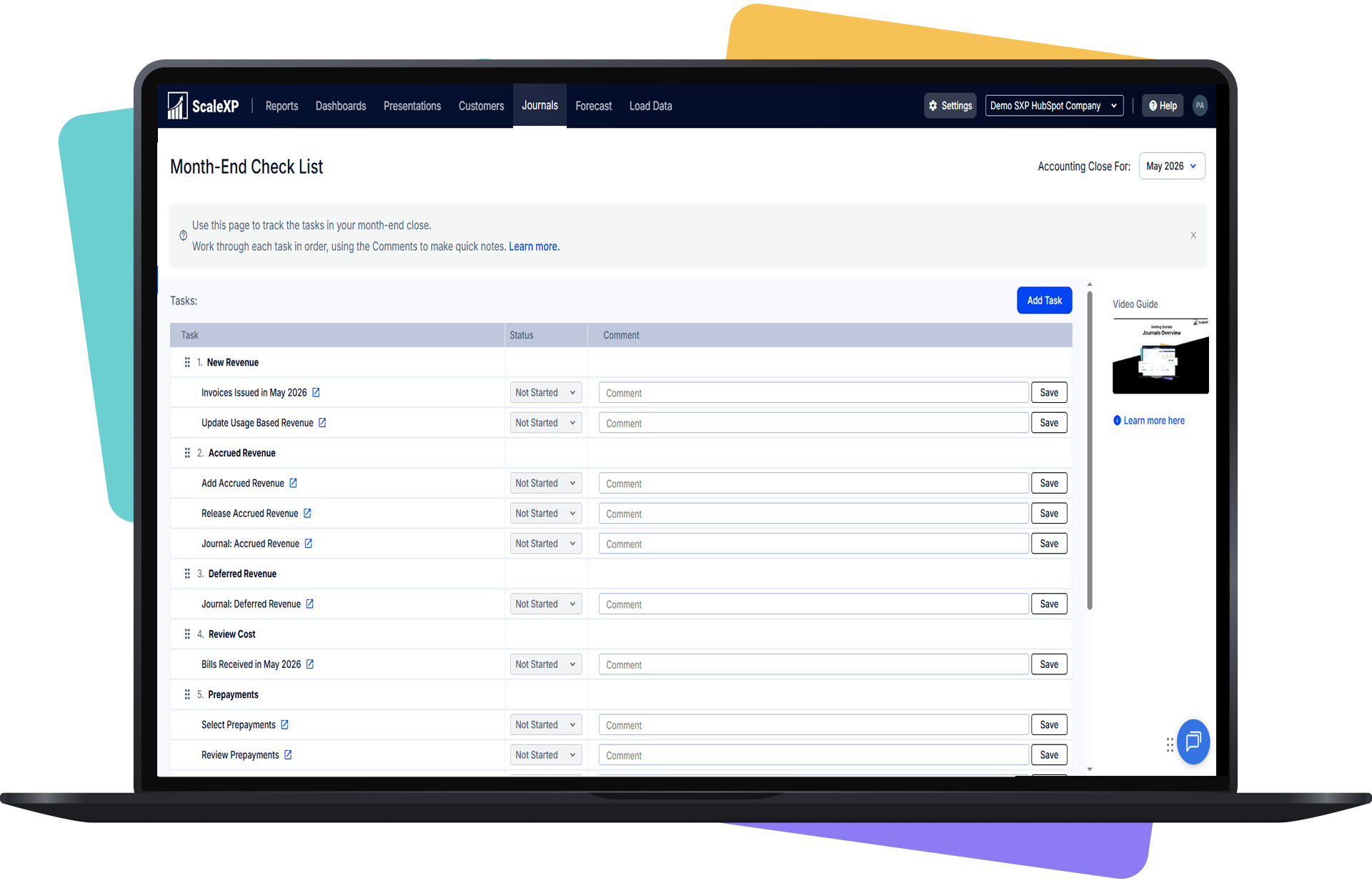
ScaleXP month-end close checklist showing revenue journal tasks including new revenue, accrued revenue, deferred revenue and prepayments

Improve Revenue Recognition Accuracy

Accrued income is calculated consistently across periods, with AI models built for IFRS and GAAP ensuring accurate revenue recognition in financial reports.
  • Accurate revenue reporting
  • Reduced risk of missed accrual adjustments
  • Consistent accounting policy application
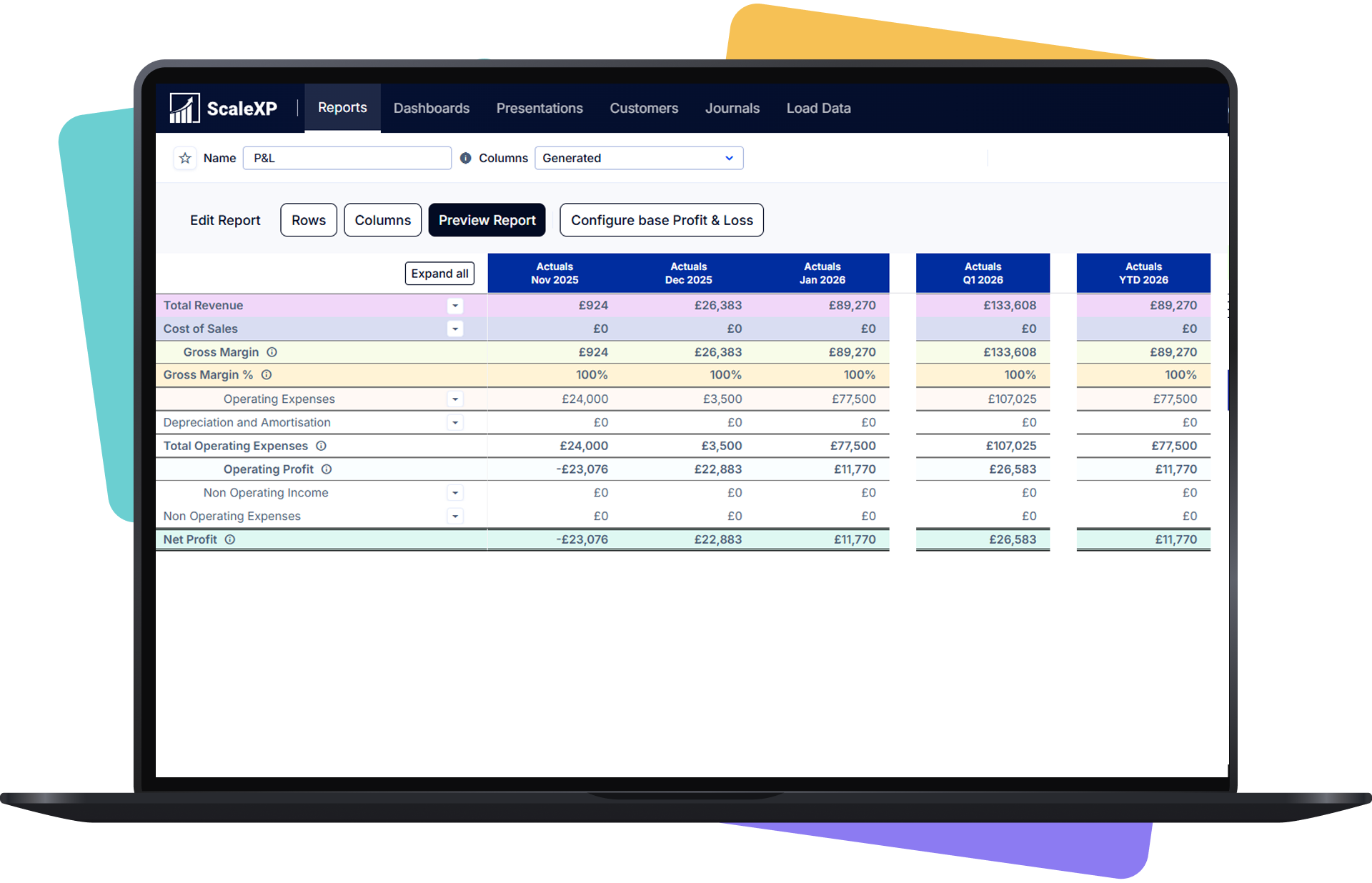
Shared operating dashboard across customer revenue and business performance data

Strengthen Financial Governance

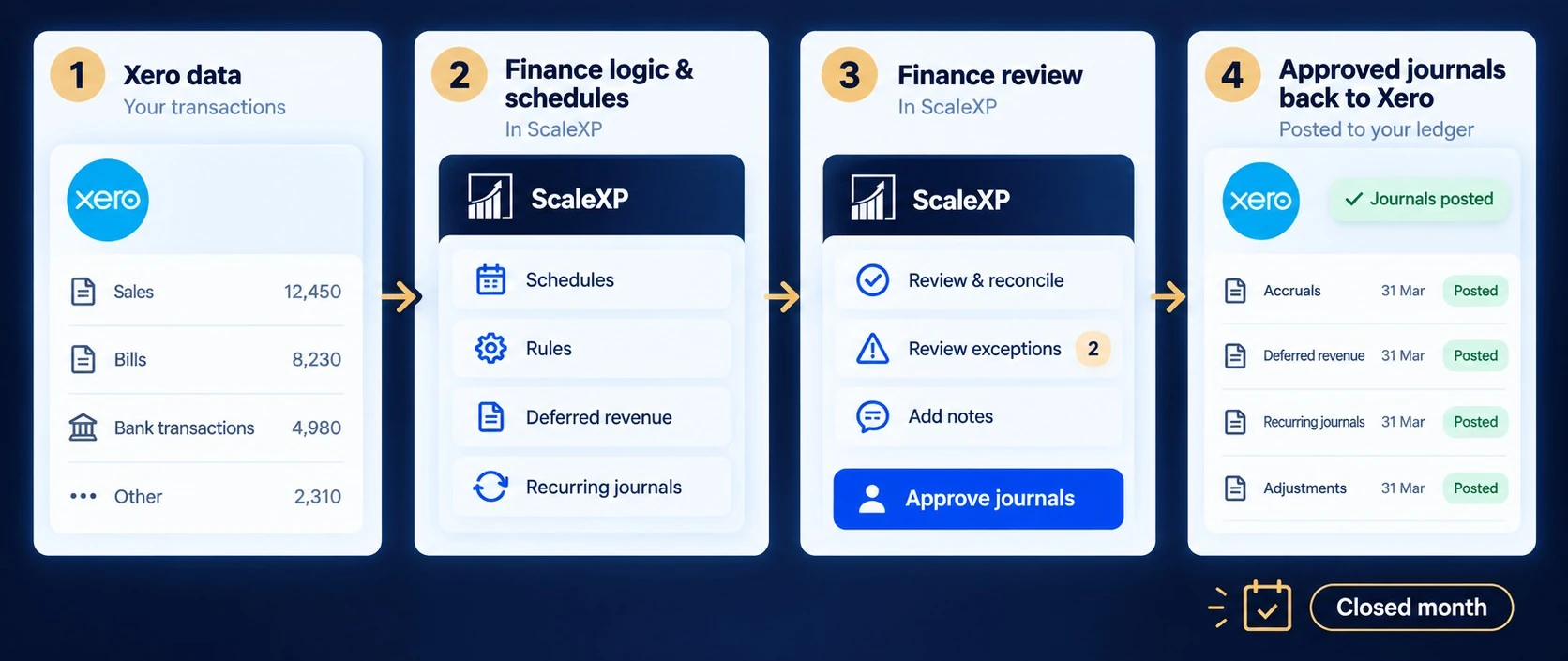
Structured accrual workflows deliver transparency and audit readiness, giving finance leaders full traceability across schedules, journals, and invoice activity.
  • Clear audit trail for accrued income journals
  • Transparent revenue recognition processes
  • Improved accounting policy control
Xero month-end workflow showing accounting data flowing through ScaleXP schedules and finance review before approved journals are posted back to Xero

Spreadsheet Accruals vs ScaleXP Automation

Swipe the table sideways to see every column.

Spreadsheet Accruals vs ScaleXP Automation
Spreadsheet AccrualsScaleXP Accrual Automation
Revenue accrual calculations are maintained manuallyAccrued income calculated automatically from accounting and CRM data
Matching rules updated each accounting periodAI applies consistent IFRS and GAAP accounting logic
Journals created manually during closeJournals posted to Xero or QuickBooks once finance approves them
Limited visibility into revenue earned but not yet invoicedVisibility into earned but unbilled revenue

With the ScaleXP platform, you can:

  • Close the Month Faster: Continuous accrual preparation reduces manual work during month-end close and stabilizes the close process.
  • Eliminate Spreadsheet Accrual Schedules: Automated accrual calculations replace spreadsheet logic used for tracking earned but unbilled revenue.
  • Increase Accrued Income Reporting Accuracy and Control: Finance leaders gain reliable accrued income calculations and consistent revenue recognition across financial reports.

Built for finance leaders responsible for accurate reporting

  • SME CFOs responsible for financial accuracy
  • Financial Controllers managing month-end close
  • Finance managers replacing spreadsheet processes
  • Accounting teams automating financial workflows
  • Companies using Xero or QuickBooks Online

Trusted by Finance Teams Who Cannot Afford Errors

  • “ScaleXP clearly understands the pain points of monthly close. All my accrual and deferred revenue manual journals in Xero are now automated — ScaleXP reads invoices and bills directly, pushes entries through, and maintains a full audit trail of every change. What used to be a risky, Excel-heavy process is now a half-day job.”

    Emmanuel · Xero review

  • “We started using ScaleXP fully in the last few months and are already finding that its slick automation is saving us numerous hours a month. Gone are the days of running lengthy reports and analyzing data. ScaleXP is a must for anyone who wants to streamline their accounts and save time. Love it.”

    Joy · Online Review

  • “Our experience with ScaleXP has been outstanding. We can now accurately track unearned revenue from Xero, something we struggled with before, and it’s made a significant impact on our financial reporting. Just as importantly, we operate across multiple locations tracked in Xero, and previously had no effective way to consolidate that data. ScaleXP solved that seamlessly. The KPIs and customizable reports have completely streamlined our month-end process. Their onboarding and support are exceptional, and Spencer was especially responsive and helpful throughout.”

    Diana · Online Review

Accrued income software FAQs

What is accrued income in accounting?

Accrued income is revenue earned during the current accounting period that has not yet been invoiced or received.

Under accrual accounting, it is recognized when the service or performance obligation is delivered rather than when billing occurs.

The entry normally increases revenue and records an accrued-income asset, which is later cleared when the invoice is raised.

Accurate accrued-income accounting prevents earned revenue from being omitted and gives management a more faithful view of period performance.

What is the difference between accrued income and deferred revenue?

Accrued income is revenue already earned but not yet invoiced, whereas deferred revenue is money invoiced or received before the related service has been delivered.

Accrued income is generally recorded as an asset and increases current-period revenue. Deferred revenue is recorded as a liability until it is earned.

ScaleXP can manage both timing differences using contract, invoice and service-period data, helping finance reconcile what was sold, billed, recognized, accrued and still deferred.

How does ScaleXP automate accrued income, accrued revenue and accrual matching?

ScaleXP analyzes accounting, billing and contract data to identify revenue earned but not yet invoiced.

It applies the agreed service period and recognition logic, calculates the accrued amount by month, builds a supporting schedule and prepares a journal for finance review.

When billing subsequently occurs, the accrued balance can be released through the controlled workflow.

This replaces manual spreadsheet calculations while retaining customer-level detail, accounting-period visibility and an audit trail from source data to journal.

What data can ScaleXP use to calculate accrued income?

ScaleXP can use posted invoices, draft invoices, repeating invoices and contract information from CRM systems such as HubSpot, Salesforce and Pipedrive.

CRM data can supply customer, product, value, start date, end date and billing terms before the final invoice exists.

Combining commercial and accounting data helps finance identify earned revenue earlier, calculate the correct period allocation and investigate contracts that appear to have been delivered but not billed.

Can ScaleXP track earned and unearned revenue automatically?

Yes. ScaleXP can compare contract or service periods with invoice activity to separate recognized revenue, accrued income and deferred revenue.

Finance receives a clearer view of what has been earned, what remains unbilled and what must stay deferred until future delivery.

The reported figures remain drillable to the customer, contract and source transaction, which improves month-end review and makes it easier to explain movements in revenue, accrued-income assets and deferred-revenue liabilities.

How do CRM contracts improve accrued-income automation?

CRM contracts provide commercial facts that may not yet exist in the accounting ledger, including contract dates, products, values and billing schedules.

ScaleXP combines those details with Xero or QuickBooks data to determine whether revenue has been earned before invoicing.

This helps finance calculate accrued income earlier, identify missing or delayed bills and reconcile Sales commitments to accounting outcomes.

It is especially useful for SaaS and subscription businesses with milestone, annual or non-standard billing arrangements.

Does ScaleXP work with Xero and QuickBooks Online for accrued income?

Yes. ScaleXP works alongside Xero and QuickBooks Online, importing relevant invoice and transaction data and preparing accrued-income schedules and journals for review.

Approved entries can flow back to the accounting system, which remains the system of record.

ScaleXP also supports reporting dimensions such as Xero Tracking Codes and QuickBooks Classes, allowing accrued revenue to remain useful in department, product, entity or management-reporting analysis.

How does accrued revenue automation work in QuickBooks Online?

ScaleXP uses QuickBooks Online invoices and CRM contract data to find revenue earned but not yet invoiced, calculates the accrued amount by month and prepares the journal.

The journal posts to QuickBooks Online once finance approves it, and the accrued balance is released when the invoice is raised.

How can accrued-income automation help prevent revenue leakage?

Accrued-income automation highlights revenue that appears to have been earned but has not yet been invoiced.

By comparing CRM contracts, service periods and accounting activity, ScaleXP can expose missing billing, delayed invoices or values that do not match the commercial agreement.

Finance can investigate the exception before it becomes lost revenue or a later-period surprise.

The same connected data also strengthens sold-versus-billed reconciliation and gives teams a clearer route from contract to invoice, recognition and cash.