B2B SaaS finance automation

SaaS Accounting and Finance Software for Xero and QuickBooks Online

ScaleXP is SaaS accounting and finance software for finance teams on Xero or QuickBooks Online that use HubSpot, Salesforce or Pipedrive.

It connects accounting, CRM and billing data to automate the finance work that gets harder as SaaS companies grow — from revenue recognition and month-end close to SaaS metrics, forecasting and board reporting.

  • Automate recurring month-end journals and revenue recognition
  • Track ARR, MRR, churn and retention without rebuilding spreadsheets
  • Turn live finance data into forecasts and board-ready reporting
Book a Demo

Rated 5.0 on the Xero App Store (90+ reviews)
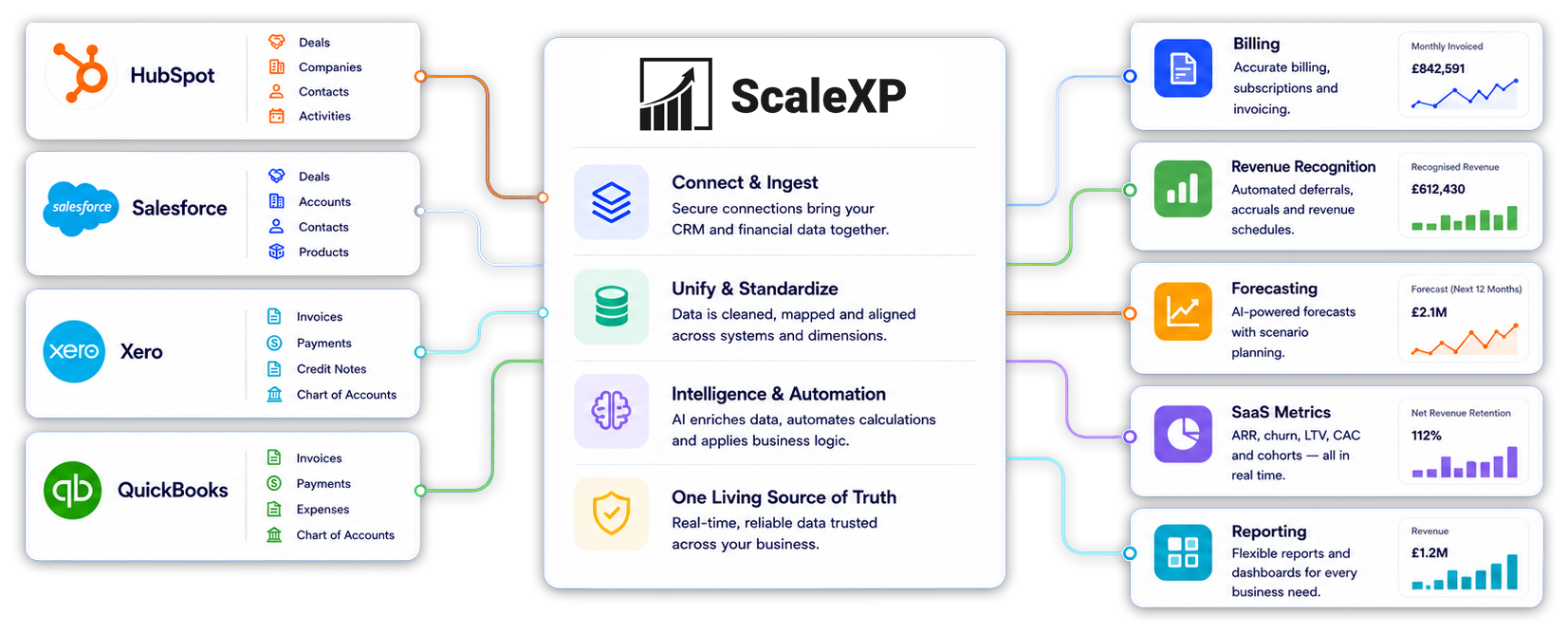
CRM accounting integration software showing CRM and accounting data joined into a revenue intelligence layer in ScaleXP
  • 5.0 out of 5Xero App Store
    90+ reviews
  • 2023 · 2025Xero Staff Pick 2023 · Featured App 2025
  • SOC 2Type II

SaaS growth creates finance complexity across disconnected systems

Customer contracts sit in CRM. Billing and invoices sit elsewhere. Actuals live in Xero, QuickBooks or Zoho Books, while recurring revenue, forecasts and reporting are often rebuilt in spreadsheets.

As customers, products and entities grow, finance spends more time reconciling systems — slowing the close, making numbers harder to explain and taking time away from analysis.

Accounting software can’t run SaaS finance

  • Revenue schedules are rebuilt by hand
  • ARR and MRR live outside the ledger
  • Renewals and forecasts sit in separate systems
  • Finance reconciles the gaps every month
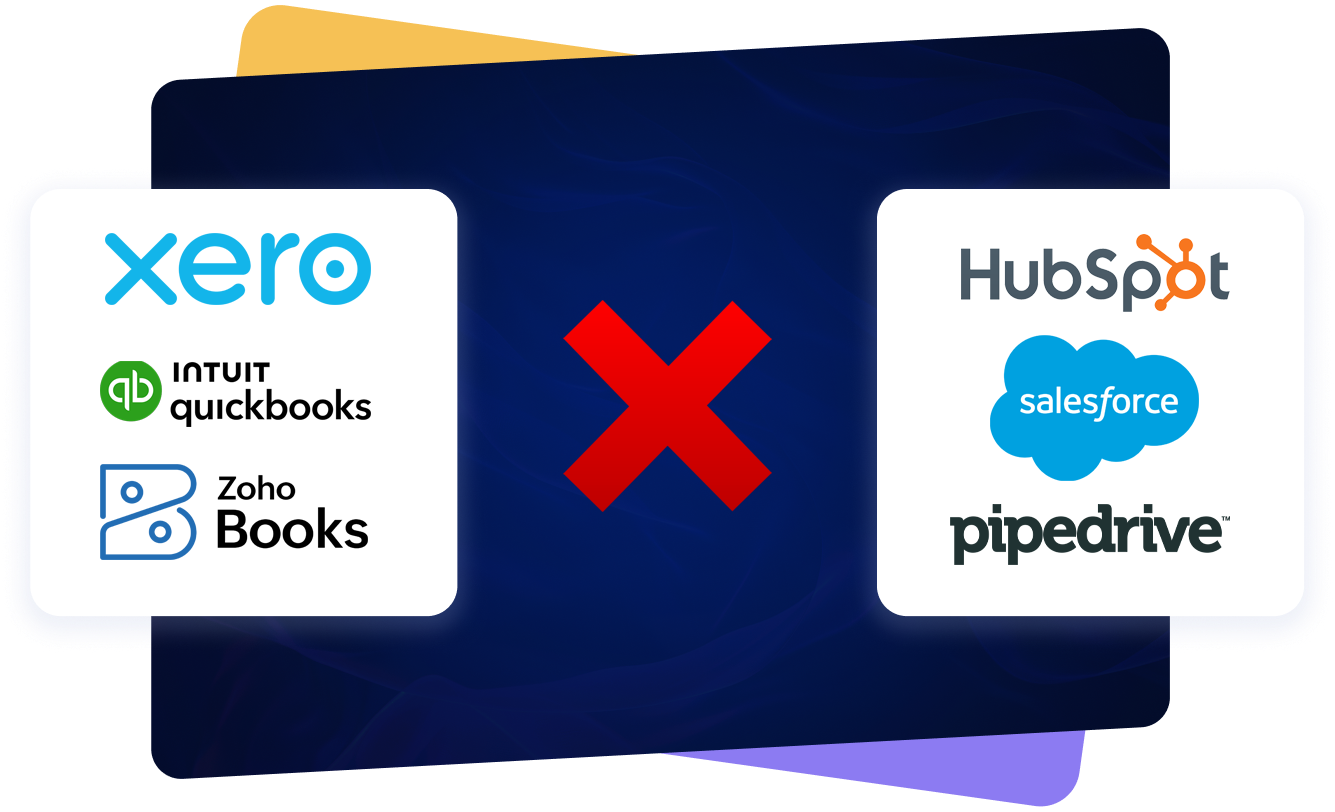
Two panels connected by a red X: Xero, QuickBooks, and Zoho Books logos on the left, HubSpot, Salesforce, and Pipedrive logos on the right, illustrating a disconnect between accounting and CRM systems.

One connected finance layer across your SaaS stack

ScaleXP adds the finance automation layer that accounting software alone does not provide.

It connects the systems your team already uses and turns customer, billing and accounting data into automated finance workflows, live SaaS metrics and management reporting.

You keep your accounting system. ScaleXP removes the spreadsheet-heavy work around it.
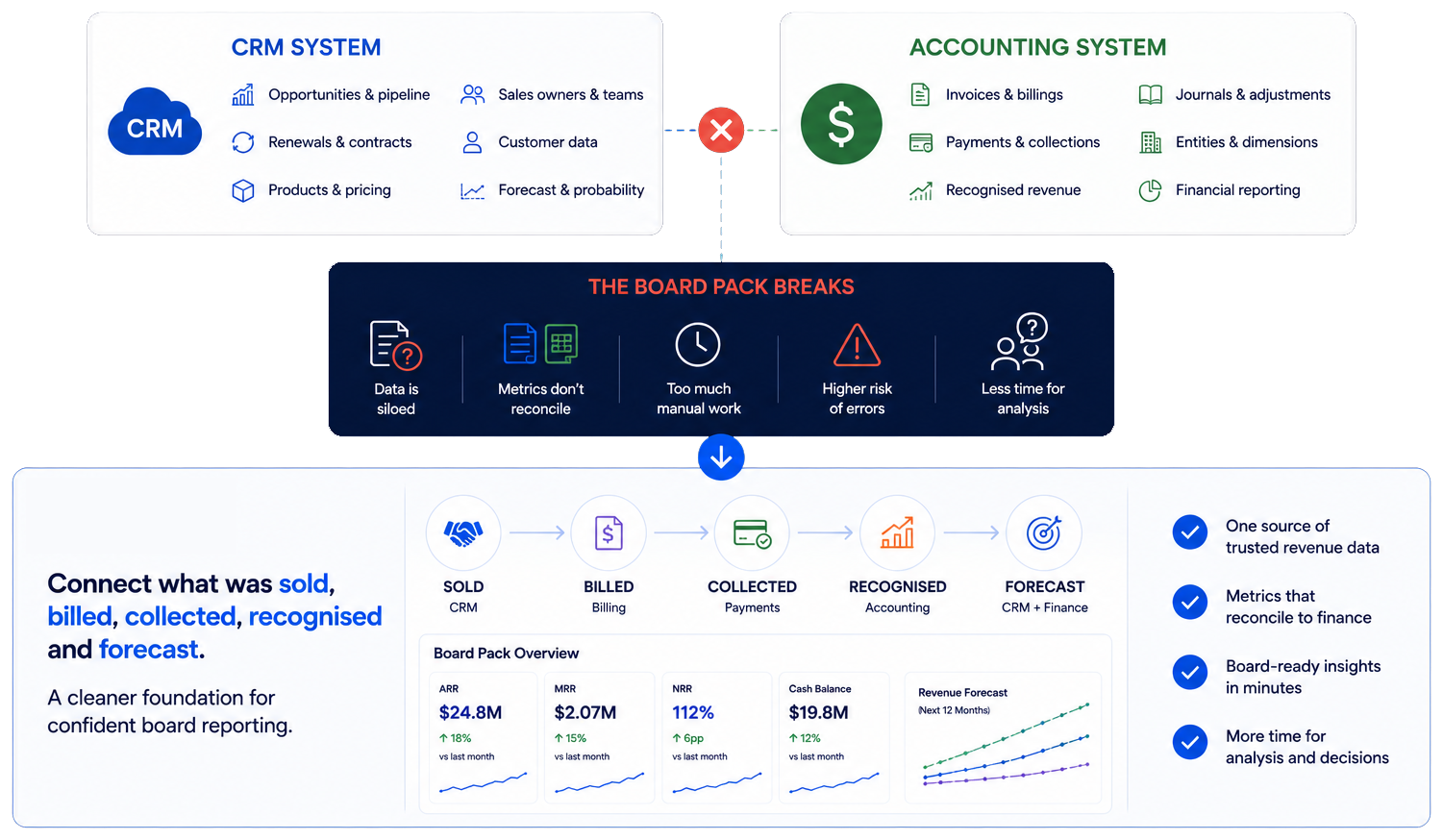
Diagram showing CRM, billing and accounting data connected into a unified SaaS board reporting platform

Automate the finance work created by subscription revenue

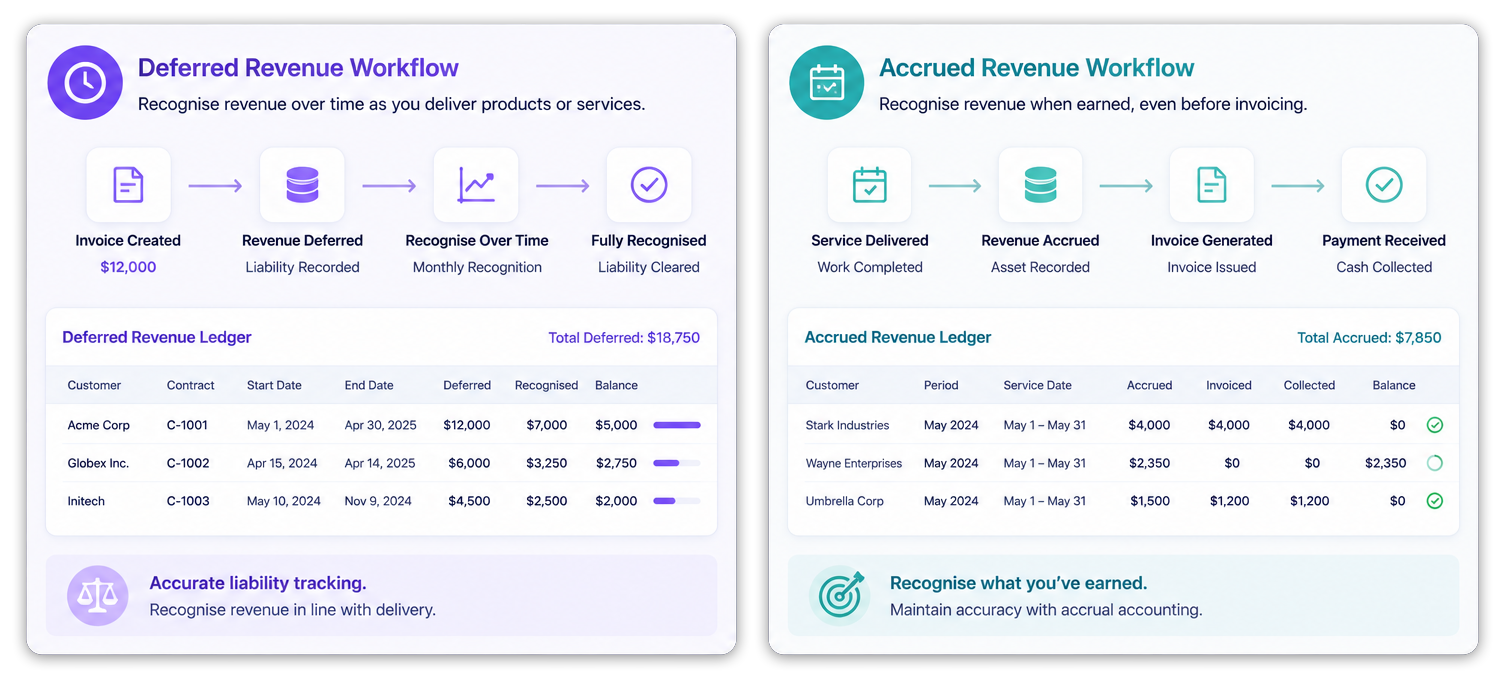
ScaleXP turns recurring subscription finance work into automated, reviewable workflows. Revenue schedules, deferred and accrued revenue, prepayments, accruals and recurring journals are calculated from source data instead of rebuilt manually every month.

As SaaS revenue recognition software, ScaleXP reads service dates from Xero and QuickBooks invoice wording and prepares the schedules and journals; they post once finance approves.
  • Close month-end faster with fewer schedules prepared manually
  • Reduce reconciliation errors between spreadsheets and the general ledger
  • Maintain a clear audit trail from calculation to journal
  • Free finance capacity for analysis instead of recurring preparation
two diagrams showing both deferred and accrued revenue flows

ScaleXP builds revenue schedules for subscriptions, usage, services and one-off fees from the invoice wording, from rules set by product, customer or account, or from CRM deal dates. ScaleXP prepares the schedules and journals; they post once finance approves in Xero or QuickBooks Online.

Swipe the table sideways to see every column.

How ScaleXP builds revenue schedules for each SaaS revenue stream
Revenue streamExampleHow ScaleXP builds the scheduleWhere it posts
SubscriptionsAnnual plan invoiced upfrontAI reads service start and end dates from the invoice wording, or rules by productXero or QuickBooks Online
UsageMetered usage billed monthlyUsage-based revenue recognitionXero or QuickBooks Online
Services and bundlesImplementation plus subscriptionEach element gets its own schedule; price allocated by standalone selling priceXero or QuickBooks Online
One-off feesSet-up feeExcluded from MRR by accountXero or QuickBooks Online
Multi-currencyEntities in several currenciesMulti-currency consolidation for Xero, QuickBooks Online and Zoho BooksGroup reporting

Customer result

3–5 finance-team days saved every month

Deferred revenue was tracked in long, tedious spreadsheets. Data required hours of checking, across the UK and South African subsidiary.

“ScaleXP has allowed us to save between 3 and 5 days a month.”

Estiaan, Finance Manager at Cue TechnologyEstiaan, Finance Manager, Cue Technology

See how Cue saves 3–5 days each month

Know exactly what changed in recurring revenue — and why

ScaleXP automatically tracks new ARR, expansion, contraction, churn, NRR and GRR and lets finance drill from headline metrics to the customers and records driving each movement.

For the months ahead, see ScaleXP’s revenue forecasting software: revenue forecasts combine CRM pipeline, renewals, billing and actuals.
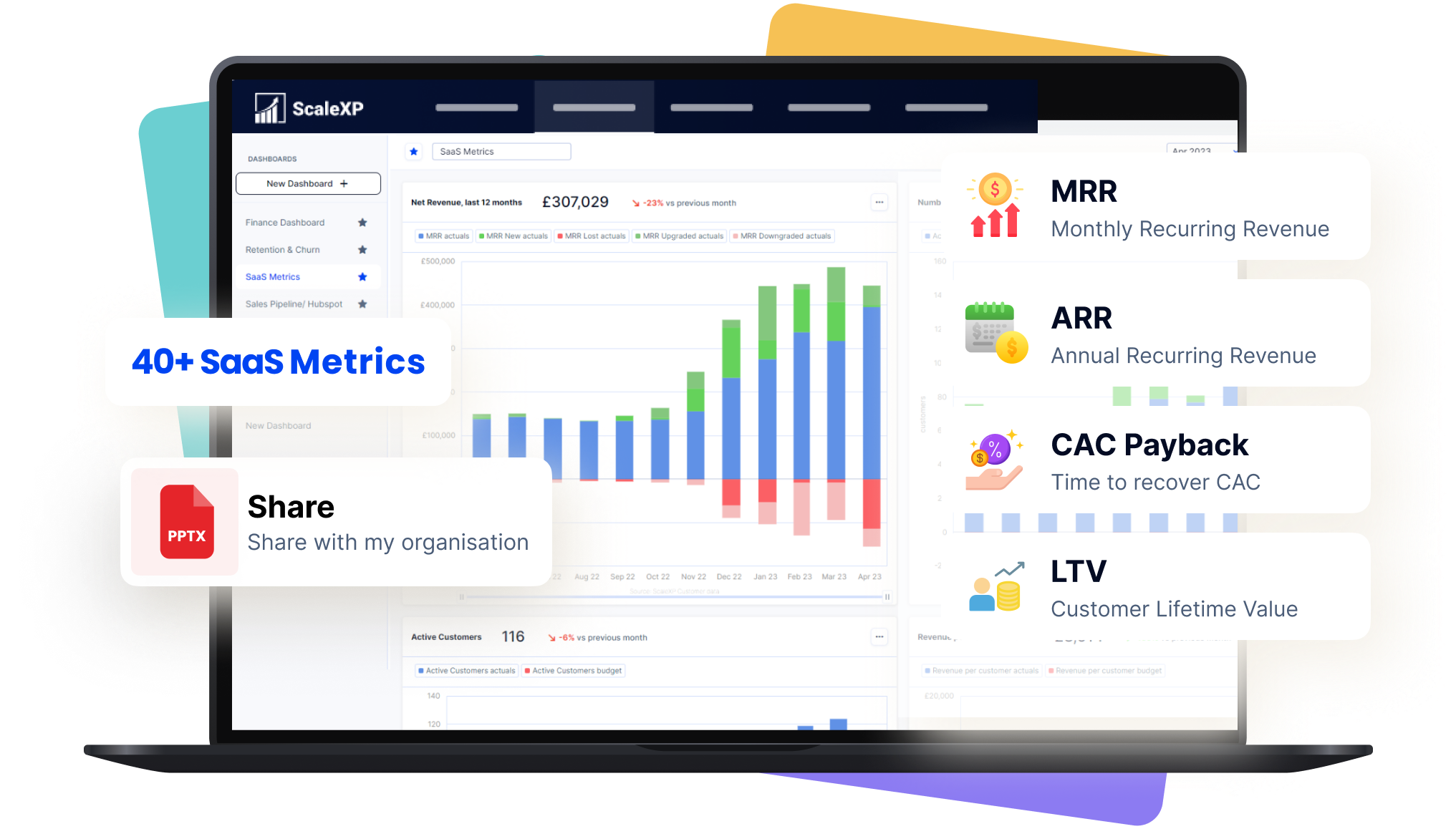
  • Explain ARR and MRR changes in minutes, not after spreadsheet reconciliation
  • Identify churn and expansion earlier at customer and cohort level
  • Give management defensible answers backed by underlying records
  • Eliminate repeated CRM and billing exports before reporting cycles
SaaS metrics dashboard showing various performance indicators and graphs on a laptop screen.

From underlying transactions to board-ready reporting

ScaleXP turns the same underlying finance and customer data into management reporting, forecasts and board-ready views, so finance does not have to rebuild reporting after every month-end close.

  • Produce board reporting faster from one consistent source of data
  • Reduce conflicting numbers between finance, SaaS metrics and forecasts
  • Trace board-level KPIs back to customers and transactions
  • Spend more time explaining performance, not assembling the pack

Book a ScaleXP demo to see the month-end close checklist, revenue journals and MRR reporting on example data, then decide whether to try it on your own Xero or QuickBooks ledger.
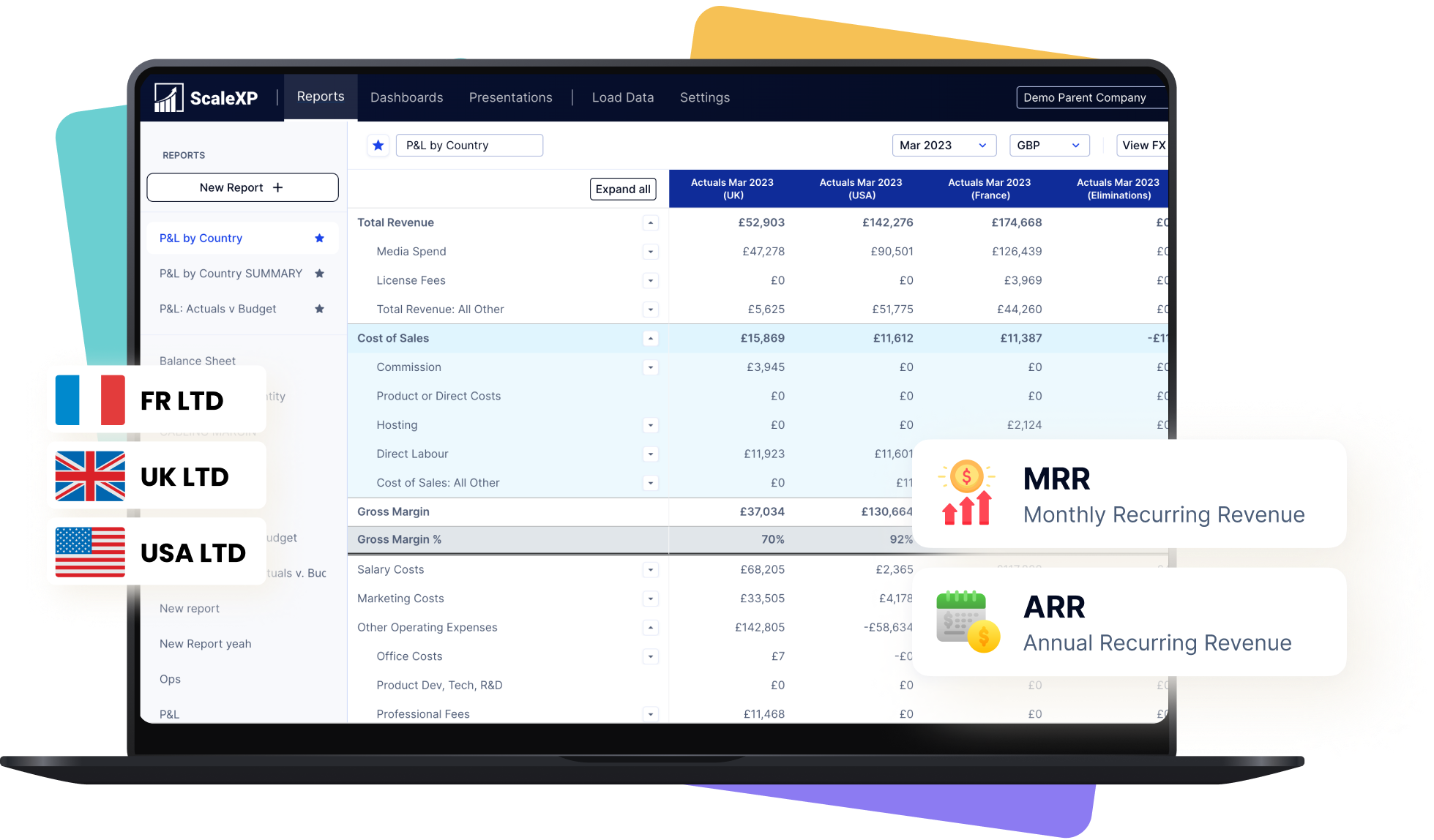
Financial reporting dashboard displaying various metrics such as MRR and ARR on a laptop screen.

Connect the systems your SaaS finance team already uses

ScaleXP connects Xero or QuickBooks Online with CRM and billing data, adding automation around the systems already running the business.

You can remove spreadsheet-heavy workflows without the cost and disruption of replacing your accounting system with a new ERP.

Multi-entity groups can consolidate up to 50 entities across Xero, QuickBooks Online and Zoho Books, with multi-currency consolidation: see financial consolidation software.

With only an accounting integration (Xero or QuickBooks Online), customers are live within 1 week at most.

With an accounting and a CRM integration (HubSpot, Salesforce or Pipedrive), for example teams moving from Maxio, it takes about 3 weeks.

  • Avoid a disruptive ERP migration just to remove spreadsheet workflows
  • Reduce manual handoffs between accounting, CRM and billing systems
  • Improve finance operations sooner with lower implementation risk
  • Avoid retraining finance teams on an unnecessary new ERP

What changes for your finance team

Before ScaleXP

  • Revenue schedules maintained manually
  • SaaS metrics rebuilt in spreadsheets
  • Systems reconciled every reporting cycle
  • Board packs assembled from multiple files
  • Month-end depends on repeated manual preparation

With ScaleXP

  • Recurring finance workflows update automatically
  • SaaS metrics stay connected to source data
  • Month-end becomes review-led rather than spreadsheet-led
  • Reporting updates from the same underlying information
  • Finance can investigate movements without rebuilding analysis

The result is a finance function that can support more revenue, customers and complexity without scaling spreadsheet work at the same rate.

Built for SaaS finance teams outgrowing spreadsheets

  • B2B SaaS companies with recurring or subscription revenue
  • Finance teams using Xero, QuickBooks Online or Zoho Books
  • Companies tracking ARR, MRR, churn and retention manually
  • Teams spending days on month-end spreadsheets and reconciliations
  • Growing multi-entity businesses needing consistent finance reporting

Finance-grade control and security

ScaleXP automates recurring finance work while keeping calculations traceable, reviewable and controlled by finance.

  • Trust Center

    Get up-to-date visibility into ScaleXP’s complete security posture, including infrastructure, organizational controls, product security and internal procedures.

  • Security Accreditations

    ScaleXP is SOC 2 Type II certified and compliant with GDPR and UK ICO requirements, helping protect sensitive finance data with independently reviewed controls.

  • 2FA

    Protect user access with security features including two-factor authentication, which can be enabled for ScaleXP users.

B2B SaaS FAQs

What is SaaS finance automation?

SaaS finance automation uses connected accounting, CRM and billing data to automate recurring finance workflows created by subscription businesses.

These can include revenue recognition, recurring journals, SaaS metrics, forecasting and management reporting.

ScaleXP adds this automation around accounting platforms such as Xero, QuickBooks Online and Zoho Books without requiring the company to replace its general ledger.

What is SaaS finance software?

SaaS finance software automates the finance work a subscription business adds on top of its ledger: revenue recognition, month-end journals, SaaS metrics and reporting.

ScaleXP is built for SaaS and recurring-revenue companies up to $50M in revenue, on Xero, QuickBooks or Zoho Books.

Month-end close journals run on Xero and QuickBooks. ScaleXP prepares the schedules and journals; they post once finance approves.

Can ScaleXP replace SaaS finance spreadsheets?

ScaleXP automates many of the recurring workflows that finance teams commonly manage in spreadsheets, including revenue schedules, journals, ARR and MRR reporting, customer-level recurring revenue movements, forecasts and management reporting.

Teams may still use spreadsheets for ad hoc analysis, but the recurring finance process no longer needs to depend on them.

Does ScaleXP replace Xero or QuickBooks?

No. ScaleXP works alongside Xero, QuickBooks Online and Zoho Books.

It automates finance processes and reporting that sit around the accounting system, so companies can improve their finance infrastructure without immediately implementing a new ERP.

What SaaS metrics can ScaleXP calculate?

ARR, MRR, NRR and GRR, churn, expansion and contraction, CAC and LTV, customer retention and cohort analysis — each calculated from connected accounting, CRM and billing data so the figure can be traced back to the customers and invoices behind it.

See SaaS metrics software for how each one is built.

Can ScaleXP automate revenue recognition?

Yes.

Service periods are read from invoice and contract data, recognized, deferred and accrued revenue schedules are built from it, and journals are prepared for Finance to review before they post.

See revenue recognition automation for the full workflow.

What CRM information can ScaleXP use?

Relevant fields such as contract dates, deal values and renewal information can be used, so commercial terms sit beside the invoices they relate to.

The exact fields connected are agreed during setup rather than every CRM field being synced indiscriminately.

See HubSpot and Xero, Salesforce and QuickBooks and Pipedrive and Xero.

Can ScaleXP use Stripe data?

Yes.

ScaleXP imports Stripe invoices, either into your accounting system or into ScaleXP directly, then applies revenue recognition logic to them and feeds the same reporting layer as the rest of your data.

Multicurrency billing is handled in the same flow.

See Stripe and Xero or Stripe and QuickBooks.

Can ScaleXP support multiple entities?

Yes. ScaleXP consolidates up to 50 entities, including entities on Xero, QuickBooks Online or Zoho Books and in different currencies, into one group view with intercompany eliminations.

See financial consolidation software.

How can SaaS companies automate financial reporting?

By connecting the systems the numbers already live in.

Once accounting, CRM and billing data are connected, reports are built from the source rather than from exports, so month-end stops being a rebuild.

Reports refresh as the underlying data changes, and each figure can be traced back to the invoice or deal behind it, which is what makes the output usable in a board pack.

For ARR, MRR, churn and NRR reporting, see ScaleXP SaaS reporting.

How quickly can ScaleXP be implemented?

Every ScaleXP plan includes tailored onboarding (1 hour on Starter, 3 hours on Growth and Scale). Connecting your accounting system itself takes a matter of hours.

Timing depends on the number of entities, how your CRM and billing data are structured, and how complex your revenue recognition requirements are.

Onboarding focuses on connecting systems, mapping finance fields and validating outputs with your finance team before any workflow is relied on.

How much does ScaleXP cost?

ScaleXP is priced per month on a published plan, with an additional monthly charge for each extra subsidiary and a discount for paying annually.

Pricing is not linked to a percentage of your ARR.

See ScaleXP pricing for the current plans and what each one includes.