Stop Managing Xero Deferred Revenue in Spreadsheets

Automate Xero deferred revenue and deferred income schedules, service-period logic and month-end journals with ScaleXP’s AI-enabled finance automation layer.

4.9

in Xero & QuickBooks app stores

Graphic representation of Xero, Salesforce, and HubSpot logos with a growth chart on a laptop screen.

ScaleXP is an approved app for leading accounting & CRM systems

Xero holds the invoices. Spreadsheets hold the risk.

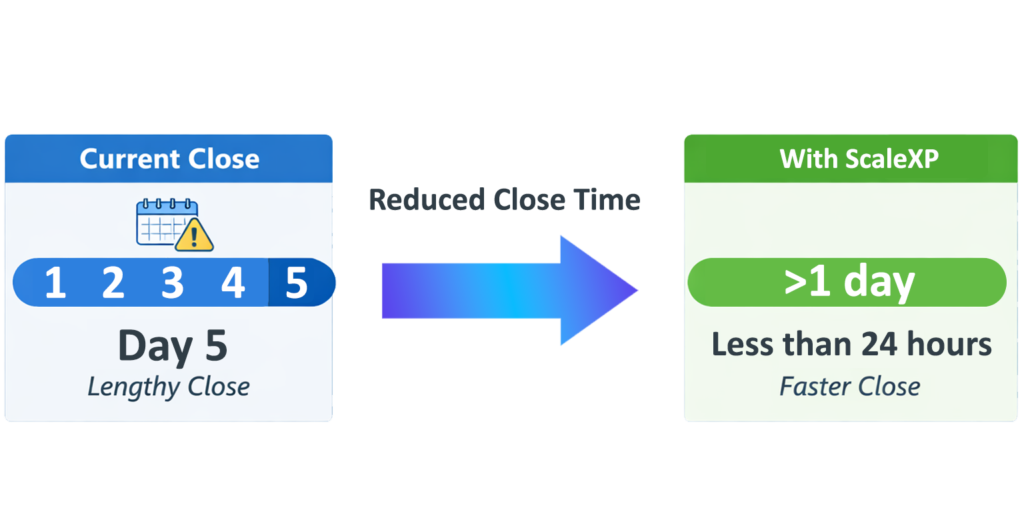
Month-end close infographic with Current Close and Improved Close panels, Day 5 lengthy close transitioning to Day 2 faster close, blue arrow across the center.

For many finance teams, Xero is the accounting source of truth, but deferred revenue logic still lives outside the system.

Annual invoices, multi-period contracts, service dates, deferred income balances and revenue release journals are often managed manually in spreadsheets.

Xero is a strong accounting platform. ScaleXP adds the deferred revenue automation layer finance teams need on top.

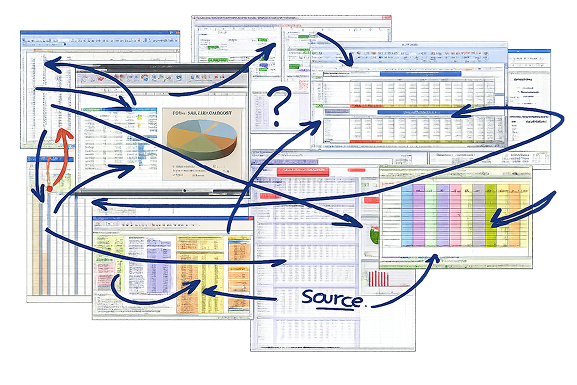
Visual showing the limitations of spreadsheet-based renewal tracking, with scattered files and disconnected teams across entities, countries, and currencies. ScaleXP is illustrated as a unified system replacing manual spreadsheets to improve speed, visibility, and control.

ScaleXP automates deferred revenue from Xero data

Recurring revenue and renewals dashboard connected to HubSpot and accounting

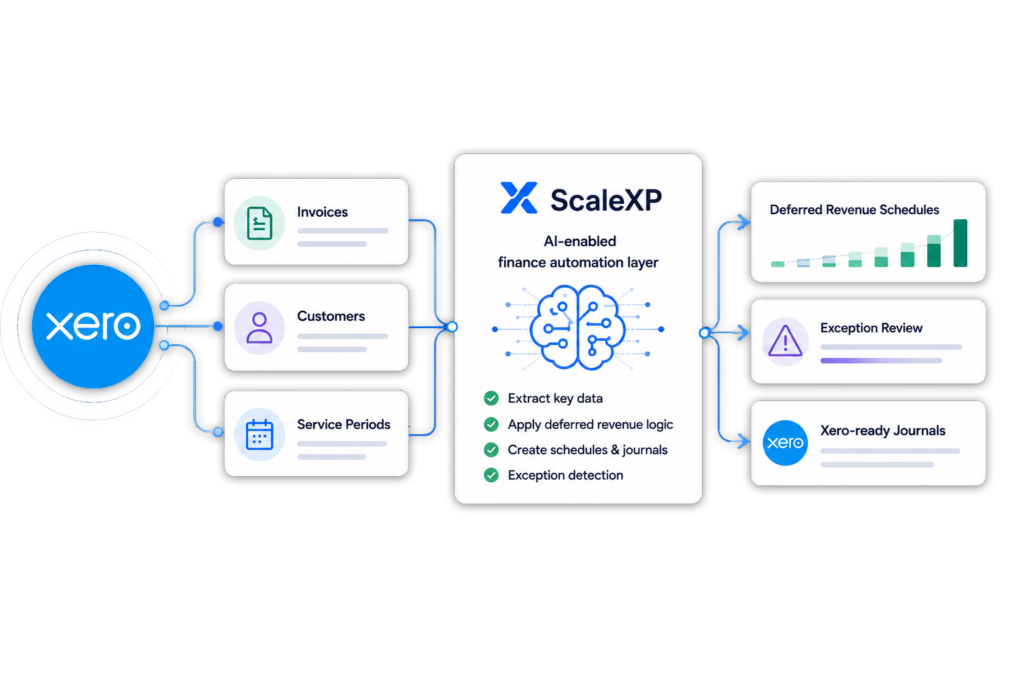
ScaleXP connects to Xero and turns invoice, customer and service-period data into deferred revenue schedules, exception reviews and Xero-ready journals.

The AI-enabled finance automation layer makes it easier to customize deferred revenue logic around how each company bills, sells and reports revenue.

ScaleXP automates deferred revenue reporting using Xero accounting data

How It Works: From Xero invoice to month-end journal

Shared operating dashboard across customer revenue and business performance data
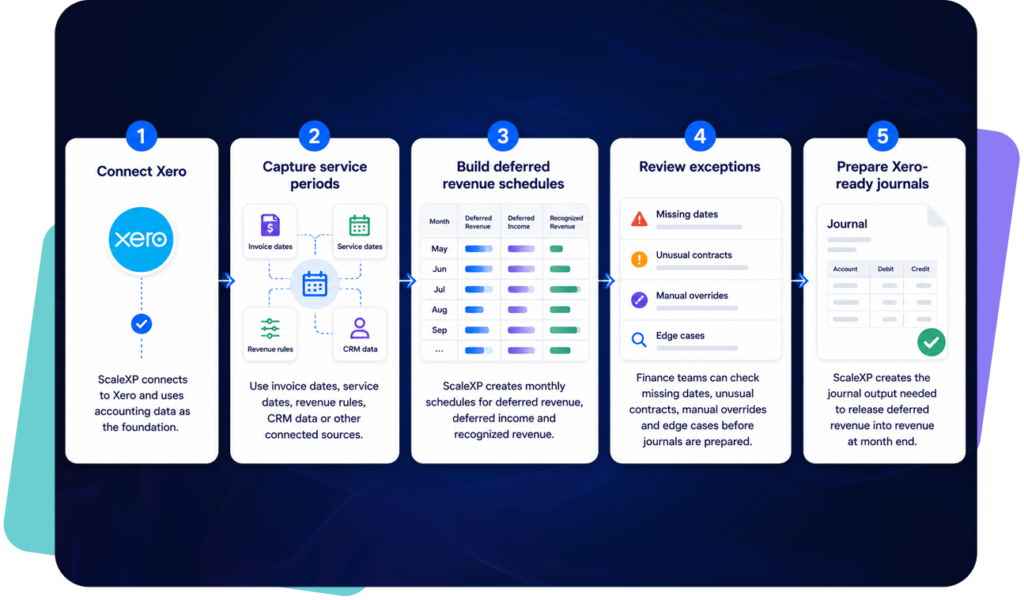
ScaleXP workflow showing how Xero invoices are converted into deferred revenue schedules and month-end journals

Built for real-world billing models

Recurring revenue and renewals dashboard connected to HubSpot and accounting

This makes ScaleXP easier to adapt to each company’s revenue model than a static deferred revenue spreadsheet.

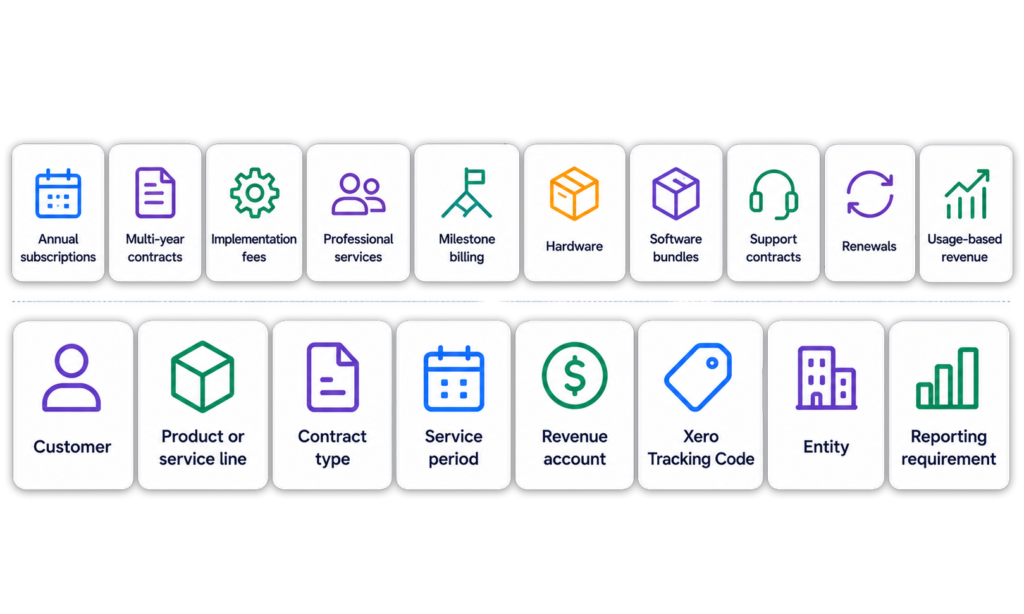
Diagram showing how ScaleXP automates deferred revenue recognition for Xero across subscriptions, multi-year contracts, professional services, milestone billing, renewals, usage-based billing, and custom revenue rules.

Create Xero-ready journals with the detail finance needs

Shared operating dashboard across customer revenue and business performance data

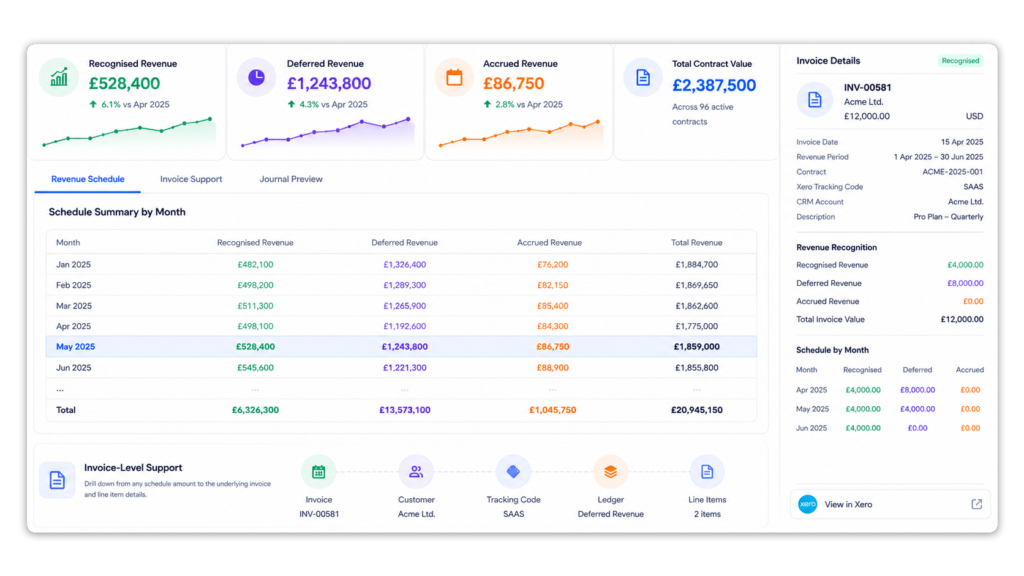
ScaleXP helps finance teams prepare month-end deferred revenue journals for Xero. That includes the detail needed to review, explain and support the numbers.

ScaleXP journals allow you to select the level of detail that you need. Journal calculations are fully automated and can be posted back to Xero in 2 simple clicks. Helping finance teams reduce their dependency on spreadsheets while maintaining control over the final finance review.

Looking to automate both accrued and deferred income?  Read more here.

ScaleXP revenue schedule dashboard showing recognised, deferred and accrued revenue by month with invoice-level audit support linked from accounting system

Automate more of month-end in Xero

Recurring revenue and renewals dashboard connected to HubSpot and accounting

ScaleXP goes beyond deferred revenue automation, helping finance teams streamline month-end in Xero, from revenue recognition and accruals to SaaS metrics, forecasting, and board reporting.

It brings everything into one connected workflow, replacing disconnected spreadsheets.

Diagram comparing month-end close time: current close takes 5 days, ScaleXP reduces it to less than 24 hours

Handles CRM, multi-entity and channel sales complexity

Shared operating dashboard across customer revenue and business performance data

Deferred revenue gets more difficult as the business scales.

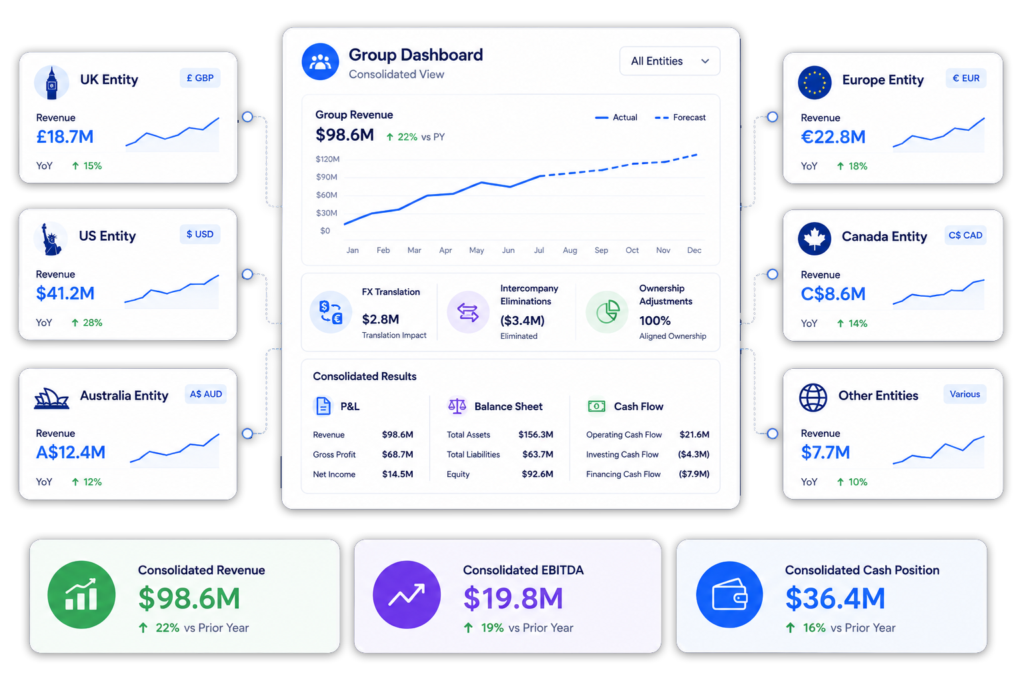
ScaleXP can support workflows that use Xero invoices, CRM dates, billing data, multiple entities, multiple currencies, reseller relationships and Sold To / Billed To structures.

This helps finance teams automate deferred revenue even when the service period, billing customer or reporting view does not sit neatly inside a single Xero invoice.

Multi-entity consolidation dashboard showing multiple companies and currencies flowing into a single consolidated view with automated FX translation, eliminations, ownership adjustments, and group financial reporting.

What a joined Salesforce + Xero revenue intelligence layer unlocks

Requirement

Xero alone vs Spreadsheet model

ScaleXP

Deferred revenue schedules

Manual / Manual

Automated

Service-period logic

Limited / Manual

Automated and customizable

Monthly release journals

Manual / Manual

Xero-ready

Exception review

Manual / Manual

Supported

Xero Tracking Code reporting

Limited / Manual

Supported

Multi-entity workflows

Limited / Complex

Supported

No credit card required

Move Xero deferred revenue out of spreadsheets to streamline your close and eliminate spreadsheet errors

Use Xero as your accounting source of truth and ScaleXP as the deferred revenue automation layer on top. Automate schedules, review exceptions, customize recognition logic and prepare Xero-ready journals without rebuilding spreadsheets every month.

HUBSPOT integration with xero and quickbooks

Integrate HubSpot and accounting data

Graphic showing HubSpot logo alongside icons for QuickBooks, Microsoft Dynamics 365, and Xero.
Logos of HubSpot, Stripe, Intuit QuickBooks, and Xero displayed on a laptop screen.

Integrate data across multiple platforms & systems

Laptop screen displaying an invoice report from Xero with financial data and graphs.

Close the month faster using automation

Reduce time spent manually tracking deferred revenue, income in advance and pre-paid expenses.  Eliminate tedious spreadsheet tracking and improve accuracy.

ScaleXP fully automates revenue recognition and prepayments using a sophisticated series of text recognition algorithms, which read and process all of the data and text on invoices. 

Read more about automating revenue recognition

Read more about automating prepaid expenses

Stop revenue leakage & get paid faster with integrated billing

Illustration of a blue faucet with dollar bills flowing out of the spout.
Financial reporting dashboard displaying various metrics such as MRR and ARR on a laptop screen.

Create a single source of truth for metrics

Easily forecast revenue or MRR

ScaleXP builds a forecast directly from HubSpot and QuickBooks or Xero

Hero product screenshot showing revenue forecast dashboard connected to CRM, billing, and accounting data
Graphic showing integration between Xero and QuickBooks with arrows indicating data flow.

Real-time 2-Way sync between HubSpot & your accounting system

Keep your teams aligned with a seamless sync between HubSpot and your accounting software (Xero, QuickBooks). 

ScaleXP automatically updates payment status and customer financial info in real time, so your sales and customer success teams can instantly see if a client is up to date or overdue, all within HubSpot. 

HubSpot + ScaleXP Delivers More

+ accounting data

+ accounting data

Fully integrate HubSpot and accounting data

Ensure all invoices are issued on time

In limited cases

Automatically track contract renewals  

In limited cases

Understand data using AI powered dashboards across integrated datasets 

Understand the highest growth customers, their channel, sector and geography

Automate business critical KPIs by fully integrated data sets

Automate sales forecasts

Woman in a yellow blazer holding an iPad displaying financial data, with logos of Xero and HubSpot in the corner.

Hubspot Contract Management FAQs

Invoicing and associated reporting can be fully automated in Xero and QuickBooks. 

ScaleXP will automatically provide a two way sync between HubSpot and your accounting system once daily.  You can also generate an immediate sync at any time, as often as you like.

Xero and QuickBooks can be automatically updated with draft revenue recognition journals. You simply review and click to approve. Journals can not be automatically passed to Zoho Books, but ScaleXP provides the full journal and a comprehensive CSV download. 

Yes.  ScaleXP provides full automation of all your sales revenue, past, current and future, including providing the associated accounting journals for accruals and deferrals in Xero and QuickBooks.

Further, ScaleXP provides a full breakdown of all revenue shown on your Income Statement as well as all deferred income and accrued revenue shown on your Balance Sheet. 

Revenue recognition schedules can be viewed by customer, by invoice, and by general ledger code. And, in case that’s not enough, all schedules can be downloaded to a spreadsheet or CSV.

By default, ScaleXP syncs daily between HubSpot and your accounting software. However, you can also trigger an immediate sync at any time. This ensures that new deals, invoices, and payments stay current across both systems on a daily basis.

Currently ScaleXP’s HubSpot invoicing automation works with Xero and QuickBooks. Invoices generated from HubSpot are posted directly into Xero or QuickBooks, where you can finalize and send them. (If you use other accounting software, ScaleXP can still produce the required journal entries for you to upload.)

Xero Deferred Revenue Software FAQs

Xero deferred revenue is revenue that has been invoiced before it has been earned.

For example, if a customer pays for a 12-month subscription in advance, the full invoice may be raised in Xero on day one, but the revenue should usually be recognized over the 12-month service period.

Deferred revenue is normally held on the balance sheet as a liability, then released into revenue over time.

It may also be called:

  • Deferred income
  • Unearned revenue
  • Income received in advance
  • Prepaid subscription revenue

Yes. Deferred revenue and deferred income usually refer to the same accounting concept.

Many UK finance teams use deferred income, while SaaS, software and international finance teams often use deferred revenue.

Both terms describe revenue that has been invoiced or paid before it has been earned. The key issue is not the wording. The key issue is whether the finance team can calculate the correct monthly release and support the balance at month end.


Xero can hold invoice, account code, customer and Tracking Code data, but many finance teams still manage deferred revenue schedules outside Xero.

This usually means exporting Xero data into spreadsheets, adding service periods, calculating monthly revenue releases and preparing journals manually.

ScaleXP adds a deferred revenue automation layer on top of Xero. It helps finance teams create schedules, review exceptions and prepare Xero-ready journals without rebuilding the logic every month.


ScaleXP connects to Xero and uses invoice, customer, account code and service-period data to create deferred revenue and deferred income schedules.

The workflow is designed for finance review:

  1. Connect Xero
  2. Pull invoice and revenue data
  3. Apply service-period and recognition logic
  4. Build deferred revenue schedules
  5. Highlight exceptions for review
  6. Prepare Xero-ready journals

This gives finance teams a repeatable month-end process for deferred revenue, rather than a manual spreadsheet process.


Deferred revenue is usually recorded by posting invoiced revenue to a deferred revenue or deferred income balance sheet account first.

Revenue is then released from the balance sheet to the profit and loss over the service period.

For example, a 12-month subscription invoice may initially be posted to deferred income, then released monthly into subscription revenue.

ScaleXP helps automate the schedule and journal calculation, so finance teams can review the deferred revenue movement before posting journals into Xero.


ScaleXP can automate deferred revenue and deferred income for revenue models that are often hard to manage in Xero spreadsheets. It is especially useful for SaaS, software, professional services, and hybrid businesses where invoicing and revenue recognition do not line up neatly.

Common examples include:

  • Annual subscriptions.

  • Multi-year SaaS contracts.

  • Monthly revenue from annual invoices.

  • Implementation and onboarding fees.

  • Professional services.

  • Milestone billing.

  • Hardware and software bundles.

  • Support and maintenance.

  • Usage-based revenue.

  • Minimum commitments and overages.

  • Renewals billed in advance.

  • Multi-period invoices.

This helps finance teams apply the correct service-period logic, spread revenue properly, and manage recognition more consistently across different billing models.


Yes. ScaleXP is designed for companies where deferred revenue logic is more complex than a simple monthly invoice.

It can support:

  • Subscriptions billed monthly, annually or multi-year
  • Services billed upfront or by milestone
  • Implementation, onboarding and setup fees
  • Hardware and software bundles
  • Support and maintenance contracts
  • Usage-based revenue
  • Minimum commitments
  • Overage revenue
  • Renewals billed before the service period starts

The important point is that ScaleXP can help finance teams customize recognition logic around the way the company actually bills and delivers its products or services.


Yes. ScaleXP helps finance teams prepare Xero-ready journal outputs for deferred revenue and deferred income. These journals can support the monthly release of deferred revenue into recognized revenue.

ScaleXP can help structure journals by:

  • Revenue account
  • Deferred revenue account
  • Customer
  • Product or service line
  • Entity
  • Xero Tracking Code
  • Service period
  • Revenue rule

This gives finance teams more control and better support for month-end review. All journals fully prepared and can be posted back to Xero in 2-clicks.


Yes. ScaleXP can support deferred revenue reporting and journal detail by Xero Tracking Code where the underlying Xero data supports that reporting structure.

This is useful when finance teams need to report deferred revenue or recognized revenue by:

  • Department
  • Project
  • Product
  • Region
  • Business unit
  • Customer segment
  • Sales channel

Tracking Code reporting is especially useful for CFOs who need deferred revenue reporting to align with management accounts, board packs or investor reporting.


ScaleXP’s AI-enabled finance automation layer helps finance teams customize deferred revenue schedules around how each company bills, sells and reports revenue.

This matters because deferred revenue logic is rarely one-size-fits-all.

For example:

  • A SaaS company may need monthly recognition from annual invoices
  • A services company may need milestone-based revenue
  • A hardware and software business may need to split bundled contracts
  • A usage-based company may need different treatment for minimum commitments, usage revenue and overages
  • A multi-entity group may need entity-level schedules and reporting

ScaleXP helps teams adapt deferred revenue reporting by customer, product, service period, contract type, Xero Tracking Code, entity, currency, sales channel and board reporting requirement.

The result is deferred revenue automation that can be customized to the business, rather than forcing finance into a rigid spreadsheet model.


Yes. ScaleXP can support more complex deferred revenue workflows where the data needed for revenue recognition does not sit only in Xero.

For example, service dates or contract dates may sit in Salesforce, HubSpot or Pipedrive. Entity-level reporting may require multiple Xero organizations. Reseller models may require reporting by both the billed customer and the end customer.

ScaleXP can support workflows involving:

  • Xero invoices
  • CRM service dates
  • Billing data
  • Multiple Xero entities
  • Multi-currency revenue
  • Reseller or distributor relationships
  • Sold To and Billed To reporting
  • Customer, product and entity-level schedules

This helps finance teams automate deferred revenue even when the billing and reporting model is more complex than a single Xero invoice.


Yes. ScaleXP automates more than deferred revenue.

Finance teams can use ScaleXP to automate recurring month-end workflows in Xero, including:

  • Deferred revenue
  • Deferred income
  • Revenue recognition
  • Accrued revenue
  • Prepayments
  • Accruals
  • SaaS metrics
  • Forecasting
  • Board reporting
  • Xero-ready journals

This helps CFOs move more of month-end out of spreadsheets and into one connected finance automation layer.

For teams already struggling with deferred revenue in Xero, this is often the first workflow to automate. Once that is under control, the same platform can help automate more of the close.