See how ScaleXP works with Xero or QuickBooks.
In a 30-minute demo, we’ll show the relevant workflows using example data and discuss how they could apply to your finance process. Complex requirements? Discuss them with us first.
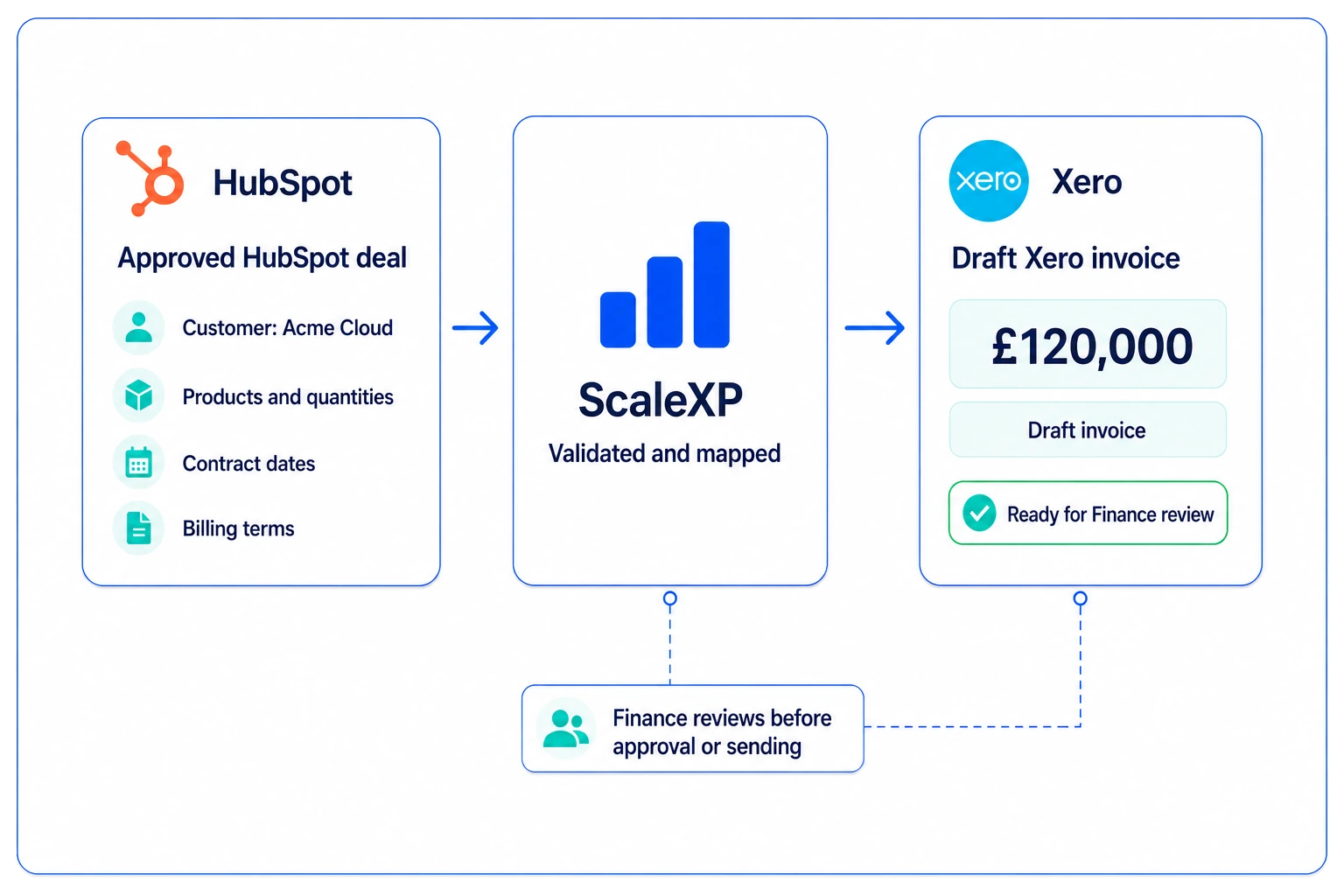
AUTOMATED INVOICING FOR FINANCE TEAMS
Turn approved sales data into accurate, finance-ready invoices without rekeying customer, product or contract information. ScaleXP connects your CRM with Xero or QuickBooks while keeping Finance in control.
on the Xero App Store (75+ reviews)
The information needed to invoice a customer often already exists in the CRM. But Finance still has to check, copy and recreate it in Xero or QuickBooks.
A Closed Won deal is rarely finance-ready. Finance still has to verify customer details, products, pricing, dates, currency and billing terms before creating the invoice.
Recurring billing, deposits, milestones and staged payments can create multiple invoice dates and values. When those schedules sit outside the CRM and accounting system, Finance has another spreadsheet to maintain and reconcile.
ScaleXP turns customer, contract and billing information already captured by Sales into finance-ready invoice data for Xero or QuickBooks.
It does more than copy fields: Finance can see what was agreed, what should be invoiced and what has actually been billed.
Automation removes repetitive work without removing financial control. ScaleXP prepares invoice information from commercial data while Finance retains the appropriate review before it reaches Xero or QuickBooks.
Customer contracts can create anything from a single invoice to a sequence of recurring or milestone payments. ScaleXP uses the agreed billing terms to prepare the required schedule without rebuilding it in a spreadsheet.
Sales and Customer Success should not need to ask Finance whether a customer has been invoiced or paid. ScaleXP makes relevant billing information available in the commercial workflow without requiring direct accounting-system access.
ScaleXP removes repetitive work between approved sales data and accounting, helping Finance create invoices faster while keeping the commercial record, invoice schedule and accounting output connected.
Less copying between CRM and accounting.
Reduce rekeying of prices, dates and customer data.
Trace invoices back to the underlying commercial record.
Give commercial teams visibility without Finance chasing updates.
Sales can continue working in HubSpot or Salesforce while Finance keeps Xero or QuickBooks as the accounting system of record. ScaleXP connects the information needed to move from sale to invoice.
For system-specific detail, see the HubSpot Xero integration and HubSpot QuickBooks integration pages, or our CRM billing and invoicing automation solution.
Customer result
Xero, budgets and HubSpot in one reporting process
Interrodata connected Xero, its budgets and HubSpot to ScaleXP, and now builds its branded SaaS reports from the combined data.
Interrodata
“ScaleXP has transformed our reporting process. We linked Xero, our budgets and HubSpot into ScaleXP... It now pulls information seamlessly and builds our branded SaaS reports.”

Chris
Interrodata
Automated invoicing software turns approved customer, product and billing information into invoices with less manual data entry. ScaleXP connects commercial data with Xero or QuickBooks while keeping Finance review and the accounting system of record intact.
ScaleXP uses customer, product, pricing, contract and billing information to prepare invoice outputs for Xero or QuickBooks, reducing repeated data entry while retaining Finance review before finalization.
Yes. ScaleXP can use approved HubSpot or Salesforce deal data to prepare invoices for Xero or QuickBooks. For broader CRM-to-finance automation, see our CRM billing and invoicing automation solution.
Yes. ScaleXP supports one-off, recurring and multi-invoice workflows using agreed billing terms. Different invoice dates and values can be used for staged, recurring or milestone invoicing.
Yes. ScaleXP automates invoice preparation while retaining Finance control. Invoice details can be reviewed before they are finalized in Xero or QuickBooks.
ScaleXP can make invoice and payment information available to Sales and Customer Success without requiring direct access to Xero or QuickBooks. The information can also support CRM workflows and follow-up.
No. Xero or QuickBooks remains the accounting system of record. ScaleXP automates the work between commercial data and invoicing, reducing manual entry while keeping Finance control.
Automated invoicing focuses on creating accurate invoices from approved commercial data. Subscription billing manages recurring billing terms, subscription changes, renewals and billing schedules over the customer lifecycle. See ScaleXP’s subscription billing software for that broader requirement.
Only if you want it to. ScaleXP prepares the invoice from your CRM deal (customer, line items, dates and billing period) and creates it in Xero or QuickBooks, as a draft or approved, your choice. You can send it from there as you do today, so your invoice numbering, templates and reminders stay in your accounting system. Or you can switch on sending from ScaleXP Invoicing, which emails the invoice with a link to pay through your own payment provider. ScaleXP never takes the payment itself.
““challenging requirements ... tremendous help in making this happen”
Automated invoicing
See how ScaleXP turns approved commercial data into finance-ready invoices, with Finance keeping the review before anything is finalized.
In a 30-minute demo, we’ll show the relevant workflows using example data and discuss how they could apply to your finance process. Complex requirements? Discuss them with us first.





