Accrual automation for QuickBooks & Xero users

Accruals Automation for Xero and QuickBooks Online

Accruals are costs your business has incurred in the period but not yet been billed for, such as a contractor's March work invoiced in April.

ScaleXP builds the accrual from draft bills, purchase orders and your Xero or QuickBooks data, prepares the journal for finance to review, and releases it when the supplier invoice arrives.

  • Recognize costs in the correct accounting period
  • Eliminate spreadsheet-driven accrual tracking
  • Improve margin accuracy and financial control
Book an accruals demo

Looking for revenue earned but not yet invoiced? See accrued income.
  • 5.0 out of 5Xero App Store
    90+ reviews
  • 2023 · 2025Xero Staff Pick 2023 · Featured App 2025
  • SOC 2Type II
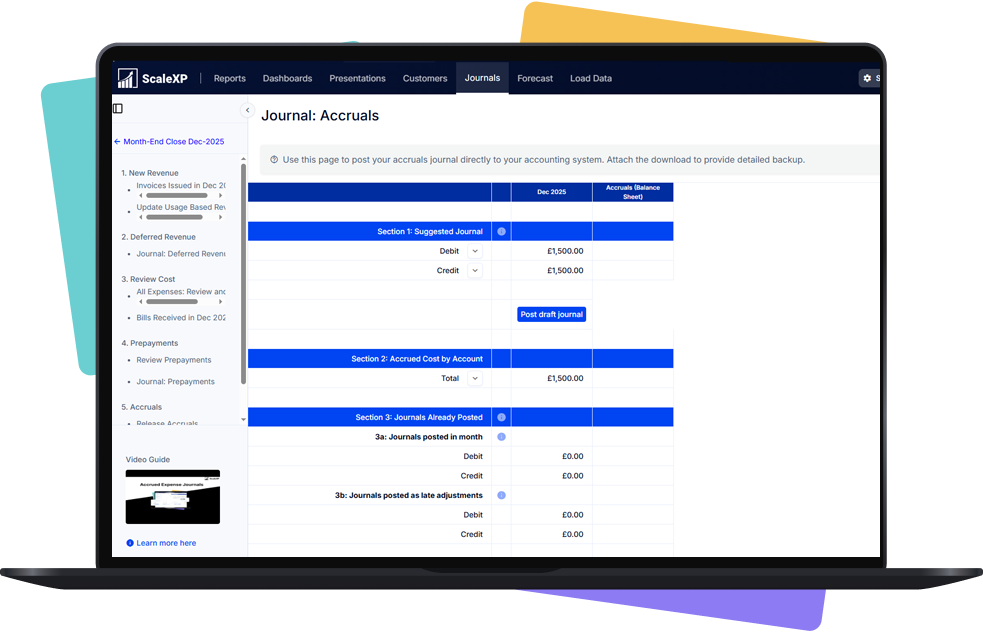
ScaleXP month-end accruals journal showing a suggested journal, accrued cost by account and journals already posted

How ScaleXP Automates Cost Accruals

ScaleXP automates cost accrual calculations and journal preparation using accounting data.

AI models designed specifically for finance teams apply IFRS and GAAP accounting logic to generate structured accrual schedules and journals.

Finance teams maintain accurate cost recognition throughout the accounting period.
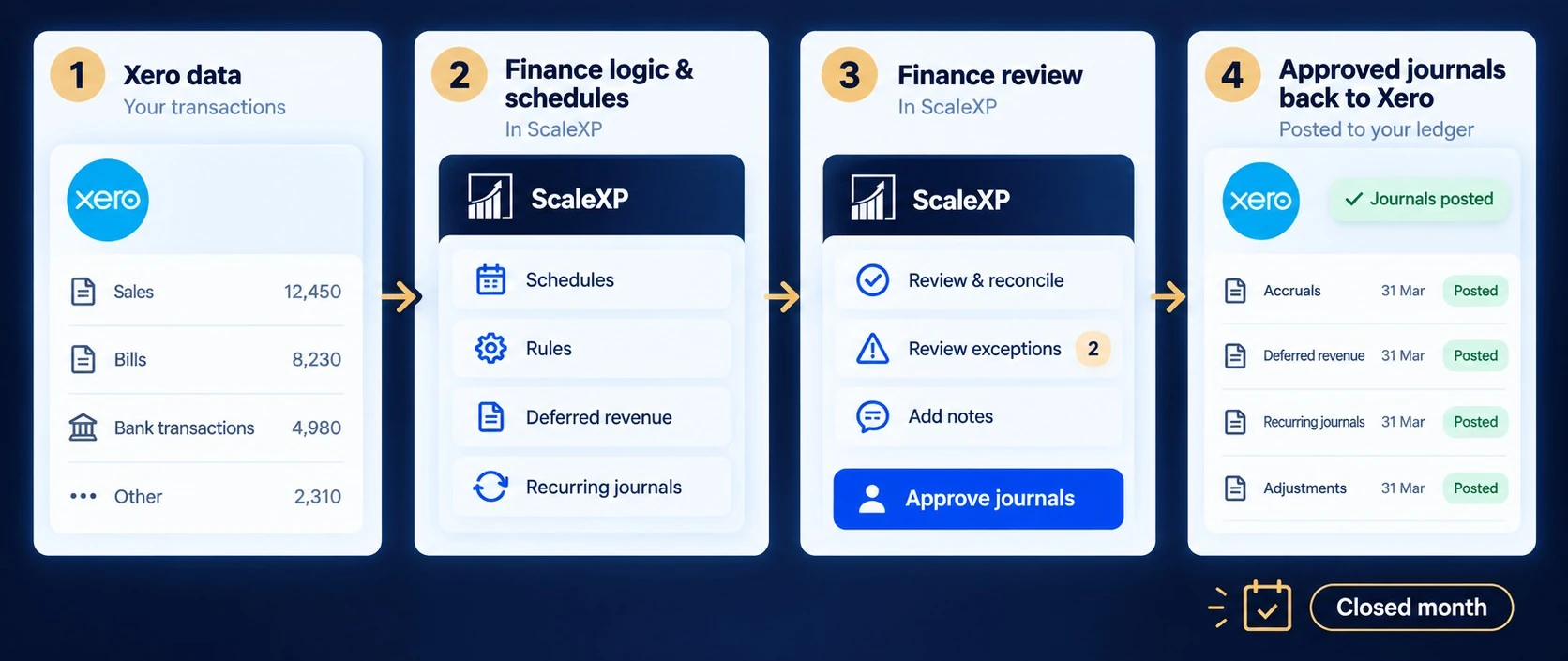
Xero month-end workflow showing accounting data flowing through ScaleXP schedules and finance review before approved journals are posted back to Xero
Illustrative example: a contractor's March work of $4,500, invoiced in April
MonthAccrualAccrued balance
March$4,500 accrued$4,500
AprilReleased when the April bill posts$0

How It Works

  1. Identify Accrual Candidates

    ScaleXP detects costs needing accruals from accounting and operational data.

  2. Capture Draft Bills or POs

    Accruals can be created from draft bills or purchase orders for early cost insight.

  3. Apply Accrual Logic

    AI applies consistent IFRS and GAAP-based accrual rules.

  4. Generate Accrual Journals

    Journal entries are auto-created and ready for ledger posting.

  5. Update Accrual Balances

    Balances update automatically when supplier invoices arrive.
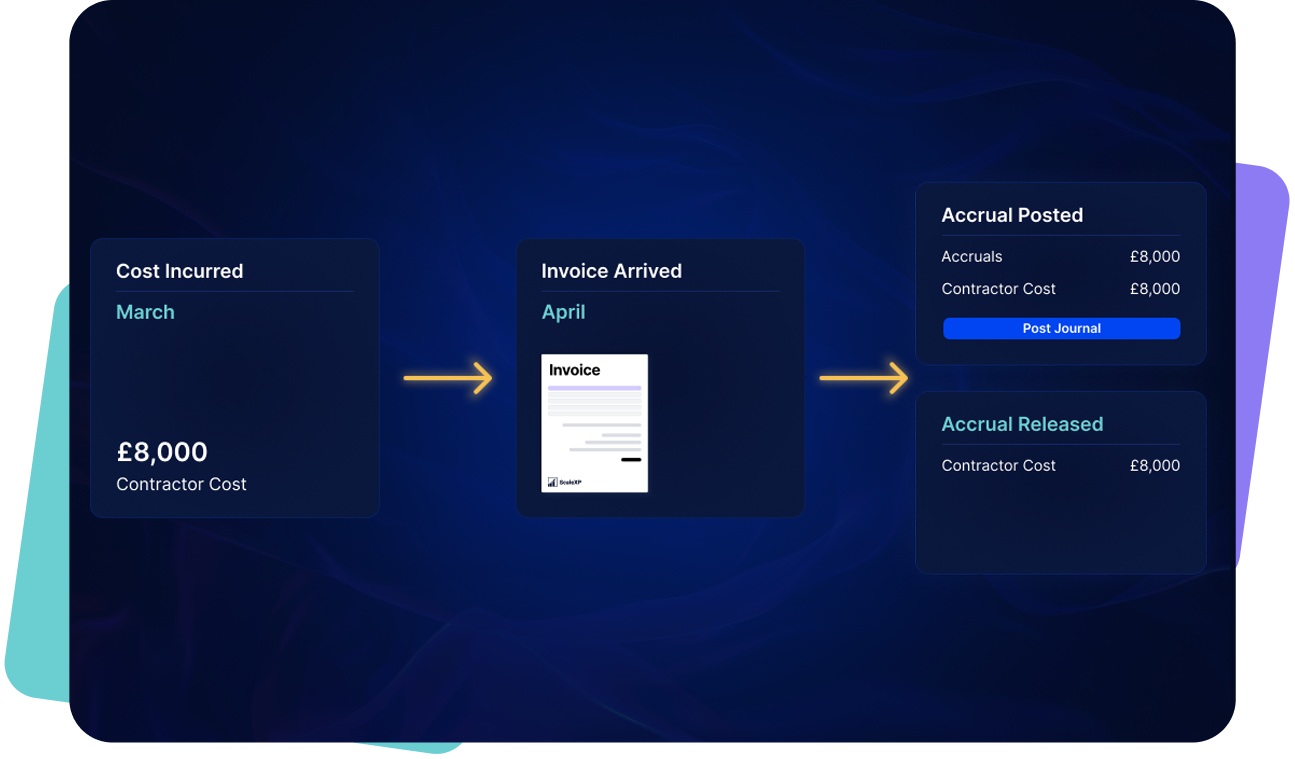
  • ScaleXP learns each supplier's billing pattern, flags a missing bill and suggests an accrual, which reverses when the bill arrives.
An 8,000 pound contractor cost incurred in March is accrued, then released when the invoice arrives in April and the journal is posted

Complex accruals?
If you have unusual accrual logic, supplier bill or month-end requirements, talk them through with us.

Discuss your requirements

What Changes for Your Finance Team

Accruals before and after ScaleXP
Before ScaleXPAfter ScaleXP
Accrual calculations are maintained manually in spreadsheetsAccrual schedules are calculated automatically from financial data
Journals prepared manually during month-end closeJournals prepared automatically for finance review
Accrual balances recalculated repeatedly during closeAccrual balances update automatically each period
Supplier invoices trigger manual schedule updatesSupplier invoices trigger automated accrual releases

Strengthen Financial Governance

Structured accrual workflows provide greater visibility and audit readiness.

Finance leaders gain traceability across accrual schedules, journal entries, and supplier invoices.
  • Clear audit trail for accrual journals
  • Transparent financial reporting processes
  • Improved accounting policy control
AI journal automation software showing finance-reviewed journal preparation from schedules and accounting data

Customer result

Excel-heavy journals reduced to a half-day job

Accrual and deferred-revenue journals in Xero are now automated, with entries pushed through and a full audit trail maintained.

“All my accrual and deferred revenue manual journals in Xero are now automated — ScaleXP reads invoices and bills directly, pushes entries through, and maintains a full audit trail of every change. What used to be a risky, Excel-heavy process is now a half-day job.”

Emmanuel · Xero review

Save Time Every Month

Automated accrual calculations remove manual preparation from the month-end close process.

Finance teams spend less time preparing accrual schedules and journals by hand each month.
  • Reduced spreadsheet preparation
  • Faster close preparation
  • More time reviewing financial results
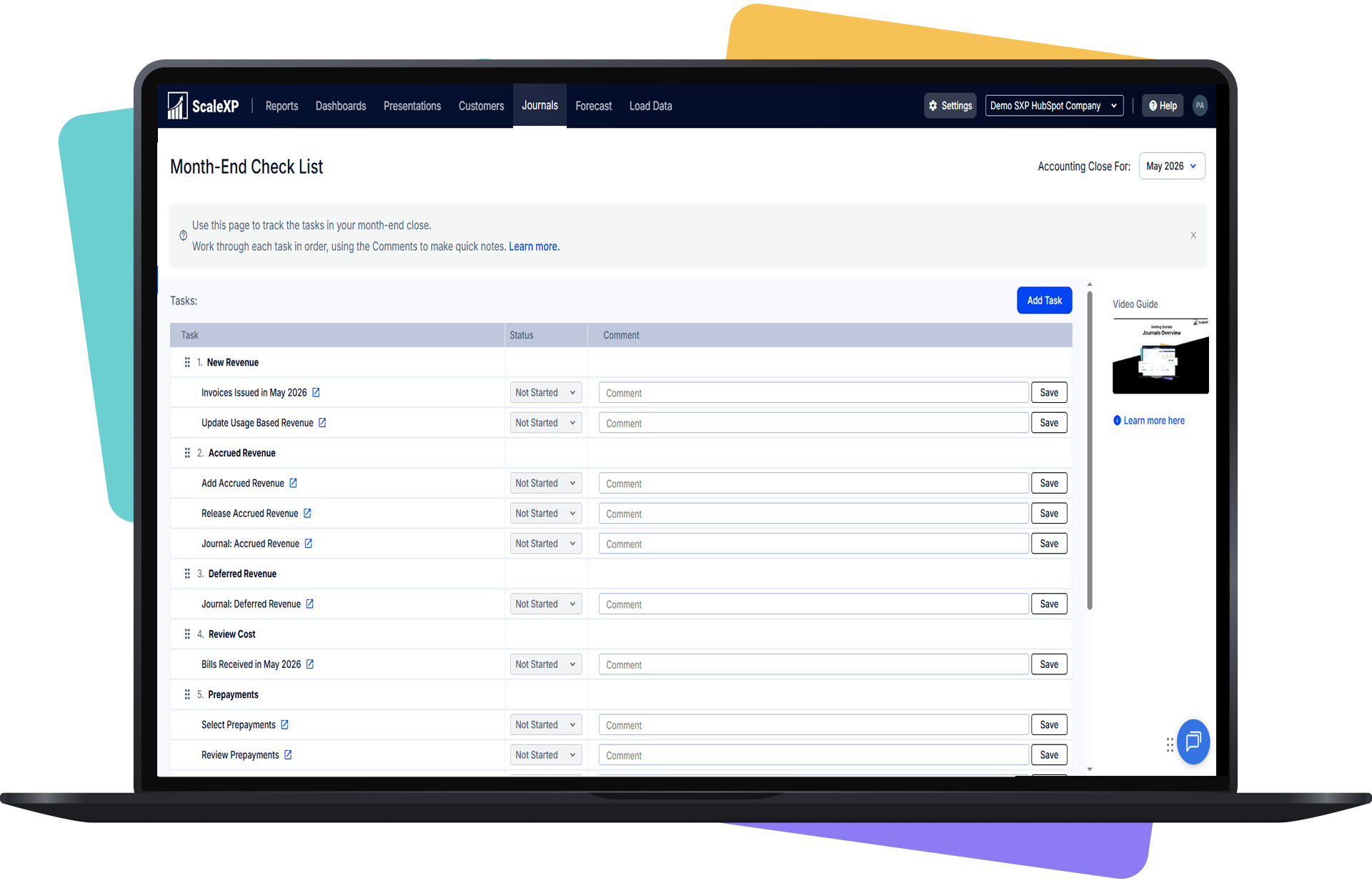
ScaleXP month-end close checklist showing revenue journal tasks including new revenue, accrued revenue, deferred revenue and prepayments

Improve Cost Recognition Accuracy

Accrual calculations are applied consistently across accounting periods.

AI models designed for IFRS and GAAP accounting frameworks ensure structured cost recognition across financial reports.

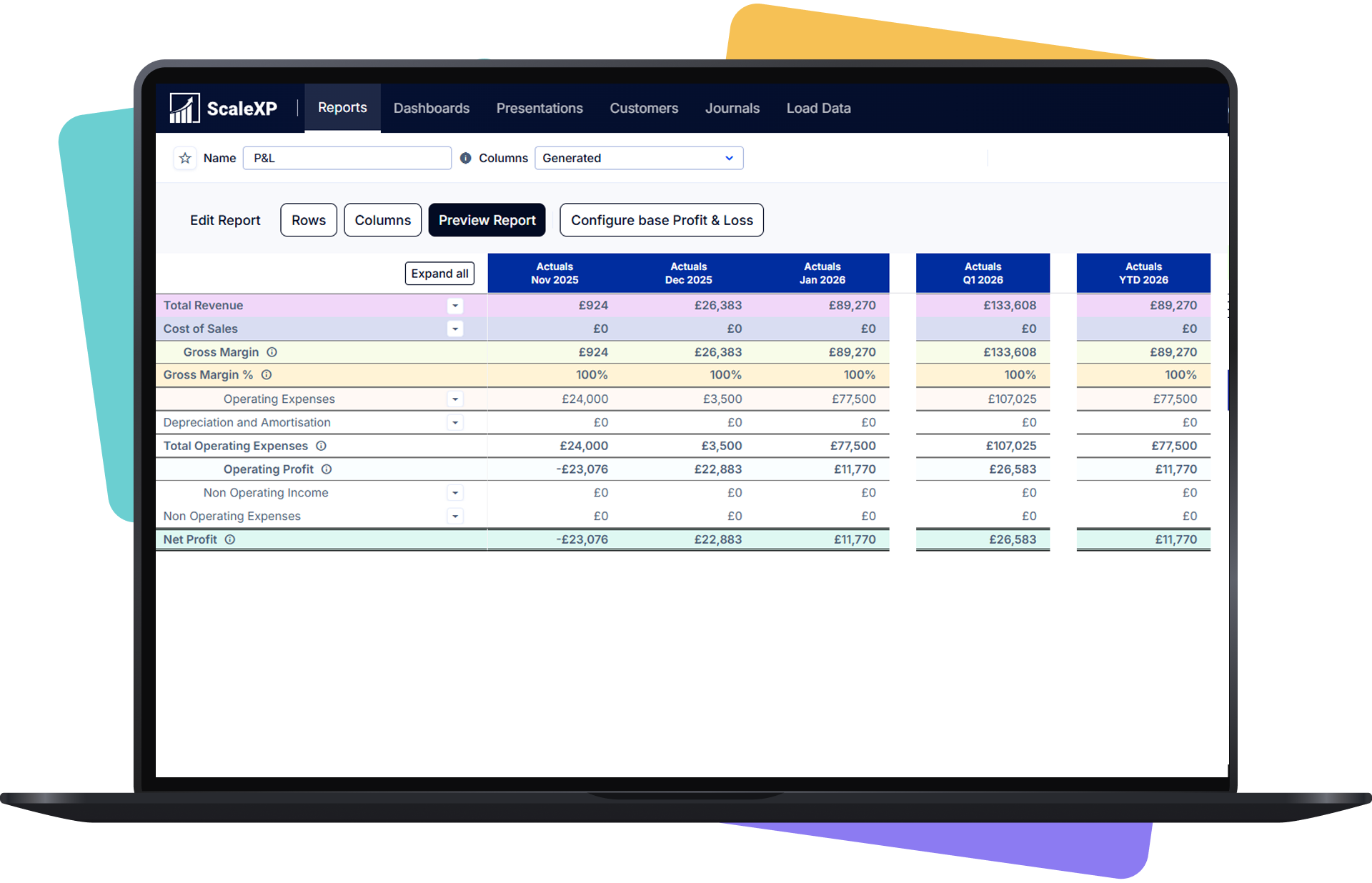
See how this fits into ScaleXP's broader AI journal automation capabilities.
  • Accurate product and service margins
  • Reduced risk of missed supplier invoices
  • Consistent accrual logic across reporting periods

Source: IFRS Conceptual Framework (IFRS Foundation)

Shared operating dashboard across customer revenue and business performance data
  • SME CFOs responsible for financial accuracy
  • Financial Controllers managing month-end close
  • Finance managers replacing spreadsheet processes
  • Accounting teams automating financial workflows
  • Companies using Xero or QuickBooks Online

With the ScaleXP platform, you can:

  • Close the Month Faster

    Continuous accrual preparation reduces manual work during month-end close and stabilizes the close process.

  • Eliminate Spreadsheet Accrual Schedules

    Automated accrual calculations replace spreadsheet logic used for tracking expenses and generating journals.

  • Increase Reporting Accuracy and Control

    Finance leaders gain reliable accrual calculations and consistent cost recognition across financial reports.

Accruals FAQs

What is accrual automation?

Accrual automation calculates expenses that should be recognized before supplier invoices arrive.

ScaleXP automates accrual schedules and journal preparation using accounting data so finance teams maintain accurate financial statements throughout the accounting period rather than adjusting results during month-end close.

How does ScaleXP automate accrual calculations?

ScaleXP monitors accounting activity and identifies transactions that require accrual treatment.

ScaleXP detects costs that need accruing and builds the accrual from draft bills, purchase orders and your Xero or QuickBooks data.

Finance teams review and approve journals before posting to the general ledger.

Can accruals be generated from purchase orders or draft bills?

Yes. ScaleXP can generate accrual entries using purchase orders or draft supplier bills.

This allows finance teams to recognize expected costs earlier and maintain accurate margin reporting even before supplier invoices are received.

Does ScaleXP work with Xero and QuickBooks Online?

ScaleXP works alongside Xero and QuickBooks Online.

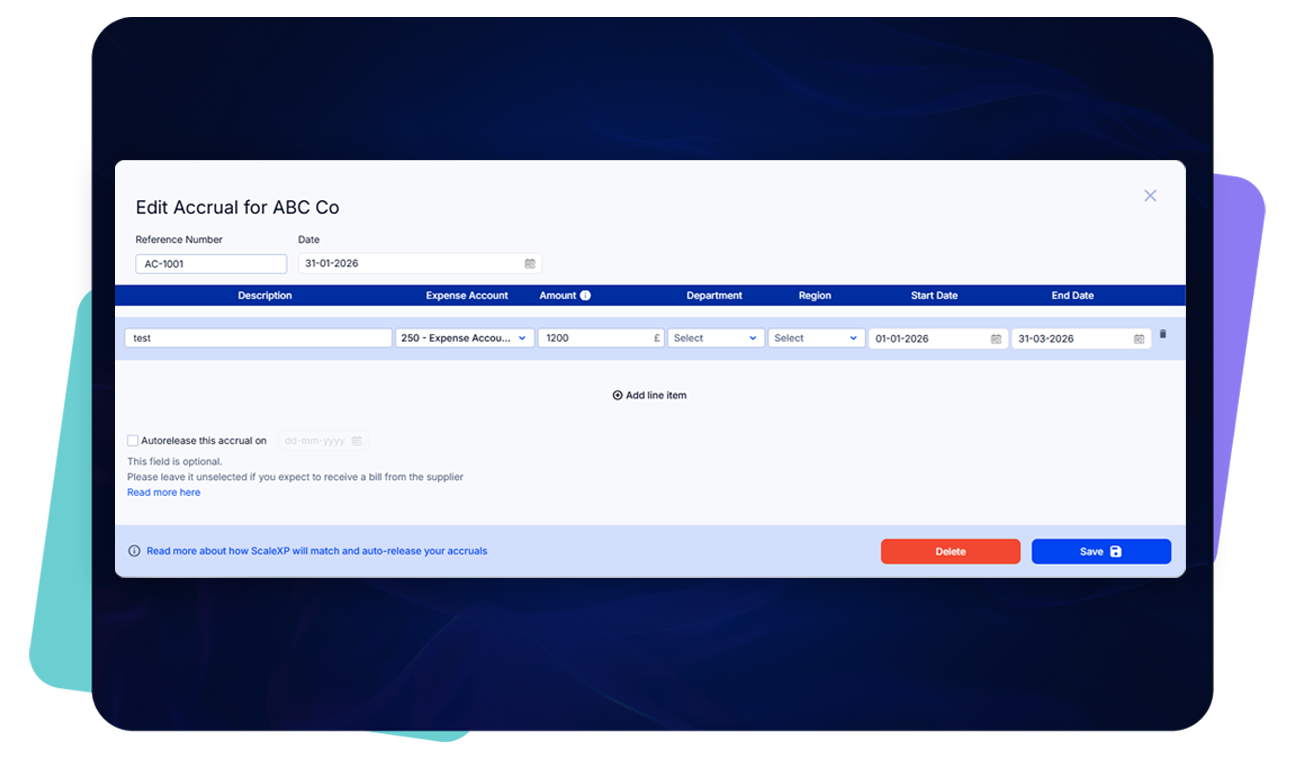
Accrual journals support Xero Tracking Codes and QuickBooks Classes, ensuring costs are allocated correctly across departments or projects.

How does accrual automation improve month-end close?

Automated accrual schedules remove manual calculations and journal preparation from the close process.

Finance teams maintain accurate accrual balances throughout the month, reducing late adjustments and making the close process faster and more predictable.

Can AI draft recurring accruals each month-end?

Yes. ScaleXP learns each supplier's billing pattern, flags a missing bill and suggests an accrual, which reverses when the bill arrives.

ScaleXP detects costs that need accruing and builds the accrual from draft bills, purchase orders and your Xero or QuickBooks data.

ScaleXP prepares the schedules and journals; they post once finance approves.

How does FinQuery compare to ScaleXP for accruals and prepaids?

FinQuery describes its accruals and prepaids product as automating amortization schedules, roll-forward reports and journal entries for mid-market accounting teams.

Its website (checked November 17, 2026) says it integrates with any ERP or general ledger.

ScaleXP detects costs that need accruing and builds the accrual from draft bills, purchase orders and your Xero or QuickBooks data.

ScaleXP prepares the schedules and journals; they post once finance approves. For prepaid expenses, see prepaid expense software.

Last reviewed: