See how ScaleXP works with Xero or QuickBooks.
In a 15- or 30-minute demo, we’ll show the relevant workflows using example data and discuss how they could apply to your finance process. Complex requirements? Discuss them with us first.
REVENUE LEAKAGE CHECK
Revenue leakage is revenue a business has earned the right to bill but never bills or collects.
ScaleXP checks every won deal in HubSpot, Salesforce or Pipedrive against Xero or QuickBooks invoices and flags the gaps before month-end.
Rated 5.0 on the Xero App Store (90+ reviews)
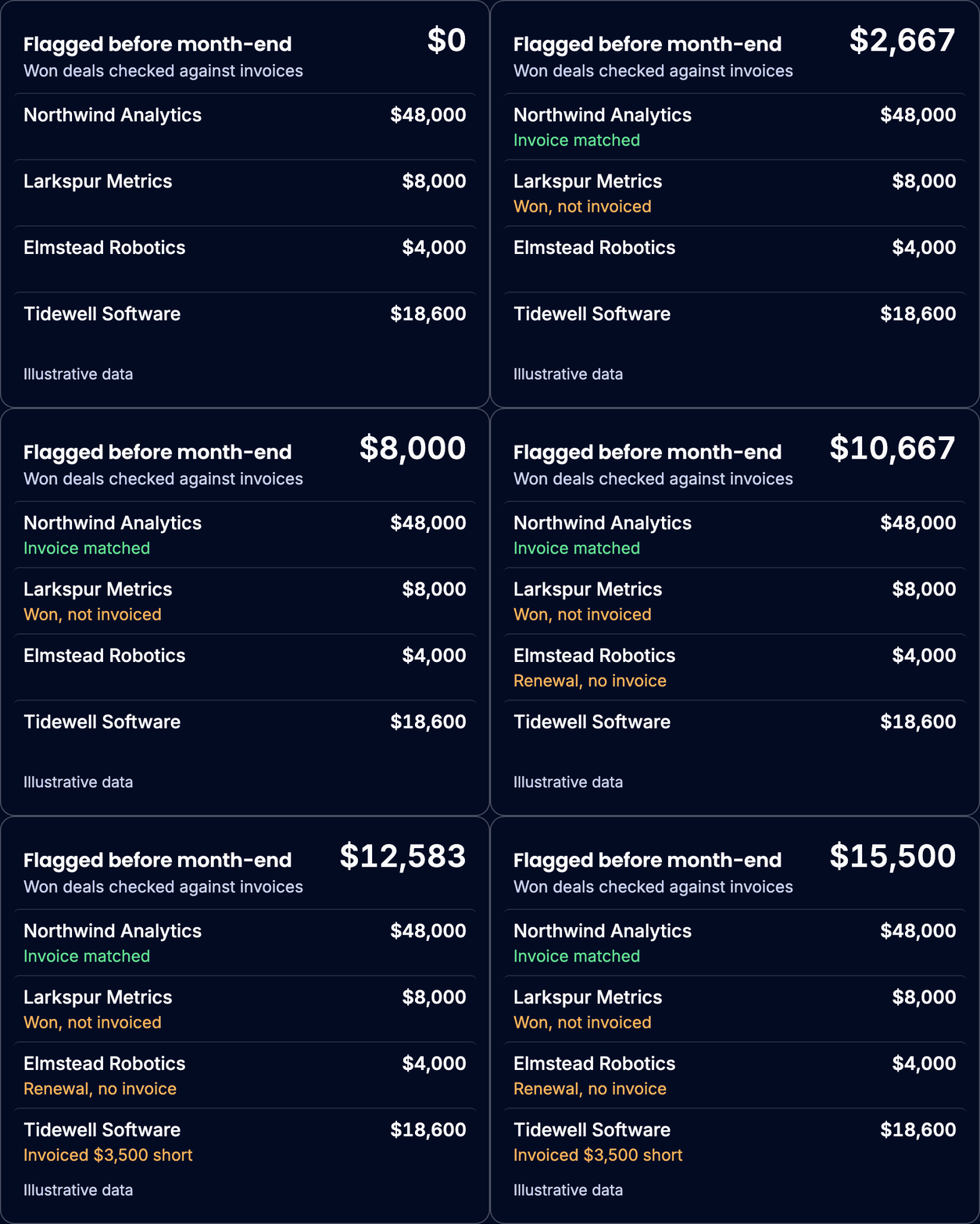
Revenue leaks at the hand-off from sales to finance. Won deals are retyped from the CRM into Xero or QuickBooks, and nobody checks every one.
Won deals are retyped into Xero or QuickBooks, and some get billed late or never.
Renewal dates live in a spreadsheet, so a renewal can pass with no invoice.
Sales and finance report different ARR, and nobody can say which is right.
A missed invoice turns up when the customer or the auditor finds it.
The cost: revenue you’ve earned but never billed, renewals lost without a decision, and a close nobody fully trusts.
ScaleXP replaces the manual check of deals against invoices with a monthly list of exceptions, so finance checks less and more of what was sold gets billed.
Finance reviews only the exceptions, not every deal against every invoice.
Every won deal is matched to its invoices, so invoices below the contract value are caught.
Deals never invoiced and invoices saved but never sent are flagged, so invoices go out sooner.
ScaleXP gives finance one list of every revenue leak, from five checks run every month, with each gap shown against the deal and the invoice.
Swipe the table sideways to see every column.
| Leak | What it looks like | How ScaleXP flags it |
|---|---|---|
| 1. Deals won but never invoiced | A deal marked Closed Won in March with no invoice in Xero or QuickBooks by month-end | Matches each won deal to its invoices (booked vs billed); a deal with no match is flagged |
| 2. Invoices below the contract value | A $24,000 contract invoiced at $20,000 because a product line was missed | Flags any deal invoiced for a different amount, with the gap |
| 3. Missed or late renewals | A renewal due January 1 that still has no invoice on January 15 | Lists renewals due without an invoice, tracked against each contract |
| 4. Lapsed contracts | A contract that ended in June with no renewal agreed | Flags renewals that were not renewed, so someone follows up before the revenue is lost |
| 5. Invoices saved but not sent | An invoice approved in Xero, or created in QuickBooks Online, but never emailed to the customer | Lists invoices saved in Xero or QuickBooks Online but never sent |
Illustrative examples.
Track what the check protects: gross and net revenue retention and remaining performance obligation.
Most leakage comes from the hand-off between sales and finance. ScaleXP sits between the two systems and checks every deal, every month.
Your CRM stays the sales system and your books stay in Xero or QuickBooks.
Connect HubSpot, Salesforce or Pipedrive, and Xero or QuickBooks Online. Nothing is migrated.
ScaleXP matches each won deal to the invoices raised for it, so booked and billed amounts sit side by side.
The Revenue Leakage page lists only the gaps. Finance checks the differences, not every customer.
Raise the missing invoice from the deal in Xero or QuickBooks. Invoice and payment status flows back to the CRM.
See how the deal becomes the invoice: CRM billing and invoicing automation. See where the check sits in the close: month-end close.
Nourish runs its UK businesses on both QuickBooks and Xero. ScaleXP gives its CFO one ARR bridge and a check that invoicing matches contracts.
6 entities
in one group board pack
Before ScaleXP, deferred revenue was hard to track in QuickBooks and in Xero.
SaaS metrics and board packs were slow to build from two accounting systems.
“We have a real time view of our ARR bridge, enabling us to get to SaaS metrics quickly and also sanity check that invoicing aligns with contracts to prevent revenue leakage.”

John, Chief Financial Officer, Nourish
“Being able to see which of our customers are churning, identifying who we’ve missed billing that month was invaluable…”
Natalie · Director of Operations (G2 review)
“It pulls data straight from Xero and HubSpot, and everything just lines up.”
Hannah · Cofounder (G2 review)
“The integration with Quickbooks Online is solid and very easy to set up.”
David · VP of Finance (G2 review)
Most invoice reconciliation starts from the bank: did the invoice get paid? Revenue leakage starts earlier: was the invoice raised at all, and for the right amount?
ScaleXP reconciles CRM deals to invoices first, then follows each invoice through payment, revenue recognition and ARR, so a missed invoice is caught before it becomes a missed month.
Swipe the table sideways to see every column.
| Approach | What it catches | What it misses | Best for |
|---|---|---|---|
| Spreadsheet reconciliation | Whatever someone remembers to check | Anything outside the sample; it is rebuilt every month | Very small deal volumes |
| Native CRM sync with Xero or QuickBooks (for example HubSpot Data Sync) | Keeps contacts, products and invoices aligned between the two systems | It doesn't compare won deals with invoices, so a deal that was never invoiced isn't flagged | Teams that raise invoices in the CRM and only need records mirrored |
| Billing platform (for example Chargebee or Maxio) | Prevents many leaks by running subscriptions and billing itself | Billing moves out of Xero or QuickBooks into a new system | Teams ready to move billing out of Xero or QuickBooks |
| ScaleXP revenue leakage check | Won deals not invoiced, under-billing, missed renewals, lapsed contracts, invoices never sent | It needs a CRM connection; it doesn't take payments | SaaS and MSP finance teams who want to keep Xero or QuickBooks |
Competitor details checked October 30, 2026.
Not sure which fits your setup? Discuss your requirements
The revenue leakage check needs a CRM connection, because it compares what was sold with what was billed. Choose your pair to see the full workflow.

Won HubSpot deals checked against Xero invoices
Won HubSpot deals checked against QuickBooks invoices
Closed Won opportunities checked against Xero invoices
Closed Won opportunities checked against QuickBooks invoices
Won Pipedrive deals checked against Xero invoices
Won Pipedrive deals checked against QuickBooks invoices
ScaleXP connects to HubSpot, Salesforce or Pipedrive and to Xero or QuickBooks Online, so nothing is migrated and both systems keep working as they do today.
Connect your CRM and Xero or QuickBooks Online to ScaleXP; your data stays where it is.
Deal fields, products and contract dates are mapped once, so every deal can be matched to its invoices.
The first check lists your gaps, and from then on it runs every month as part of the close.
Revenue leakage is revenue a business has earned the right to bill but never bills or collects.
For SaaS companies and managed service providers (MSPs), it usually happens between the CRM and the invoice. Common gaps are unbilled deals, under-billing, missed renewals, lapsed contracts and unsent invoices.
Because contracts recur, one missed invoice can repeat every billing cycle.
The most common causes are deals won but never invoiced, invoices below the contract value, missed or late renewals, lapsed contracts and invoices saved but never sent.
In SaaS and managed services alike, most start at the hand-off from sales to finance, when deals from HubSpot, Salesforce or Pipedrive are retyped into Xero or QuickBooks.
Connect your CRM and Xero or QuickBooks to ScaleXP. It matches every closed-won deal in HubSpot, Salesforce or Pipedrive to the invoices raised in Xero or QuickBooks Online.
Any deal with no invoice, or invoiced for a different amount, appears on the Revenue Leakage page with the gap, before the month is closed.
Three kinds of tool help SaaS and MSP finance teams. Native CRM syncs with Xero or QuickBooks keep records aligned but don’t compare deals with invoices.
Billing platforms such as Chargebee or Maxio prevent many leaks by taking over billing.
ScaleXP checks CRM deals against Xero or QuickBooks invoices and flags the gaps, so Xero or QuickBooks stays your system of record.
Detect revenue leakage by matching every closed-won deal in the CRM to the invoices raised for it, then checking renewals and contract end dates.
ScaleXP does this every month for HubSpot, Salesforce or Pipedrive with Xero or QuickBooks Online, and lists only the gaps on its Revenue Leakage page before month-end.
Yes. ScaleXP is built for SaaS and recurring-revenue companies up to $50M in revenue, including MSPs.
It works when your service contracts are sold in HubSpot, Salesforce or Pipedrive and invoiced in Xero or QuickBooks Online.
ScaleXP then checks every contract against its invoices, renewals included, and flags the gaps before month-end.
Renewals leak the same way for SaaS subscriptions and MSP service contracts. The renewal date passes without an invoice, the renewal is invoiced late, or a lapsed contract goes unnoticed.
ScaleXP tracks each renewal against its contract, lists renewals due without an invoice and flags lapsed contracts before month-end.
Invoice reconciliation usually checks whether invoices were paid, by matching them to bank payments. Revenue leakage starts earlier: was the invoice raised at all, and for the right amount?
ScaleXP reconciles CRM deals to invoices in Xero or QuickBooks first, then follows each invoice through payment, revenue recognition and ARR.
Chargebee and Maxio are billing platforms: they prevent many leaks by running subscriptions and invoicing themselves, which means moving billing out of Xero or QuickBooks.
ScaleXP keeps billing in Xero or QuickBooks and your CRM, and catches leaks by checking every won deal against its invoices.
Teams ready to replace their billing process may prefer a billing platform.
No. The revenue leakage check covers revenue that was never billed, or billed short, rather than invoices awaiting payment. Payment status is still visible.
ScaleXP writes invoice and payment status, including overdue invoices, back to HubSpot, Salesforce or Pipedrive, so account owners see who has paid before a renewal call.
It suits SaaS companies and managed service providers with up to $50M in revenue, where sales runs HubSpot, Salesforce or Pipedrive and finance runs Xero or QuickBooks Online.
It fits best when won deals are retyped by hand, contracts renew annually or over several years, and renewal dates live in a spreadsheet.
It isn’t a fit without a CRM, or if your books are in NetSuite or Sage Intacct.
No. The automated check compares what sales closed in HubSpot, Salesforce or Pipedrive with what finance invoiced in Xero or QuickBooks Online, so it needs a CRM connection. CRM integrations can be added to any ScaleXP plan: see plans and pricing. Revenue recognition from your invoices works without a CRM.
They overlap. Revenue assurance is a broader discipline, most common in telecoms, covering every control that protects revenue. Revenue leakage is the loss itself.
For a SaaS or MSP finance team on Xero or QuickBooks, checking every won deal against its invoices each month is a core revenue assurance control.
Manual subscription management leaks revenue in five places, and each has one fix:
The ScaleXP revenue leakage check flags five things: deals won in the CRM but never invoiced; invoices below the deal value; renewals due without an invoice; lapsed contracts (renewals that were not renewed); and invoices saved but not sent, in Xero or QuickBooks Online.
Last reviewed: October 2026 by Suezann Holmes, qualified accountant (Wharton MBA)
““Thanks to ScaleXP, our month-end close is now twice as fast!”
CRM and Xero or QuickBooks
See the revenue leakage check in a demo.
In a 15- or 30-minute demo, we’ll show the relevant workflows using example data and discuss how they could apply to your finance process. Complex requirements? Discuss them with us first.