SaaS Board Reporting Software for Finance Teams

Create board-ready SaaS reporting without rebuilding spreadsheets every month.

4.9

in Xero & QuickBooks app stores

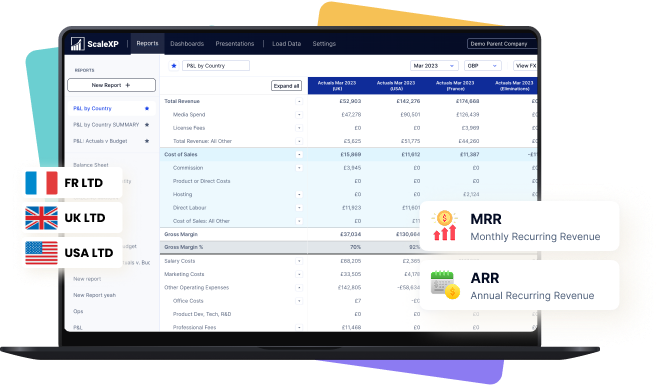
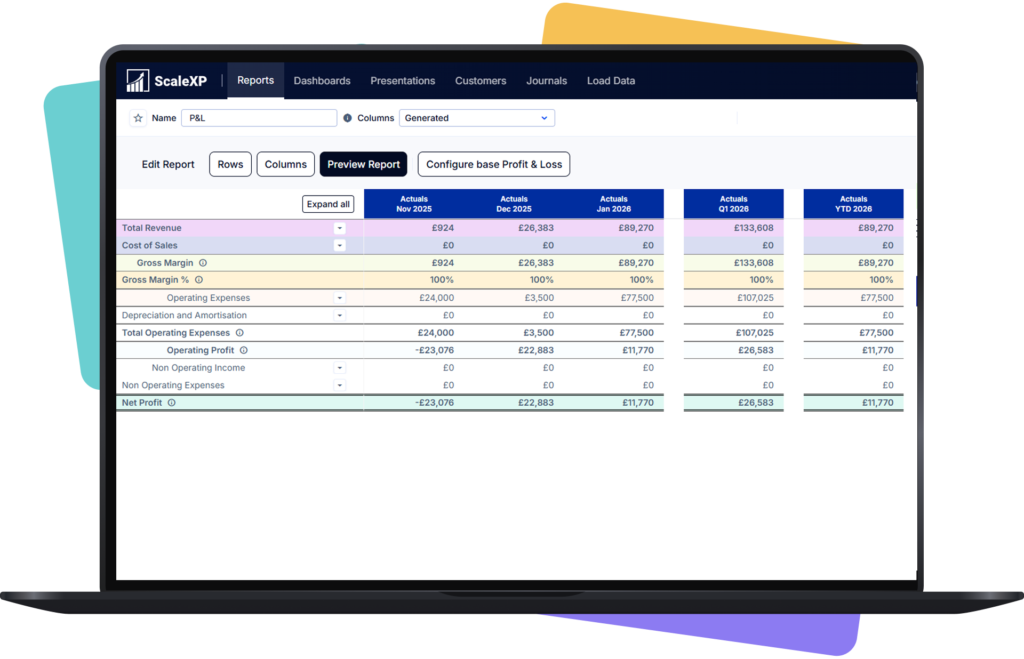
SaaS board reporting dashboard showing consolidated ARR, MRR and multi-entity financial reporting for CFOs.

ScaleXP is an approved app for leading accounting & CRM systems

Board reporting takes too long

Month-end close infographic with Current Close and Improved Close panels, Day 5 lengthy close transitioning to Day 2 faster close, blue arrow across the center.

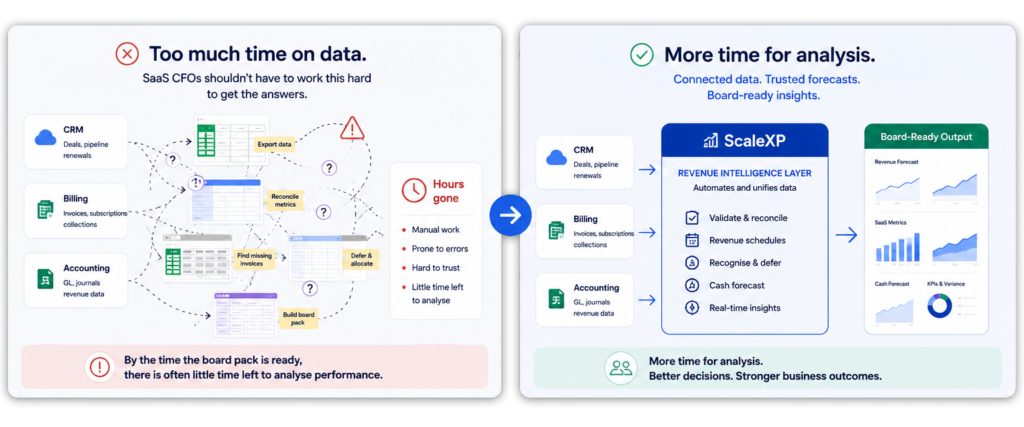
SaaS CFOs spend too much time gathering data, checking spreadsheets and reconciling metrics back to invoices.

By the time the board pack is ready, there is often little time left to analyse performance.

SaaS CFO reviewing spreadsheets and reconciling finance data before preparing a board pack

ScaleXP reduces the manual work behind SaaS board reporting

Recurring revenue and renewals dashboard connected to HubSpot and accounting

ScaleXP connects CRM, billing and accounting data into a finance-reviewed reporting layer.

Finance teams can report ARR, MRR, revenue, deferred revenue, cash and forecasts from connected source data instead of rebuilding the board pack manually.

This helps CFOs spend less time compiling numbers and more time explaining what changed, why it changed and what action the business should take.

Finance dashboard connecting CRM, billing and accounting data for SaaS board reporting

How it works

Shared operating dashboard across customer revenue and business performance data
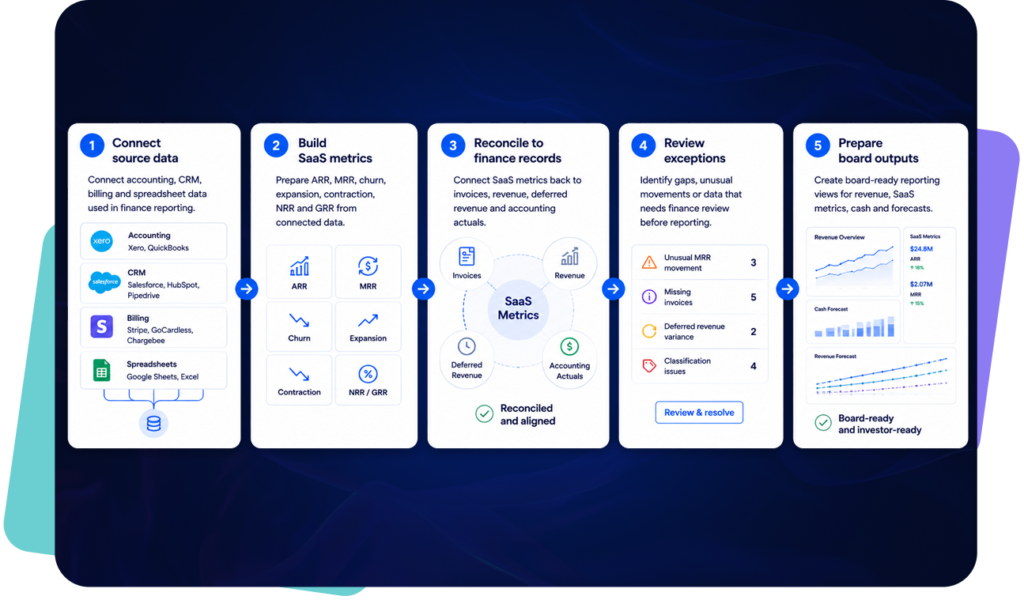
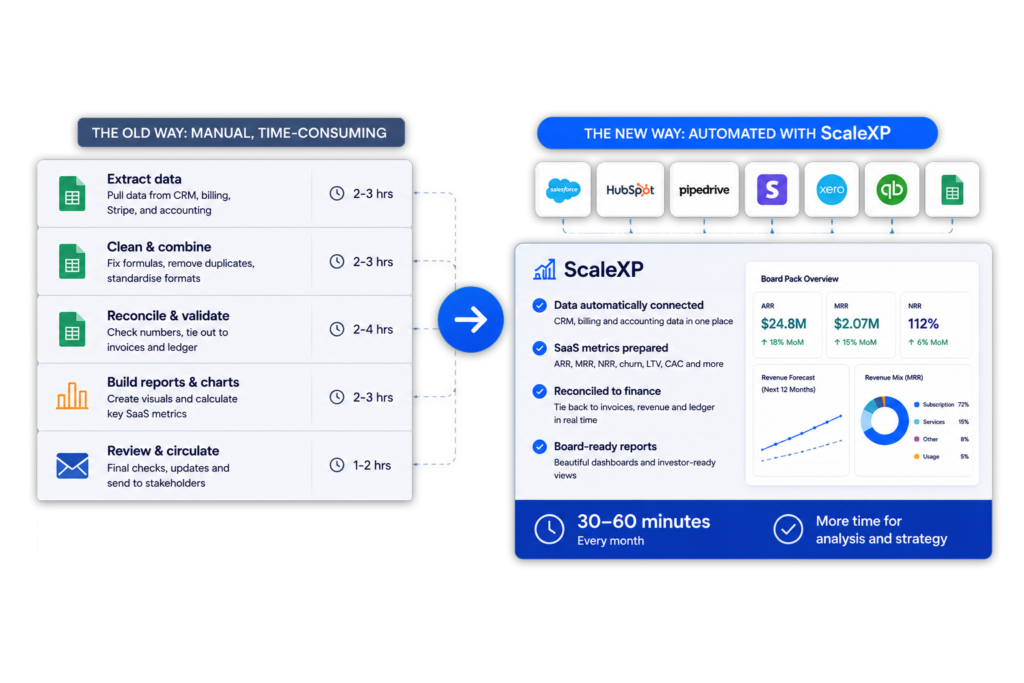
Five-step SaaS board reporting workflow connecting CRM, billing and accounting data to board-ready finance reports

Spend less time compiling the board pack

Recurring revenue and renewals dashboard connected to HubSpot and accounting

ScaleXP reduces the manual work needed to gather, reconcile and prepare SaaS board reporting.

Finance team preparing a board pack using connected SaaS reporting data

Connect SaaS metrics to finance data

Shared operating dashboard across customer revenue and business performance data

ARR and MRR reporting is more useful when it connects back to finance records.

ScaleXP dashboard view with revenue predictions £901,632 and 25% growth, blue charts and tables showing forecast reports, CRM and billing panels

Improve board-level analysis

Recurring revenue and renewals dashboard connected to HubSpot and accounting

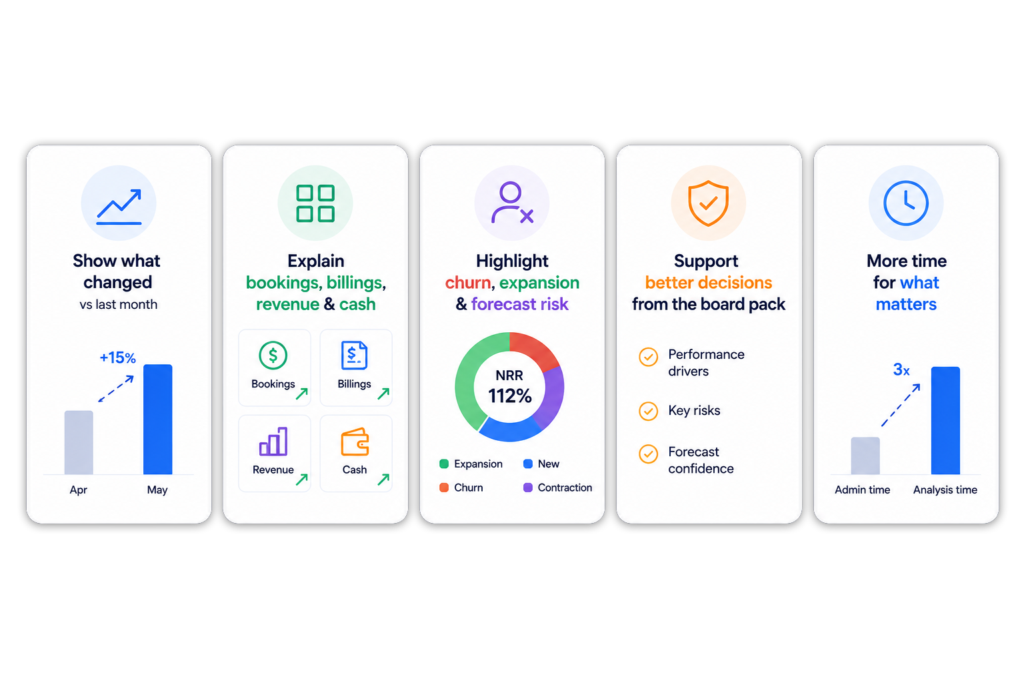
CFOs need to explain performance, not just produce charts.

Five-panel infographic showing how ScaleXP improves board-level analysis by explaining financial performance, highlighting SaaS metrics and reducing board pack preparation time.

What goes into a SaaS board pack

Board reporting area

What finance needs to explain

ARR and MRR

New business, expansion, contraction and churn

NRR and GRR

Revenue retention and customer movement

Revenue

Recognised revenue, deferred revenue and timing differences

Cash

Invoicing, collection and cash impact

Forecasts

Pipeline, renewals, contracted revenue and actuals

Commentary

What changed, why it changed and what needs action

No credit card required

Board reporting for SaaS finance should start with trusted data

Recurring revenue and renewals dashboard connected to HubSpot and accounting

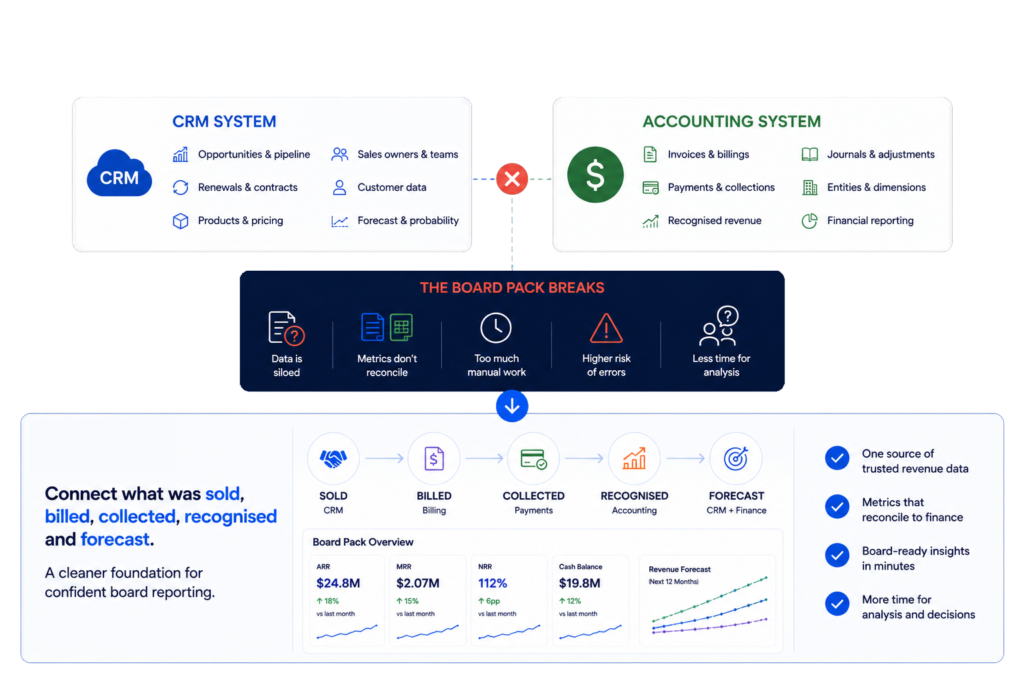
SaaS board reporting usually breaks because the data sits in different systems.

CRM holds opportunities, renewals, products, sales owners, customer data and pipeline. Accounting systems hold invoices, payments, recognised revenue, journals, entities and reporting dimensions.

The board pack needs both views.

ScaleXP helps finance teams connect what was sold, billed, collected, recognised and forecast. This gives CFOs a cleaner foundation for board reporting.

For broader CRM and finance workflows, see CRM Accounting Integration Software.

Diagram showing CRM, billing and accounting data connected into a unified SaaS board reporting platform

Connect bookings, billings, revenue and cash

Shared operating dashboard across customer revenue and business performance data

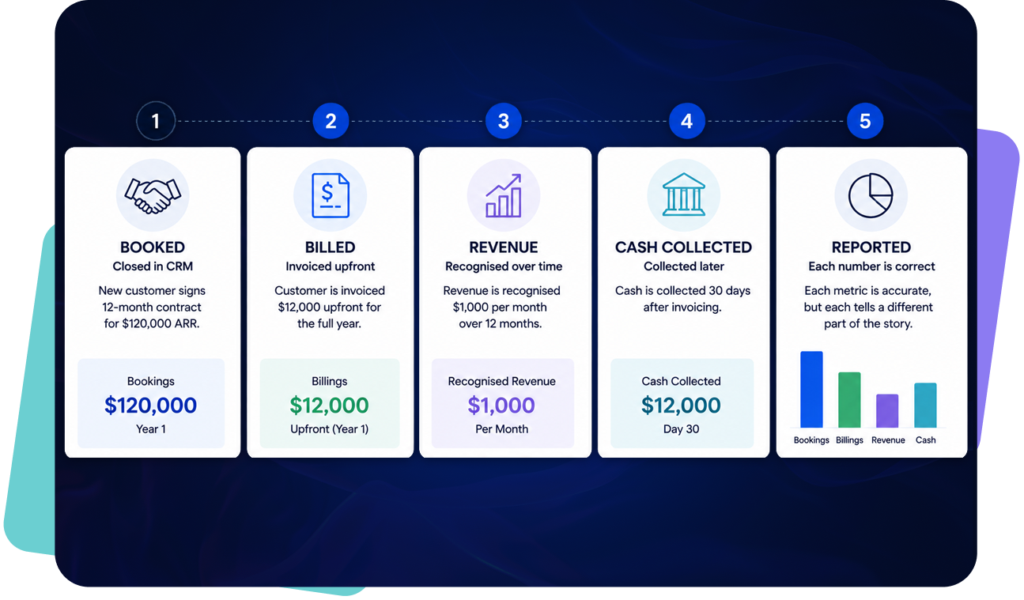
SaaS performance is hard to explain when bookings, billings, revenue and cash are reported separately.

A new customer may be closed in CRM, invoiced upfront, recognised over twelve months and collected later. Each number is correct, but each tells a different part of the story.

This is especially useful for SaaS businesses with annual billing, deferred revenue, multi-period contracts or renewal-driven growth.

For revenue workflows, see Revenue Recognition Software.

Five-step SaaS revenue lifecycle showing how bookings, billings, recognised revenue and cash collection occur at different times, with each metric contributing to board reporting.

SaaS board reporting metrics finance teams usually need

Recurring revenue and renewals dashboard connected to HubSpot and accounting

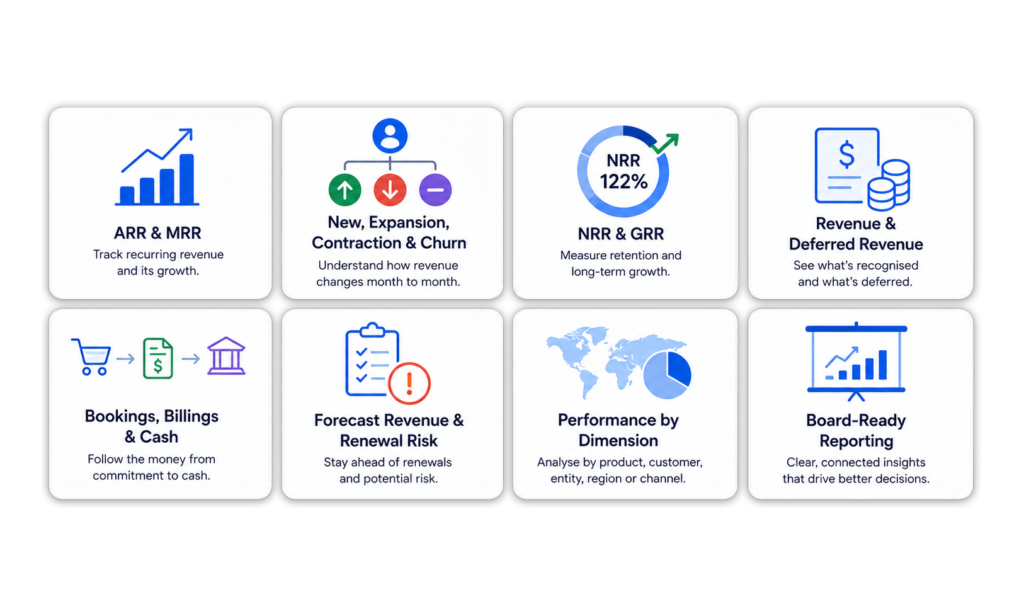
A SaaS board pack usually needs to explain revenue movement, customer movement and forward-looking performance.

These metrics are more useful when they are connected to the underlying invoices, revenue schedules and accounting actuals.

Infographic showing the key metrics included in a SaaS board pack, including ARR, MRR, NRR, GRR, revenue, deferred revenue, bookings, billings, cash, forecasts and board-ready reporting.

Board reporting by entity, product and customer

Shared operating dashboard across customer revenue and business performance data

As SaaS companies grow, board reporting needs more detail.

Finance teams may need to report by entity, product, customer, region, channel, sales owner or accounting dimension. This becomes difficult when those fields are spread across CRM, accounting and spreadsheets.

ScaleXP helps finance teams create reporting views by customer, product, entity and reporting dimension.

From board pack preparation to CFO analysis

Recurring revenue and renewals dashboard connected to HubSpot and accounting

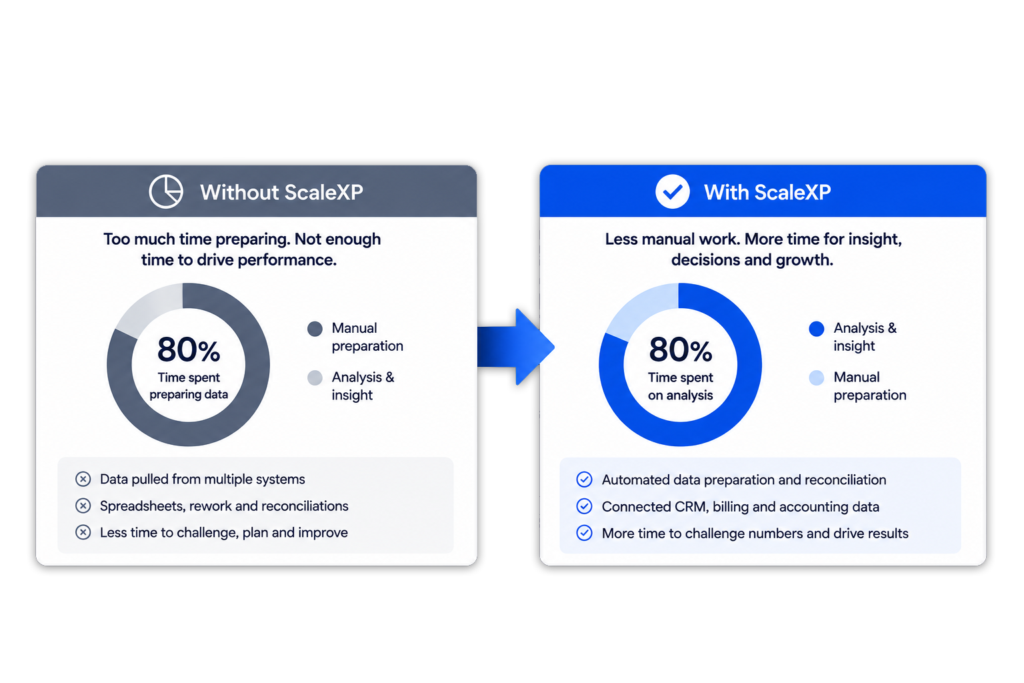
The board pack should not consume the whole reporting cycle.

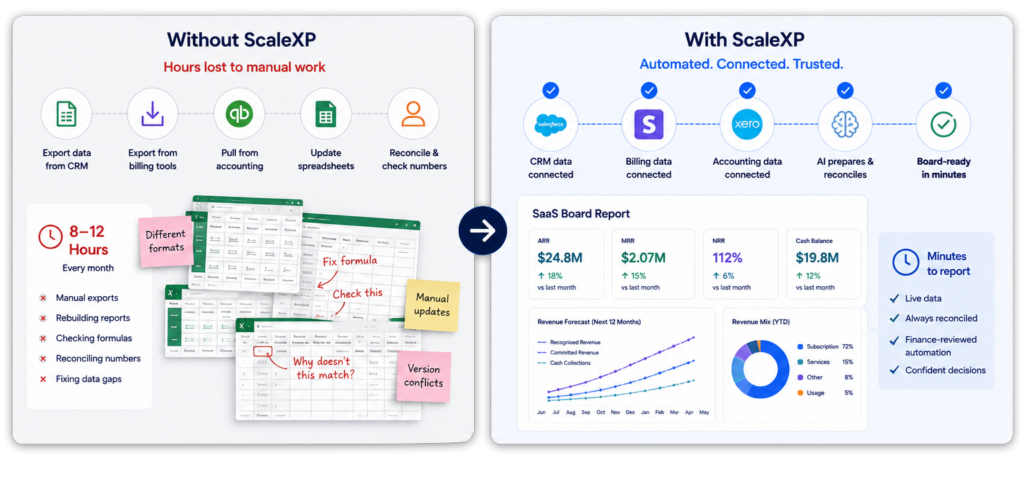
When finance teams spend days preparing data, there is less time to challenge the numbers, identify trends and improve business performance.

ScaleXP helps shift the finance workflow from manual preparation to analysis.

This is where SaaS board reporting becomes more valuable: not just reporting what happened, but helping the business decide what to do next.

Comparison infographic showing manual SaaS board pack preparation versus automated board reporting with ScaleXP, highlighting more time for analysis and less time spent compiling data.

Board reporting with finance control

Shared operating dashboard across customer revenue and business performance data

ScaleXP is designed to support finance-reviewed workflows.

The objective is not to bypass finance judgement. The objective is to reduce manual preparation work, improve reporting consistency and give finance teams better control over board reporting outputs.

For related forecasting workflows, see Revenue Forecasting. For Xero-specific SaaS metrics reporting, see the Xero SaaS Metrics Dashboard.

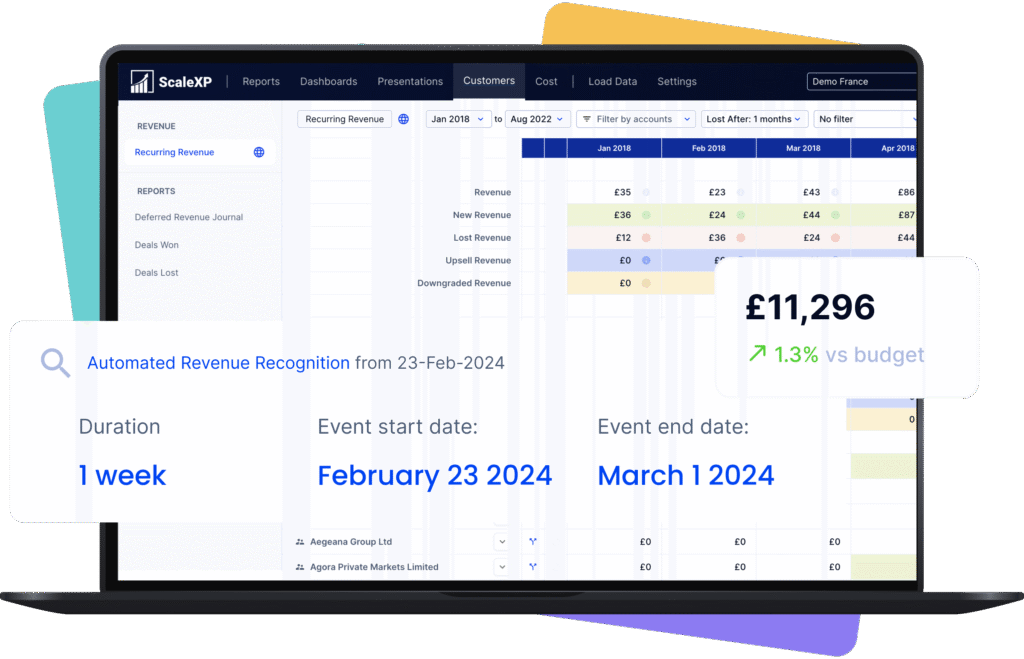
Revenue reports dashboard displaying automated revenue recognition and budget metrics on a laptop screen.

Trusted by teams joining CRM, revenue and reporting

HUBSPOT integration with xero and quickbooks

Integrate HubSpot and accounting data

Graphic showing HubSpot logo alongside icons for QuickBooks, Microsoft Dynamics 365, and Xero.
Logos of HubSpot, Stripe, Intuit QuickBooks, and Xero displayed on a laptop screen.

Integrate data across multiple platforms & systems

Laptop screen displaying an invoice report from Xero with financial data and graphs.

Close the month faster using automation

Reduce time spent manually tracking deferred revenue, income in advance and pre-paid expenses.  Eliminate tedious spreadsheet tracking and improve accuracy.

ScaleXP fully automates revenue recognition and prepayments using a sophisticated series of text recognition algorithms, which read and process all of the data and text on invoices. 

Read more about automating revenue recognition

Read more about automating prepaid expenses

Stop revenue leakage & get paid faster with integrated billing

Illustration of a blue faucet with dollar bills flowing out of the spout.
Financial reporting dashboard displaying various metrics such as MRR and ARR on a laptop screen.

Create a single source of truth for metrics

Easily forecast revenue or MRR

ScaleXP builds a forecast directly from HubSpot and QuickBooks or Xero

Hero product screenshot showing revenue forecast dashboard connected to CRM, billing, and accounting data
Graphic showing integration between Xero and QuickBooks with arrows indicating data flow.

Real-time 2-Way sync between HubSpot & your accounting system

Keep your teams aligned with a seamless sync between HubSpot and your accounting software (Xero, QuickBooks). 

ScaleXP automatically updates payment status and customer financial info in real time, so your sales and customer success teams can instantly see if a client is up to date or overdue, all within HubSpot. 

HubSpot + ScaleXP Delivers More

+ accounting data

+ accounting data

Fully integrate HubSpot and accounting data

Ensure all invoices are issued on time

In limited cases

Automatically track contract renewals  

In limited cases

Understand data using AI powered dashboards across integrated datasets 

Understand the highest growth customers, their channel, sector and geography

Automate business critical KPIs by fully integrated data sets

Automate sales forecasts

Woman in a yellow blazer holding an iPad displaying financial data, with logos of Xero and HubSpot in the corner.

Hubspot Contract Management FAQs

Invoicing and associated reporting can be fully automated in Xero and QuickBooks. 

ScaleXP will automatically provide a two way sync between HubSpot and your accounting system once daily.  You can also generate an immediate sync at any time, as often as you like.

Xero and QuickBooks can be automatically updated with draft revenue recognition journals. You simply review and click to approve. Journals can not be automatically passed to Zoho Books, but ScaleXP provides the full journal and a comprehensive CSV download. 

Yes.  ScaleXP provides full automation of all your sales revenue, past, current and future, including providing the associated accounting journals for accruals and deferrals in Xero and QuickBooks.

Further, ScaleXP provides a full breakdown of all revenue shown on your Income Statement as well as all deferred income and accrued revenue shown on your Balance Sheet. 

Revenue recognition schedules can be viewed by customer, by invoice, and by general ledger code. And, in case that’s not enough, all schedules can be downloaded to a spreadsheet or CSV.

By default, ScaleXP syncs daily between HubSpot and your accounting software. However, you can also trigger an immediate sync at any time. This ensures that new deals, invoices, and payments stay current across both systems on a daily basis.

Currently ScaleXP’s HubSpot invoicing automation works with Xero and QuickBooks. Invoices generated from HubSpot are posted directly into Xero or QuickBooks, where you can finalize and send them. (If you use other accounting software, ScaleXP can still produce the required journal entries for you to upload.)

Board Reporting FAQs

SaaS board reporting software helps finance teams prepare board packs for leadership, investors and board meetings.

It usually covers ARR, MRR, churn, expansion, NRR, GRR, revenue, deferred revenue, cash, forecasts and commentary on performance.

Finance board reporting software helps finance teams prepare board packs, investor reports and leadership reporting from connected financial and operational data.

For SaaS companies, this should include ARR, MRR, churn, revenue, deferred revenue, cash, forecasts and commentary.

ScaleXP connects CRM, billing and accounting data so finance teams can prepare board-ready reporting from connected source data.

This reduces manual spreadsheet work and gives CFOs more time to analyse performance.

SaaS metrics often sit outside the accounting system.

Finance teams usually need to combine CRM data, invoices, revenue schedules, deferred revenue, cash and forecasts. Without connected data, this work happens in spreadsheets.

Yes. ScaleXP can help SaaS finance teams report ARR, MRR and related SaaS metrics.

This can include new ARR, expansion, contraction, churn, NRR and GRR, depending on the data connected.

Yes. ScaleXP helps finance teams connect SaaS reporting to billing, invoice and accounting data.

This helps reduce the gap between operational SaaS metrics and finance-reported results.

Yes. ScaleXP can use CRM data from systems such as Salesforce, HubSpot and Pipedrive.

CRM data can support reporting on pipeline, renewals, products, customers, owners and forecast revenue.

Yes. ScaleXP works with Xero and QuickBooks.

Finance teams can use ScaleXP to support SaaS metrics, revenue recognition, deferred revenue, forecasting and board reporting workflows.

Yes. ScaleXP supports revenue recognition and deferred revenue workflows.

Finance teams can prepare schedules, review exceptions and use the outputs for journals, reporting and board pack preparation.

No. ScaleXP is designed to support finance-reviewed workflows.

It reduces manual preparation work, improves reporting consistency and helps finance teams review outputs before they are used in board reporting.