QuickBooks and Zoho Books comparison graphic with ScaleXP branding and bold headline text in white on a dark navy background.

Multi-Entity Consolidation Across QuickBooks and Zoho Books: How Group Finance Teams Close in One View

A woman with brown hair smiling, wearing a light-colored top and a necklace, against a textured background.

FINANCE SPECIALIST

Marjorie Stern Jackson

Share this article:

Multi-Entity Consolidation Across QuickBooks and Zoho Books: How Group Finance Teams Close in One View

It happens more often than most finance leaders expect. A company acquires a smaller business. A group spins out a new entity in a different market. A PE-backed portfolio adds another platform company. Suddenly the finance team is managing entities on two different accounting platforms — and the monthly consolidated P&L is a five-tab Excel model that takes three days to build.

The most common cross-platform combination in growing groups: some entities on QuickBooks Online, others on Zoho Books. Different platforms, different chart of accounts structures, different default currencies — and a finance team trying to reconcile them all by hand every month.

This post covers why cross-platform consolidation is harder than single-platform consolidation, what the manual process actually costs, and how purpose-built tools handle the gap — producing a single group view regardless of which accounting platform each entity uses.


Key Takeaways

  • Neither QuickBooks Online nor Zoho Books has native multi-entity consolidation capability
  • Mixed-platform groups arise from acquisition, geographic expansion, and cost decisions — rarely by design
  • Manual cross-platform consolidation typically costs a Finance Director 3–5 days per close cycle
  • Purpose-built tools connect to both platforms natively and automate consolidation, intercompany eliminations, and FX translation
  • ScaleXP consolidates across QuickBooks, Zoho Books, and Xero simultaneously — no migration required

Why Groups End Up With QuickBooks and Zoho Books Side by Side

It's rarely a deliberate architectural decision. The most common reasons:

  • Acquisition: the acquired company was already on Zoho Books or QuickBooks and migrating mid-close is too disruptive. "We'll standardize later" becomes a two-year deferral.
  • Geographic expansion: Zoho Books has stronger built-in compliance for GST (India), VAT (UAE), and several Asia-Pacific tax regimes. Groups expanding into those markets often run Zoho Books for those entities while the parent group stays on QuickBooks.
  • Cost optimization: Zoho Books is significantly cheaper than QuickBooks Online at comparable tier levels. Groups managing 4–6 entities sometimes deliberately run lower-complexity entities on Zoho Books to manage subscription cost.
  • Legacy decisions: an entity was set up by a local finance team or accountant who chose their preferred platform. The group inherited the decision.

The reason for the mixed-platform situation doesn't change the consolidation problem. Two different systems with two different data structures need to produce one set of group financial statements — and neither QuickBooks nor Zoho Books has a native mechanism to do that.


What Each Platform Can and Can't Do Natively for Group Consolidation

Both platforms share the same fundamental limitation at group level, even if the details differ.

QuickBooks Online for multi-entity groups:

  • No native consolidated P&L or balance sheet across multiple QBO company files — each file is a completely separate silo
  • No intercompany elimination capability — management charges, intercompany loans, and shared cost allocations require manual identification and journal entries
  • No group-level FX translation — QBO handles transaction-level currency conversion but cannot translate a subsidiary's financial statements into a group functional currency
  • Class and location tracking is useful for entity-level segment reporting but does not extend across company files

Zoho Books for multi-entity groups:

  • No native consolidated financial reporting across multiple Zoho Books organizations — each organization is a separate silo
  • Zoho Analytics integration provides some cross-organization data aggregation, but it is a reporting layer, not a consolidation tool — it does not handle intercompany eliminations, FX translation, or statutory-quality consolidated accounts
  • No intercompany elimination — same limitation as QuickBooks
  • Stronger multi-currency at entity level than QuickBooks for certain markets, but group-level FX translation is still a manual process

The result: a group finance team managing QuickBooks and Zoho Books entities runs two separate manual consolidation processes — exporting trial balances from each QBO file, exporting from each Zoho Books organization, mapping all of them to a common chart of accounts, eliminating intercompany balances, translating currencies, and assembling the result in a spreadsheet. At each step there is a different export format, a different account coding structure, and a different potential for error.


The Real Cost of a Cross-Platform Manual Consolidation

Finance teams in this situation consistently underestimate the monthly time cost because the work is distributed across the close cycle. When you add it up:

  • Trial balance exports from each platform: QuickBooks and Zoho Books export differently — different date range selectors, different account code structures, different CSV formats. For a 4-entity group (2 QBO, 2 Zoho Books): 45–90 minutes of export and formatting work before the consolidation even starts.
  • Chart of accounts mapping: QBO and Zoho Books use different default account numbering. A group that didn't standardize its chart of accounts at setup must manually map each entity's accounts to the group structure every month — or maintain a mapping table that needs updating whenever an entity adds a new account.
  • Intercompany reconciliation: identifying and reconciling intercompany balances across two platforms with no shared transaction reference system is time-consuming and error-prone. A management charge posted in QBO as "Intercompany - Mgmt Fee" and in Zoho Books as "Group Recharge" requires manual matching.
  • FX translation: pulling average rates for the period and closing rates for the balance sheet, applying them correctly, and posting the translation difference to equity is a mechanical but entirely manual process.
  • Assembly and review: building the consolidated P&L and balance sheet from the mapped, eliminated, translated data — then formatting it for the board pack — typically takes the longest of any single step.

For a 4-entity group with 2 QuickBooks entities and 2 Zoho Books entities, one foreign currency, and moderate intercompany activity: the consolidation process typically takes 3–5 days per close cycle.

At an $85,000 Finance Director salary, 4 days per month = $28,000/year of senior finance time spent on a process that is almost entirely mechanical. That figure doesn't include the cost of errors — a missed intercompany elimination or incorrect FX rate that flows into board reporting and is corrected at the next close.


Manual vs Automated Consolidation — What Changes

Manual Excel process ScaleXP (automated)
Data collection Manual exports from QBO and Zoho Books Automatic via native API — no exports
Chart of accounts mapping Manual mapping each close cycle Configured once, applied automatically
Intercompany eliminations Manual identification and journal entries Identified and applied automatically
FX translation Manual rates, manual calculation Correct methodology applied automatically
Consolidated output Manually assembled Excel model Board-ready P&L, balance sheet, cash flow
Audit trail Spreadsheet formulas and version history Full trace from consolidated figure to source transaction
Close time 3–5 days Same day as last entity close
Error risk High — FX rates, missed eliminations, mapping errors Low — rules applied consistently every close

How ScaleXP Consolidates QuickBooks and Zoho Books Groups in a Single View

ScaleXP is built specifically for finance teams that need group consolidation across multiple entities and multiple accounting platforms — without migrating every entity onto a single system.

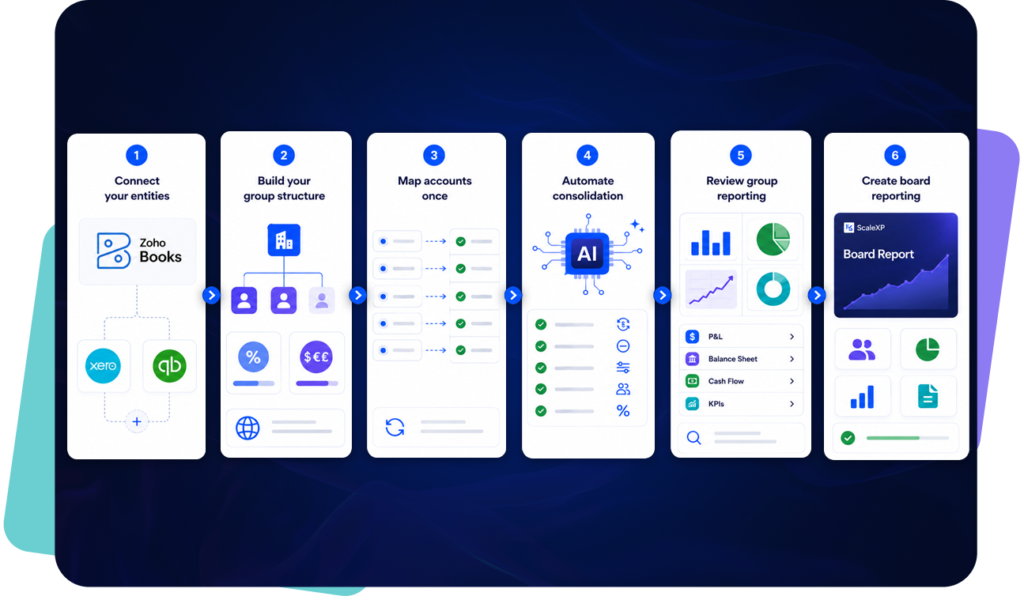
ScaleXP connects natively to QuickBooks Online, Zoho Books, and Xero simultaneously. For a group with entities split across QuickBooks and Zoho Books, ScaleXP pulls trial balance data from each platform automatically at close, maps it to the group chart of accounts, and produces consolidated financial statements — without CSV exports or manual intervention.

What the close looks like with ScaleXP in a mixed QuickBooks and Zoho Books group:

  • Entity closes complete on their respective platforms: QBO entities close in QuickBooks, Zoho Books entities close in Zoho Books. Each team works in the system they know. No migration, no retraining.
  • ScaleXP pulls data from both platforms automatically: once entity closes are complete, ScaleXP connects to each system via the native API and pulls the trial balance data. No exports, no uploads.
  • Intercompany eliminations applied automatically: ScaleXP identifies intercompany balances across QBO and Zoho Books entities — regardless of how they were coded in each system — and eliminates them at group level. The finance team reviews and approves; they do not build the eliminations.
  • FX translation applied with correct methodology: average rate to P&L, closing rate to balance sheet, translation difference posted to the correct reserve account automatically.
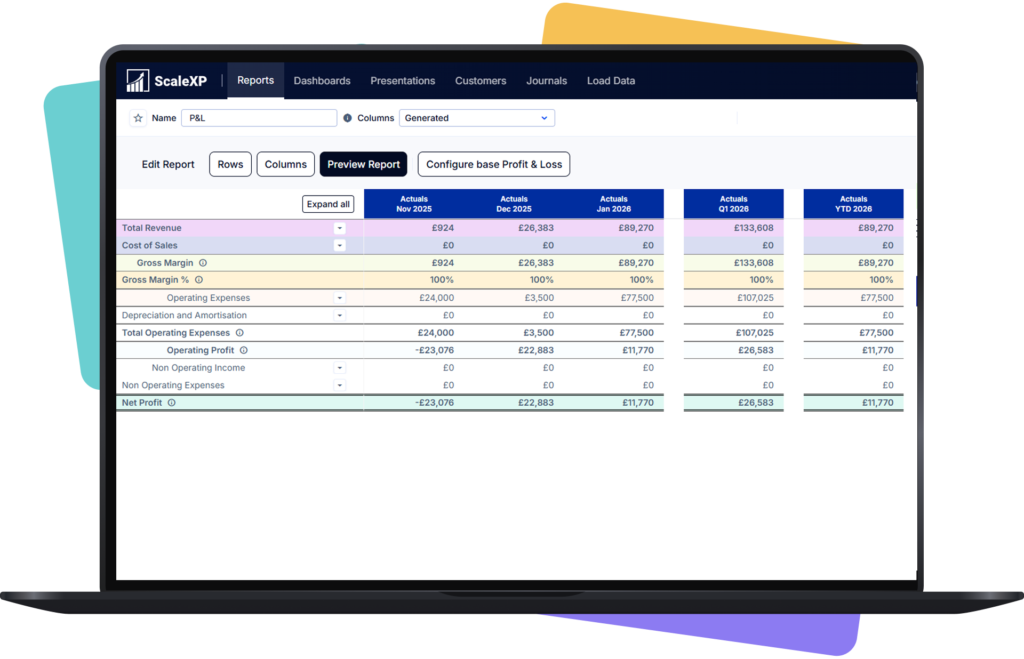
  • Consolidated P&L, balance sheet, and cash flow produced: board-ready, formatted, and ready for presentation — same day the last entity closes. No separate assembly step.

ScaleXP also handles the entity-level close automation that reduces the time each subsidiary takes to close — accruals, deferred revenue recognition, and prepayment amortization — posted directly into QuickBooks or Zoho Books automatically. The group consolidation is faster because the individual entity closes are faster.

For groups that later add a Xero entity through acquisition or new entity setup, ScaleXP adds it to the consolidation without requiring any changes to the existing setup. The platform decision at entity level does not limit group reporting capability.

ScaleXP connects to QuickBooks Online and Zoho Books natively. For finance teams evaluating multi-entity consolidation software, this is the approach that retains working entity systems, removes spreadsheet consolidation, and creates a defensible group reporting layer.

“A single source of truth even across 2 order systems.” — James Murphy, ScaleXP customer
“Seamless integration, saved time across the board.” — Priya Anand, ScaleXP customer

What to Look for in Cross-Platform Consolidation Software

Not all consolidation tools handle mixed-platform groups. When evaluating options:

  • Native API connections to both platforms: the tool must connect directly to QuickBooks Online and Zoho Books via their official APIs — not rely on CSV exports or manual uploads. API-native integration means data flows automatically at close without manual steps.
  • Chart of accounts mapping that handles structural differences: QBO and Zoho Books use different default account numbering. The tool must maintain a persistent mapping between each entity's account codes and the group chart of accounts — updated once when accounts change, applied automatically to all future closes.
  • Intercompany elimination logic that works across platforms: the elimination engine must be able to match intercompany transactions that originated in different systems with different transaction references.
  • Correct FX translation methodology: average rate for P&L, closing rate for balance sheet, translation difference to equity reserve. Confirm the tool applies this correctly before committing.
  • Audit trail from consolidated figure to source transaction: auditors will test the consolidation. The tool must maintain a traceable path from a consolidated P&L line back to the source transaction in the originating platform.
  • Scalability to additional platforms: if the group might add a Xero entity in the future, confirm the tool handles three-platform consolidation.

The Bottom Line

Mixed-platform groups are more common than ever — acquisitions, geographic expansion, and cost optimization all produce situations where QuickBooks entities and Zoho Books entities need to be consolidated together every month.

Neither platform was built to consolidate with the other. The manual process works — at the cost of 3–5 days of senior finance time per close, a persistent risk of intercompany and FX errors, and board accounts that are always several days behind where they should be.

The right consolidation tool connects to both platforms natively, eliminates intercompany balances automatically across the platform boundary, applies correct FX translation, and produces consolidated accounts the same day the last entity closes. The finance team's job becomes review, not construction.

Book a free demo → to see how ScaleXP consolidates your QuickBooks and Zoho Books group in a single view.

Or learn more about multi-entity consolidation software and what to look for before evaluating tools.


Frequently Asked Questions

Can QuickBooks Online consolidate multiple entities?

No. QuickBooks Online has no native multi-entity consolidation capability. Each QBO company file is a completely separate silo. To produce a consolidated P&L, balance sheet, or cash flow across multiple QuickBooks entities, finance teams need a purpose-built consolidation tool such as ScaleXP, which connects to each QBO company file via the native API and automates the consolidation process.

Can Zoho Books consolidate multiple organizations?

Zoho Books does not support native multi-entity consolidation. Zoho Analytics provides some cross-organization data aggregation, but it does not perform intercompany eliminations, FX translation, or produce statutory-quality consolidated accounts. Purpose-built consolidation software is required for proper group reporting across multiple Zoho Books organizations.

How do you consolidate QuickBooks and Zoho Books together?

The most effective approach is using a consolidation tool that connects natively to both QuickBooks Online and Zoho Books via their APIs — pulling trial balance data from each platform automatically, mapping accounts to a common group chart of accounts, eliminating intercompany balances, applying FX translation, and producing a consolidated P&L, balance sheet, and cash flow. ScaleXP does this across QuickBooks, Zoho Books, and Xero simultaneously.

Why do groups end up with both QuickBooks and Zoho Books?

It's rarely a deliberate choice. The most common reasons are acquisition (the acquired company was already on a different platform), geographic expansion (Zoho Books has stronger compliance for India GST, UAE VAT, and APAC tax regimes), cost optimization (Zoho Books is cheaper per entity than QuickBooks at equivalent tiers), or legacy decisions made by local finance teams.

Do I need to migrate all entities to one platform to consolidate?

No. ScaleXP consolidates across QuickBooks Online, Zoho Books, and Xero simultaneously without requiring any platform migration. Each entity continues using its existing accounting system. ScaleXP connects to all platforms via their native APIs and produces a unified group view automatically at close.

How long does it take to implement cross-platform consolidation with ScaleXP?

A standard implementation for a mixed QuickBooks and Zoho Books group typically takes 2–4 weeks. There is no data migration, no retraining of entity-level teams, and no disruption to existing accounting workflows. The first automated consolidated close typically runs in the same month as go-live.

What happens if the group adds another entity on a different platform later?

ScaleXP supports consolidation across Xero, QuickBooks Online, and Zoho Books. If a new entity is added — whether through acquisition or new entity setup — it can be connected to ScaleXP regardless of which of the three platforms it uses. The group consolidation continues without any architectural changes.

Download your FREE investor approved Board Pack template