
See how ScaleXP works with Xero or QuickBooks.
In a 30-minute demo, we’ll show the relevant workflows using example data and discuss how they could apply to your finance process. Complex requirements? Discuss them with us first.
How the SaaS quote-to-cash process runs from CRM deal to invoice, cash and revenue recognition, where it breaks down, and how to automate each handoff.
For SaaS companies, the quote-to-cash (Q2C) process isn’t just administrative- it’s strategic. It’s the full journey from a signed deal to cash in the bank and revenue on the books. When it’s optimized, you invoice faster, collect cash sooner, and report metrics with confidence.
But when your CRM, billing, and finance systems don’t speak to each other, quote-to-cash can easily become a manual tangle of approvals, Slack messages, spreadsheets, and delays.
In this post, we’ll break down the quote-to-cash process, identify where it breaks in SaaS, and show how platforms like ScaleXP can automate it, turning friction into a fast, seamless revenue engine.
Quote-to-cash refers to the entire lifecycle that begins when a sales rep generates a quote and ends when cash is received. It typically includes:
The best processes build this data into your revenue or ARR forecast and your renewals schedules.
For SaaS businesses, this cycle is especially complex. Common challenges include:
A fragmented quote-to-cash process slows down billing, causes revenue leakage, and introduces risk at every stage.
When quotes are manually built in PDFs or spreadsheets, they require back-and-forth emails for review and approval, often delaying deal closure.
Deals may close in HubSpot or Salesforce, but billing teams often don’t see the data until days later. Without integration, teams rely on manual data entry to generate invoices- introducing errors and delays. In the worst case, finance teams don’t even know that an invoice needs to be sent because of a missed email or Slack message.
Finance teams frequently rely on spreadsheets to track recognition schedules, especially for deferred or usage-based revenue. It’s not only inefficient but also error-prone. Spreadsheets undermine credibility because other teams can rarely see or understand the calculations.
Without visibility into renewal dates or upcoming payments, revenue forecasting becomes guesswork. Teams miss upsell opportunities or renewals altogether.
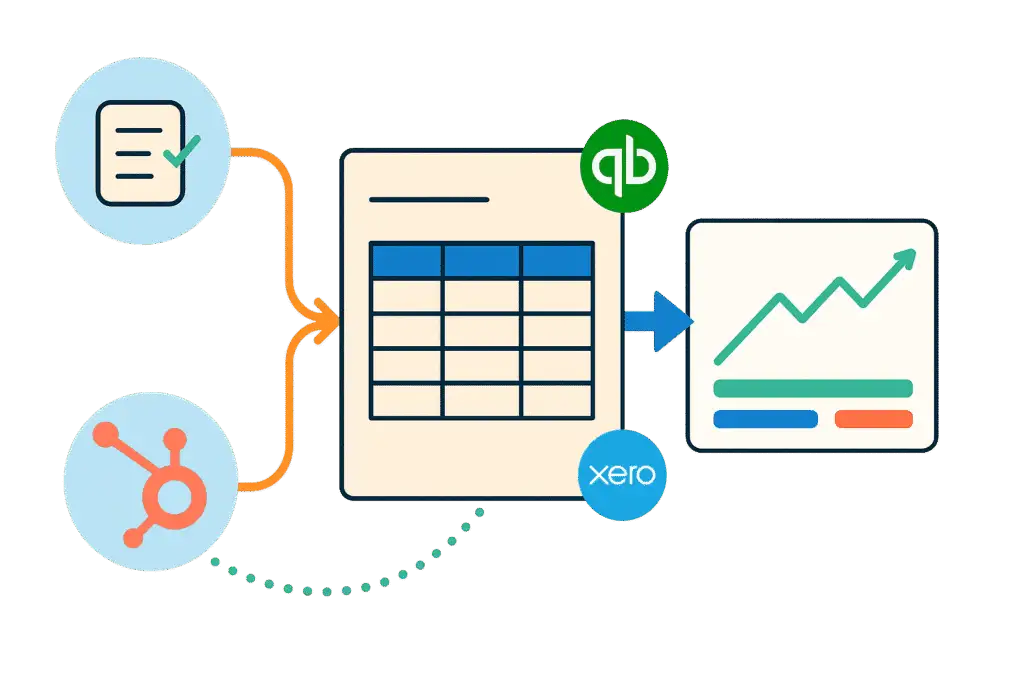
With ScaleXP’s CRM billing and invoicing automation, when a deal closes in HubSpot or Salesforce, an invoice is automatically generated based on the contract terms. No manual handoff. No missing deals.
ScaleXP posts the invoice to your accounting system, tracks payment status, and builds a revenue recognition schedule using AI-powered parsing of service periods. ScaleXP prepares the journals; your finance team reviews and approves them before they’re posted to Xero or QuickBooks.
Upcoming renewals, contract expansions, and churn risks are visible in ScaleXP’s forecasting engine, which blends actual finance data with CRM pipeline insights. Teams gain a single source of truth for future revenue.
With built-in SaaS metrics dashboards (ARR, CAC, LTV, NRR), ScaleXP replaces manual spreadsheets entirely. Board-ready views are updated in real time, eliminating manual reporting prep.
If your SaaS revenue workflows still rely on spreadsheets and siloed systems, you’re not alone. But you’re also not stuck.
The quote-to-cash process begins in the CRM — and for most SaaS businesses, that means HubSpot or Salesforce. This is where the deal is configured, the quote is generated, the contract is negotiated, and the signature is collected. Both platforms have built-in quoting tools that can produce a PDF quote or proposal with pricing, terms, and e-signature capability. Once a deal is marked Closed Won, the downstream process — invoicing, payment collection, and revenue recognition — should begin automatically.
In practice, this handoff is where the process most commonly breaks. When a deal closes in HubSpot or Salesforce, someone in finance needs to know about it, create the corresponding invoice, and ensure the contract details have been captured correctly. Without integration, this means a manual email, a shared spreadsheet, or a Slack message — all of which introduce delay and the risk of data entry errors.
ScaleXP automates this handoff. When a deal closes in HubSpot or Salesforce, ScaleXP reads the opportunity data and automatically creates the corresponding invoice in Xero or QuickBooks. The deal data — account name, contract value, billing terms, start and end dates — is mapped to invoice fields without any manual re-entry. See how Salesforce to Xero invoicing works with ScaleXP.
Xero and QuickBooks sit at the invoicing and accounting stage of the quote-to-cash process. This is where the invoice is created, sent to the customer, and tracked for payment — and where recognized revenue is recorded on the P&L. For SaaS businesses with recurring revenue, it’s also where deferred revenue is managed and where MRR, ARR, and NRR figures must reconcile with the financial statements.
When the CRM-to-invoice workflow isn’t automated, several things typically go wrong. Finance teams miss deals that closed late in the month, causing invoices to be generated in the following period. Invoice amounts differ from deal values because contract amendments weren’t communicated. Revenue is recognized in the wrong period because service start dates weren’t captured. Deferred revenue balances accumulate on a spreadsheet that doesn’t reconcile with Xero or QuickBooks.
Each of these failures has a cost: delayed cash collection, misstated revenue, and a month-end close process that takes longer than it should. See how to automate the Salesforce QuickBooks finance workflow.
If your CRM is HubSpot rather than Salesforce, the same timing problem applies: invoices that post after finance has closed the period. We cover that in HubSpot and QuickBooks integration for invoicing without breaking month-end close.
Revenue recognition is often treated as an accounting task that happens after the quote-to-cash process ends. In reality, it’s embedded in the process — because how you structure the deal in the CRM determines how revenue must be recognized in the accounting system (see the main revenue recognition methods).
When a customer signs a 12-month SaaS contract in January, the full contract value cannot be recognized as revenue in January. Under ASC 606 and IFRS 15, revenue must be recognized over the period during which the service is delivered — one twelfth per month for a monthly contract, or according to a specific performance obligation schedule for more complex arrangements. This means closing a deal in the CRM does not equal recognized revenue.
The gap between the deal close date and the recognition schedule is where most SaaS finance teams still rely on spreadsheets. ScaleXP closes this gap by reading the service period from the invoice or contract data, building an automated recognition schedule, and posting the monthly journal entries directly into Xero or QuickBooks. The result is a quote-to-cash process where recognition is built into billing — not added as a manual afterthought. Learn more about revenue recognition automation with ScaleXP.
For deferred revenue tracking, see our guide to deferred revenue software for SaaS.
Quote to cash (Q2C) in SaaS refers to the complete process that begins when a sales rep generates a quote for a prospect and ends when cash is received and revenue is recognized in the accounting system. The stages typically include: configuring and approving the quote, generating and signing the contract, creating and sending the invoice, collecting payment, and recognizing revenue over the contract term. In SaaS, this process is made more complex by recurring billing, multi-year contracts, usage-based pricing, and the need to comply with ASC 606 or IFRS 15 for revenue recognition.
HubSpot and Salesforce are the CRM platforms where the quote-to-cash process begins. Both platforms support quote generation, contract management, and e-signature collection. When a deal closes in HubSpot or Salesforce, the downstream finance process — invoice creation, payment tracking, and revenue recognition — should begin. The challenge is that HubSpot and Salesforce don’t connect to accounting systems like Xero or QuickBooks automatically. ScaleXP provides this connection, ensuring that deal data flows from the CRM to the accounting system without manual intervention. See how ScaleXP automates HubSpot invoicing in Xero.
Revenue recognition sits at the end of the quote-to-cash process — after the invoice is created and payment is received. Under ASC 606 and IFRS 15, revenue is recognized when (or as) performance obligations are satisfied, which for most SaaS businesses means recognizing subscription revenue ratably over the contract term. This means that closing a deal and collecting payment are not the same as recognizing revenue. ScaleXP automates the recognition step by reading contract data, building recognition schedules, and posting journal entries into Xero or QuickBooks — completing the full quote-to-cash cycle. Learn how to automate HubSpot invoicing in QuickBooks.
To automate the full quote-to-cash workflow, you need to connect your CRM (HubSpot or Salesforce) to your accounting system (Xero or QuickBooks) and add a revenue recognition layer that handles deferred revenue and compliance. ScaleXP does all three: it reads deal data from HubSpot or Salesforce, automatically creates invoices in Xero or QuickBooks, and builds recognition schedules with journal entries each month that are posted once finance approves them. Finance teams can close faster, report accurately, and present board-ready SaaS metrics without manual spreadsheet work.
Quote to cash typically refers to the end-to-end process from generating a sales quote to receiving payment and recognizing revenue. Order to cash (O2C) is a related but slightly narrower concept that begins with a confirmed order (not a quote) and ends with cash collection. In SaaS, quote to cash is the more relevant term because the process begins before a formal order — with a proposal or quote — and extends beyond cash collection to include revenue recognition over the contract term. ScaleXP is designed for the full quote-to-cash cycle, including recognition and reporting.
How ScaleXP does this
ScaleXP builds revenue recognition schedules from your CRM contracts and prepares the journals for Xero or QuickBooks. Finance approves them before they’re posted. See how revenue recognition works in ScaleXP