Salesforce Revenue Recognition Software for Xero & QuickBooks

Automate revenue schedules, journals and forecasts using Salesforce opportunity and accounting data.

4.9

in Xero & QuickBooks app stores

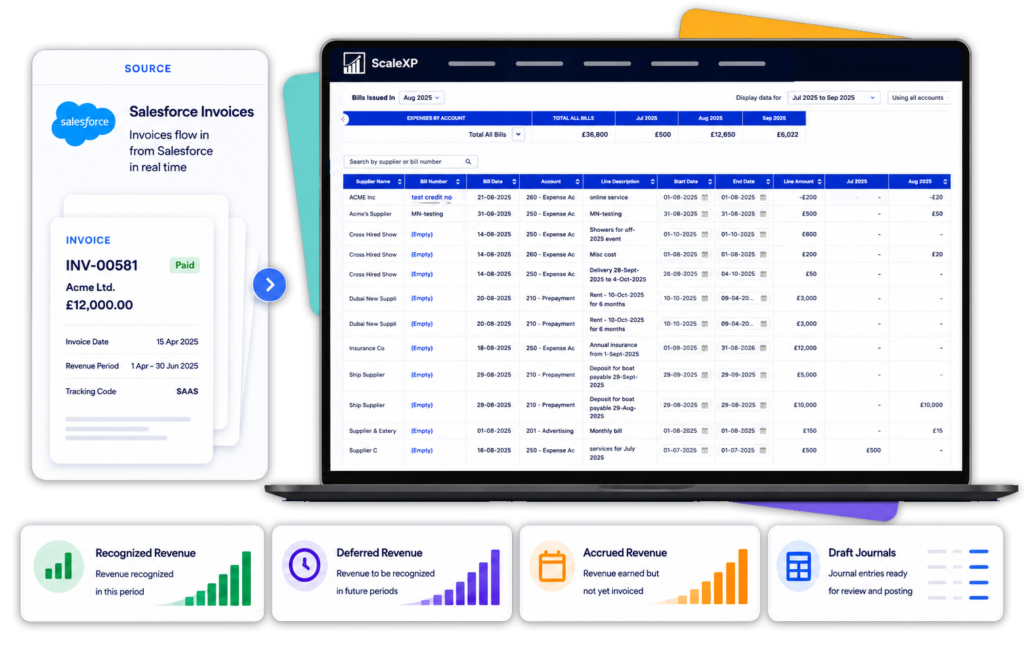
Salesforce revenue recognition software – ScaleXP dashboard showing Salesforce invoices syncing in real time, with recognized, deferred and accrued revenue tracked automatically

Connect Revenue Recognition to the Systems You Already Use

Salesforce and Finance Often
Work from Different Revenue Data

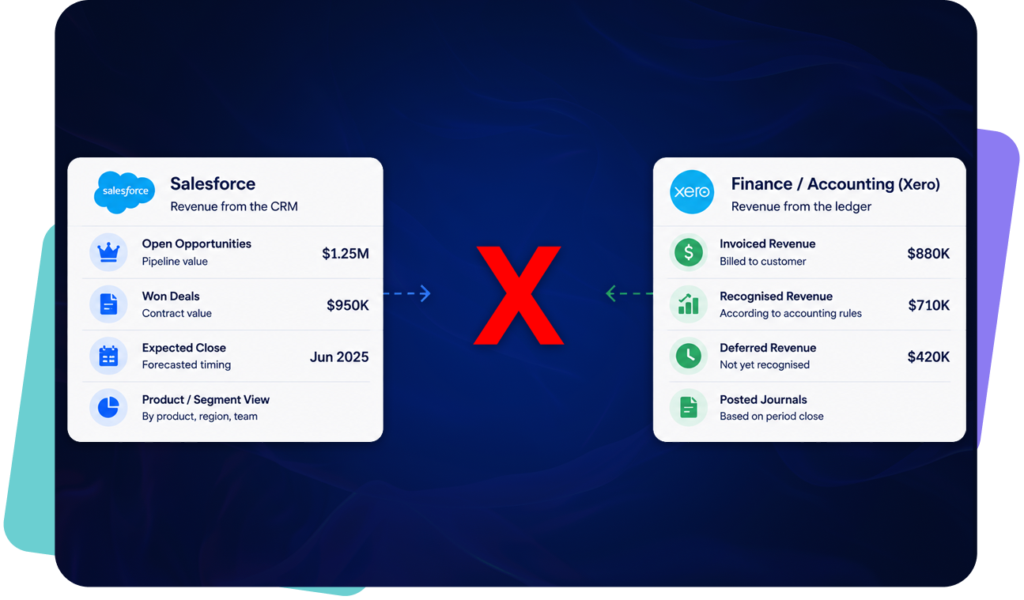
Salesforce records what was sold, while finance often rebuilds billing and revenue-recognition schedules in spreadsheets or separate systems.

Salesforce and finance working from different data – Salesforce shows pipeline and won deals while Xero shows invoiced, recognised and deferred revenue, with no connection between the two

Connect Salesforce Opportunities to Revenue Recognition

ScaleXP combines Salesforce opportunity and Opportunity Product data with invoices and accounting information from Xero or QuickBooks.

It creates a controlled revenue workflow connecting what was sold, what was invoiced and what finance should recognise.

Learn more about the wider CRM accounting integration workflow.

Connect your CRM systems and billing into scalexp to recognise revenue

How Salesforce Revenue Recognition Works

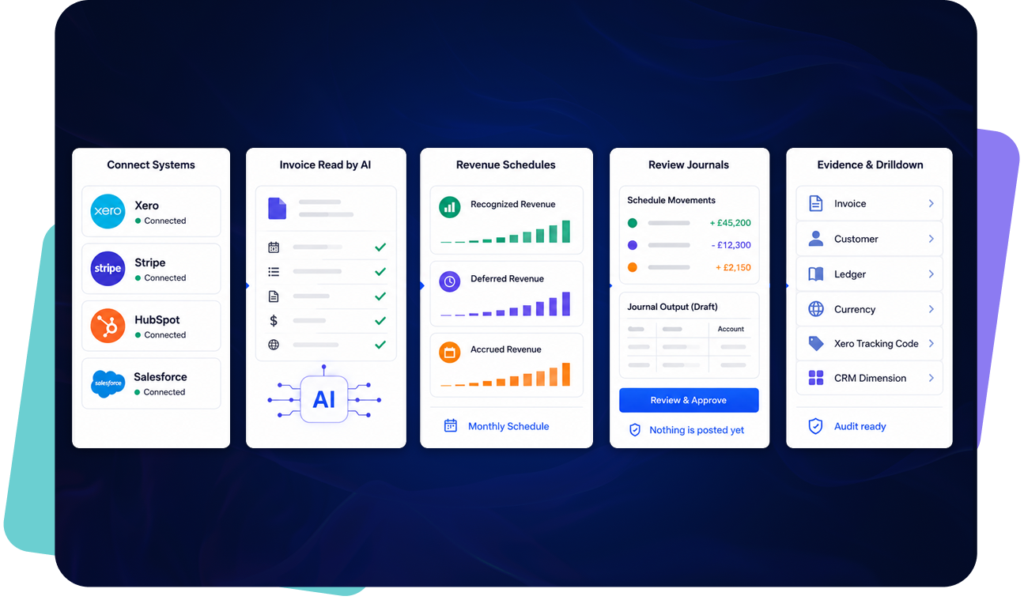
AI reads Xero invoice data and creates recognized, deferred and accrued revenue schedules

Revenue Recognition from Salesforce Opportunities

Salesforce opportunity data can support more than invoice creation.

ScaleXP connects the complete sales-to-finance workflow:

Opportunity → Billing → Invoice → Revenue Schedule → Journal → Forecast

The same opportunity data can support CRM billing and invoicing, reducing the gap between a Closed Won opportunity and the finance process.

This reduces the need to re-enter commercial terms into separate invoicing and revenue-recognition spreadsheets.

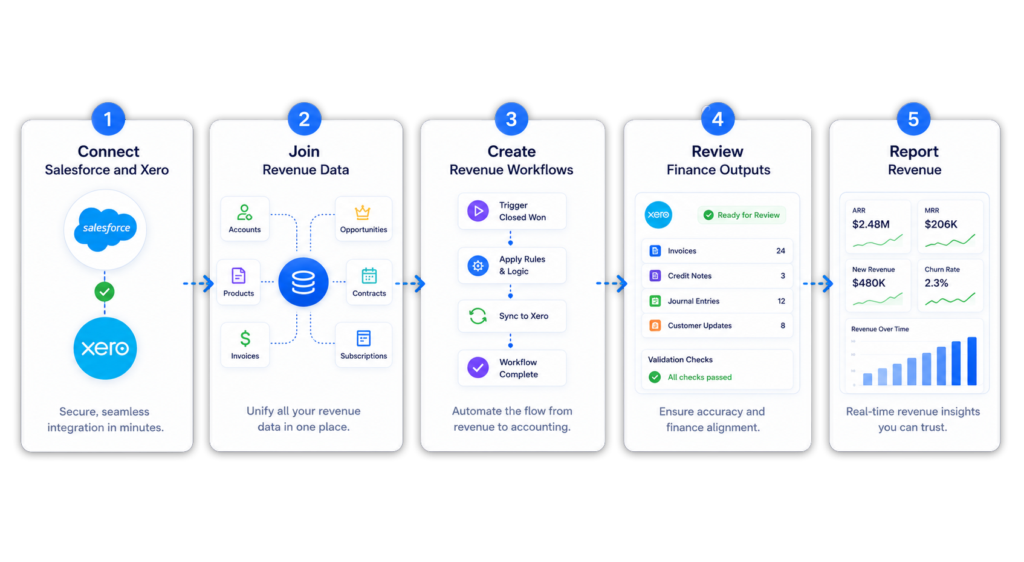
a diagram showing left to right how you connect salesforce and xero to the scalexp platform

Connect Sold, Invoiced
and Recognised Revenue

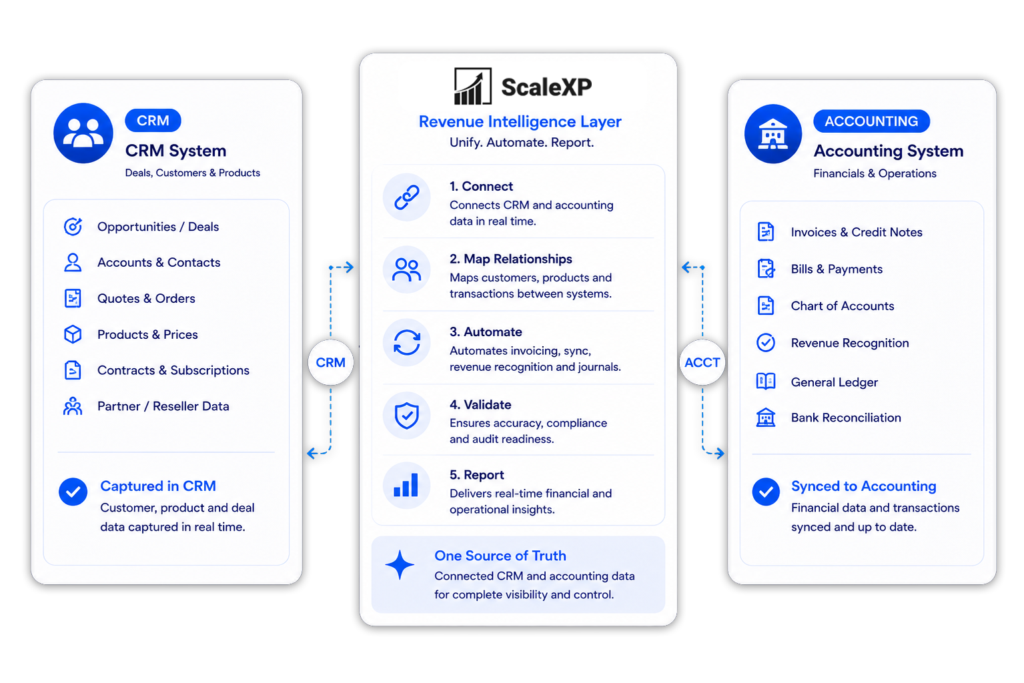
ScaleXP creates a revenue intelligence layer between Salesforce and accounting.

Finance can compare what was sold, what should have been invoiced, what has been billed and what should be recognised in each period.

CRM billing automation showing Sold To customer, Bill To customer, reseller and distributor invoice workflows in ScaleXP

Salesforce Revenue Recognition with QuickBooks Online

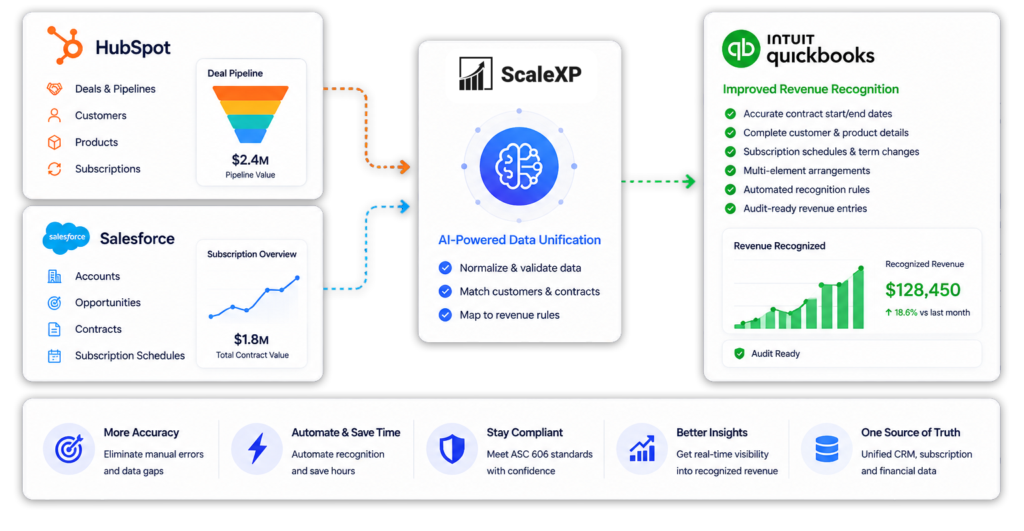
ScaleXP combines Salesforce opportunity data with QuickBooks customer, invoice and accounting information.

The workflow creates a clearer connection between what sales contracted, what QuickBooks invoiced and what finance should recognise.

Explore the full Salesforce QuickBooks integration for invoicing, payment status, and reporting workflows.

QuickBooks revenue recognition using CRM data – ScaleXP unifies HubSpot and Salesforce deals, contracts and subscriptions, then maps them to revenue rules for audit-ready recognition in QuickBooks

Salesforce Revenue Recognition with Xero

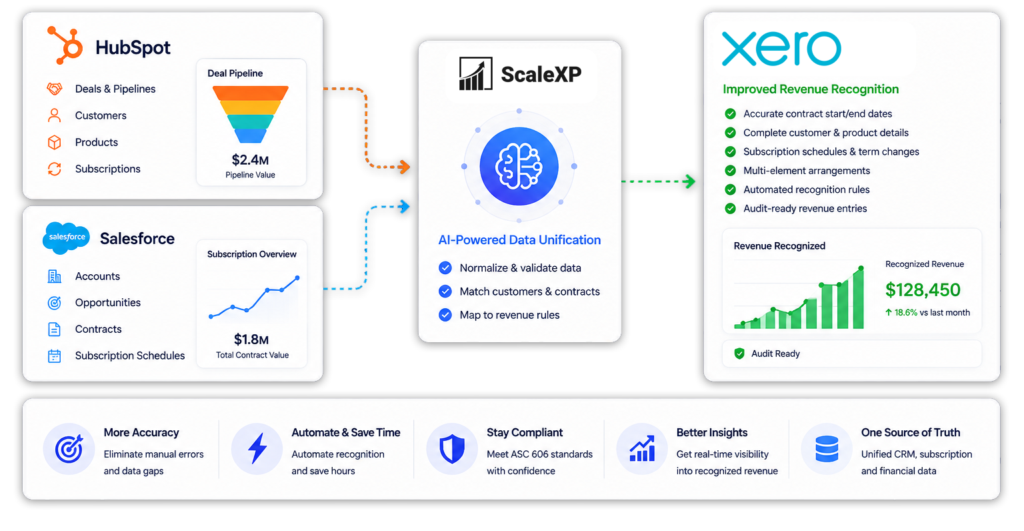
ScaleXP combines Salesforce commercial data with Xero invoices, customers and accounting balances.

The workflow connects opportunity-to-invoice automation with revenue recognition, reconciliation and reporting.

Explore the full Salesforce Xero integration for invoicing, payment status, and finance-reporting workflows.

Xero revenue recognition using CRM data – ScaleXP unifies HubSpot and Salesforce deals, contracts and subscriptions, then maps them to revenue rules for audit-ready recognition in Xero

Shorten the Revenue Recognition Close

ScaleXP replaces repeated spreadsheet preparation with a controlled workflow based on Salesforce and accounting data.

Finance retains control over every schedule and journal before anything is posted.

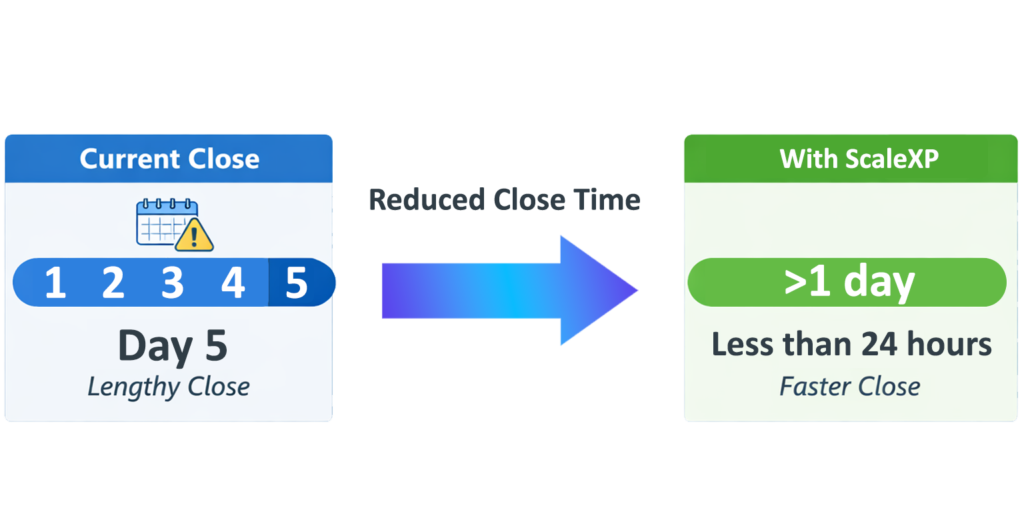
Diagram comparing month-end close time: current close takes 5 days, ScaleXP reduces it to less than 24 hours

Reconcile Contracted,
Invoiced and Recognised Revenue

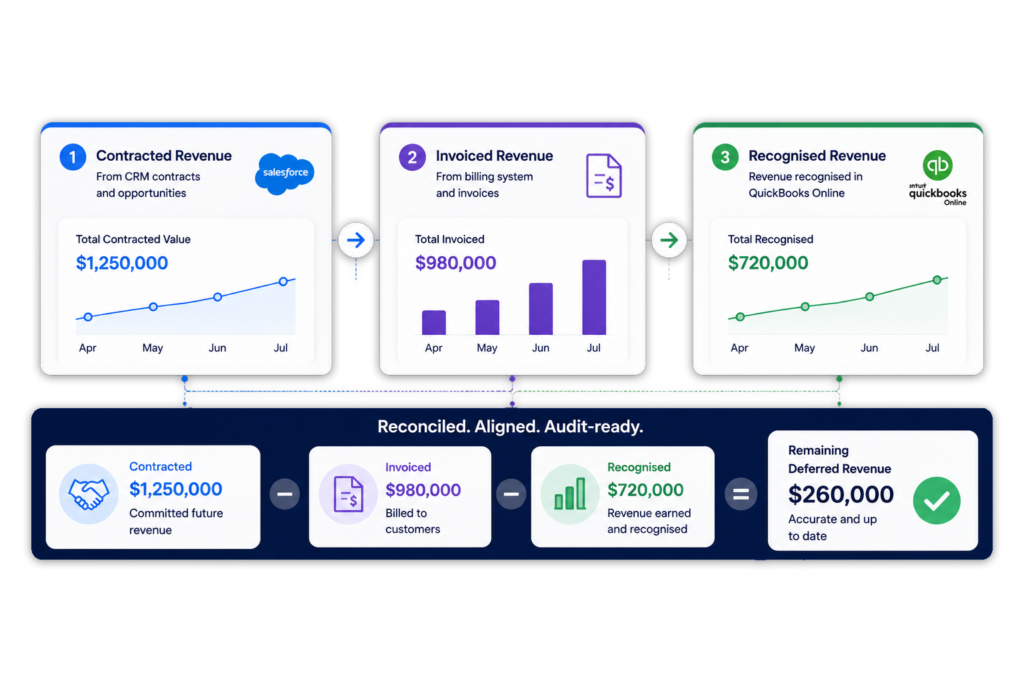
Finance can see the relationship between opportunity value, issued invoices and recognised revenue before approving each journal.

ScaleXP’s deferred revenue software provides invoice-level schedules and journal support for revenue relating to future periods.

Reconcile contracted, invoiced and recognised revenue – ScaleXP connects Salesforce contract values, billed invoices and QuickBooks recognised revenue into one reconciled, audit-ready view with deferred revenue calculated automatically

Connect Revenue Recognition with SaaS Metrics

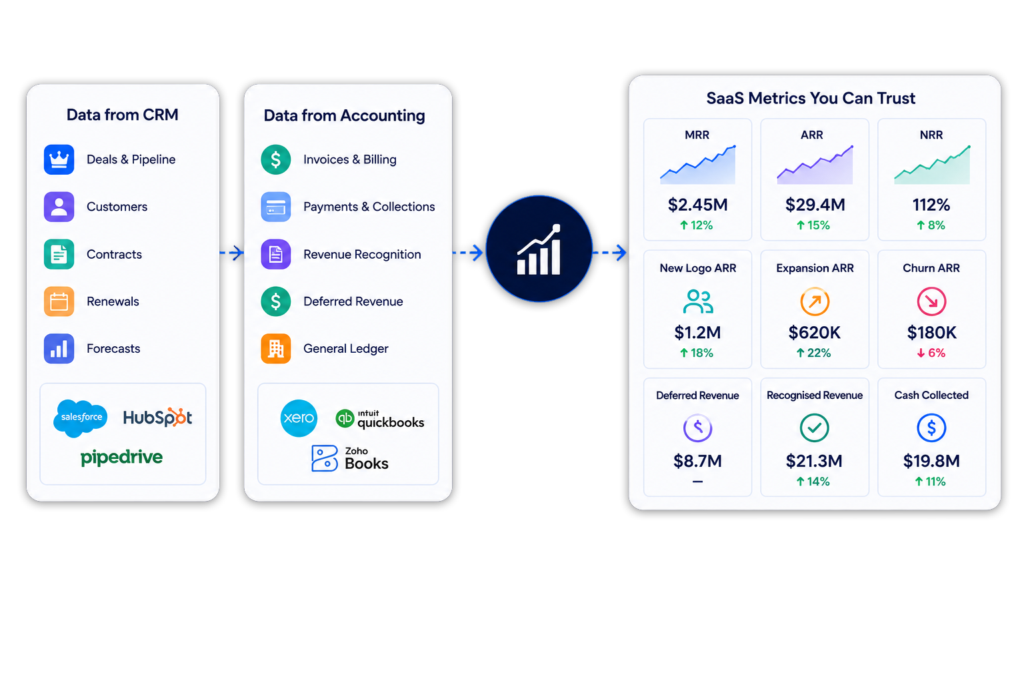
ScaleXP uses Salesforce and accounting data to connect contract revenue with the metrics SaaS finance teams need for monthly reporting, forecasting and board review.

SaaS metrics dashboard combining CRM and accounting data for ARR, MRR and churn reporting

Built for Controlled Finance Workflows

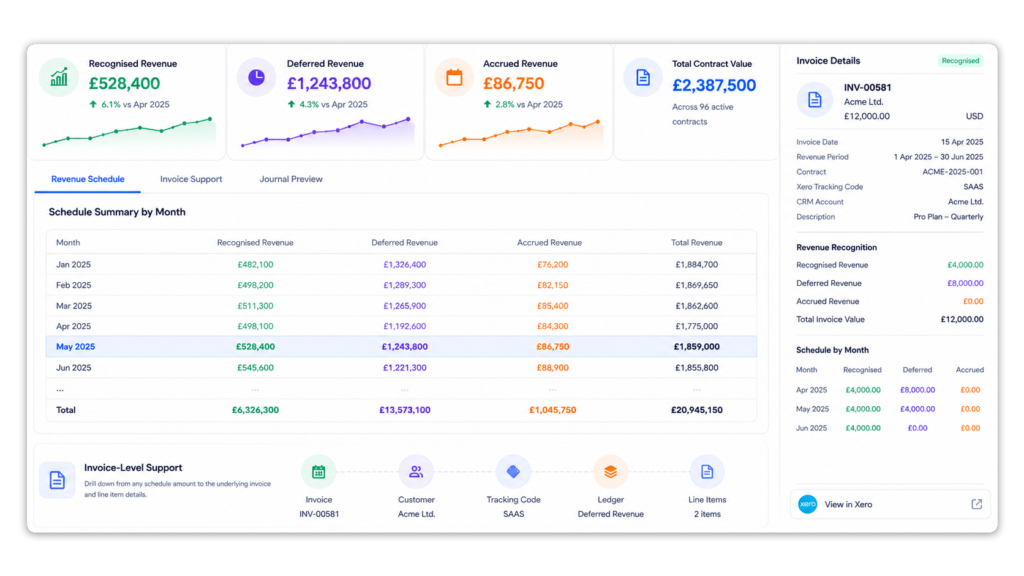
ScaleXP helps finance teams automate month-end processes while retaining review, control and supporting detail.

ScaleXP revenue schedule dashboard showing recognised, deferred and accrued revenue by month with invoice-level audit support linked from accounting system

Salesforce Revenue Recognition FAQs

Salesforce stores commercial data such as opportunities, products, values and service dates, but it does not normally combine this information with accounting invoices, balances and revenue schedules.

ScaleXP connects Salesforce with Xero or QuickBooks to create a controlled revenue-recognition workflow.

Salesforce revenue recognition software uses opportunity and product data from Salesforce to help calculate when revenue should be recognised.

ScaleXP combines Salesforce data with accounting information to prepare revenue schedules, deferred and accrued revenue calculations, journals, forecasts and reporting.

Yes. ScaleXP can use Salesforce Opportunities, Opportunity Products, service dates, billing frequency and other configured fields to prepare revenue schedules.

The available data, mappings and revenue rules are confirmed during implementation.

Yes. ScaleXP connects relevant Salesforce opportunity data with invoice and accounting information from Xero or QuickBooks.

It calculates recognised, deferred and accrued revenue and prepares detailed schedules and journals for finance review.

Yes. ScaleXP combines Salesforce opportunity data with QuickBooks Online customer, invoice and accounting information.

Finance teams can reconcile contracted and invoiced revenue, calculate deferred or accrued revenue and prepare journals for review.

Yes. ScaleXP connects Salesforce opportunity and product data with Xero invoices, customers and accounting balances.

The combined data supports revenue schedules, deferred and accrued revenue calculations, journals, forecasting and reporting.

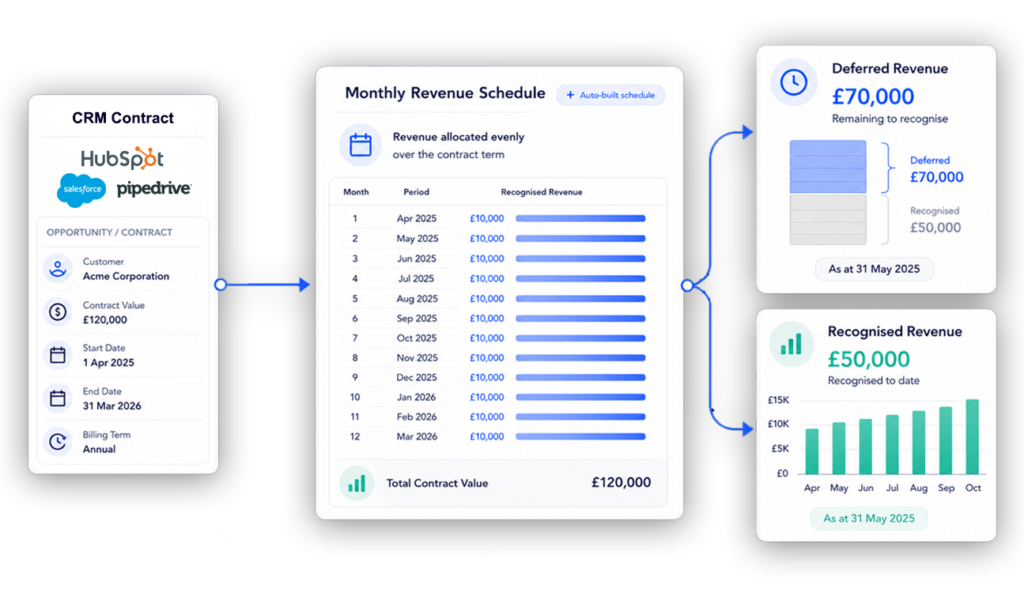
Yes. Where an annual invoice covers a future service period, ScaleXP can allocate the revenue across the relevant months.

The resulting schedule separates recognised revenue from deferred revenue and supports the associated journal.

Yes. ScaleXP can support multi-year opportunities where the required service dates, product values, billing information and revenue rules are available.

Revenue can be scheduled across the relevant reporting periods for finance review.

Yes. ScaleXP calculates the portion of invoiced revenue relating to future periods and prepares the associated deferred revenue schedule and journal.

Salesforce data can provide the commercial terms while Xero or QuickBooks provides the accounting information.

Yes. ScaleXP can calculate revenue earned before invoicing where the relevant opportunity, product and service-period information is available.

This helps finance identify earned but unbilled revenue and prepare the appropriate accrued revenue entry.

Yes. Relevant contract, product or service dates held in Salesforce can be used to define revenue-recognition periods.

The exact Salesforce fields and mappings are configured during implementation.

Yes. Salesforce Opportunity Products can be mapped to different accounting and revenue treatments.

Products can use different service periods, billing frequencies or recognition rules where required.

ScaleXP prepares detailed revenue schedules and journals for finance review.

Once approved, journals can be posted into Xero or QuickBooks, preserving finance control over the accounting process.

Yes. ScaleXP can combine Salesforce opportunity data with accounting information to calculate ARR, MRR, renewals, churn, expansion and contraction.

This connects revenue recognition with forecasting, SaaS reporting and board-level metrics.

ScaleXP supports the schedules, calculations and journal workflows used by finance teams applying ASC 606, IFRS 15 and related accounting standards.

Each company remains responsible for determining and approving its accounting policies and revenue treatment.