
See how ScaleXP works with Xero or QuickBooks.
In a 15- or 30-minute demo, we’ll show the relevant workflows using example data and discuss how they could apply to your finance process. Complex requirements? Discuss them with us first.
Moving off NetSuite to cut costs? See how Xero plus ScaleXP keeps your month-end automation at about 25% of the cost, and when NetSuite is still the better fit.
Key takeaways
You can leave NetSuite and keep the month-end automation that matters: revenue recognition, accruals and prepayment journals, prepared in Xero for finance to approve. Xero keeps your books, and ScaleXP reads every Xero invoice and bill, builds the schedules and prepares the journals. For many software and services companies, that pairing comes to about 25% of the cost of NetSuite.
This guide covers why finance teams leave NetSuite, what NetSuite automates at month-end that Xero does not do on its own, how Xero plus ScaleXP compares task by task, what the move saves, and when NetSuite is still the better choice.
NetSuite is a full ERP. It covers accounting, order management, inventory, purchasing, CRM and more, and it is built to be customized. That breadth is valuable for companies that use it. Many software and services businesses, though, adopted NetSuite mainly to get revenue recognition, and they find they are paying for an ERP while using its accounting and one module.
Cost is what usually starts the conversation. A NetSuite subscription combines a platform license, named users and separate modules, with revenue recognition in Advanced Revenue Management, plus implementation through Oracle or a partner.
When the renewal notice arrives, the question becomes simple: what would it take to get the same month-end result from Xero?
In NetSuite, Advanced Revenue Management turns sales transactions into revenue arrangements. Each invoice or contract line carries a start date, an end date and an amount. NetSuite builds a schedule from those dates and posts a recognition journal each period. Its amortization schedules do the same for prepaid expenses. Finance closes the period once the numbers are reviewed, and the schedules give auditors the detail behind each balance.
Xero records invoices, bills, credit notes and journals well, but it does not build revenue recognition or amortization schedules on its own. Teams that move to Xero without an automation tool usually end up maintaining deferred revenue and prepayments in spreadsheets and typing the journals in by hand, which is the work NetSuite was bought to remove.
ScaleXP connects to Xero, imports every invoice and credit note, and handles revenue recognition automation on top of Xero. Here is how the tasks line up.
| Task | NetSuite (with Advanced Revenue Management) | Xero + ScaleXP |
|---|---|---|
| Build schedules from service dates | Revenue arrangements created from sales transactions | AI reads the service start and end dates from the wording on each Xero invoice; rules can also be set by product, customer or account |
| Spread revenue | Set by the arrangement's rules | By day or by whole month, your choice |
| Bundles and multi-element contracts | Allocation by standalone selling price (Revenue Allocation add-on) | Allocates the price across elements by standalone selling price; each element gets its own schedule |
| Monthly journals | Recognition journals each period | Deferred revenue, accrued revenue, prepayments and accruals journals prepared for you; they post once finance approves |
| Invoice changes and credit notes | Arrangement updated in NetSuite | The schedule is recalculated when an invoice changes, and credit notes are flagged for review |
| Closed periods | Periods closed in NetSuite | Xero's locked periods are respected: items for a closed period are booked in the current month with a warning |
| Audit trail | System audit trail | Every journal has a full audit trail you can download as a spreadsheet, and auditors can have read-only access |
| Reporting | Saved searches and dashboards | 30+ SaaS metrics and automated board packs built from your accounting data |
The result is the same month-end close output NetSuite produced: a schedule per customer and invoice, a reconciled deferred revenue balance, and journals finance has reviewed before they reach Xero.
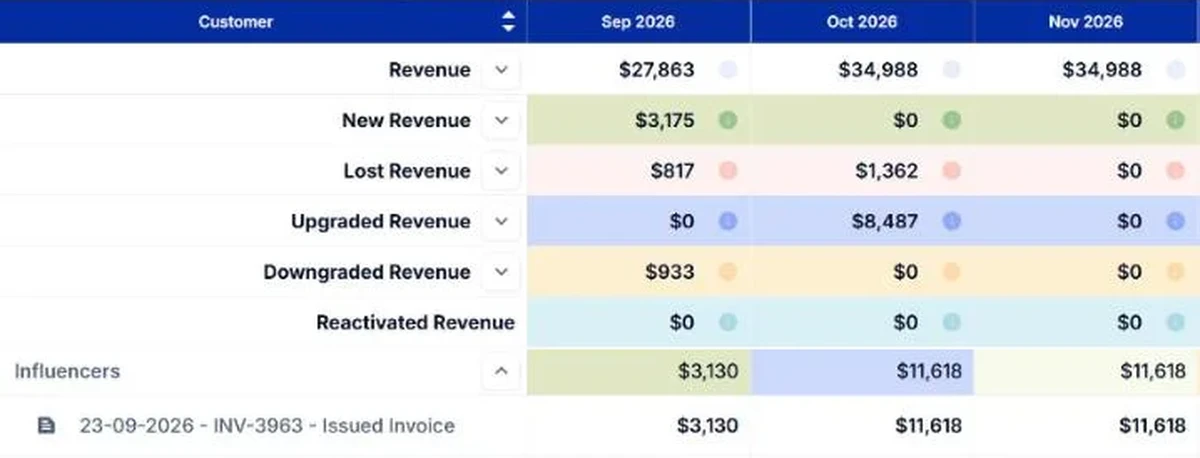
Revenue is only part of the close. ScaleXP prepares the other recurring journals the same way, so they move across from NetSuite too.
Xero plus ScaleXP comes to about 25% of the cost of NetSuite. The FAQ below shows how the figure is worked out. The exact saving depends on the NetSuite package you are on, so compare it with your own renewal.
Setup differs too. NetSuite modules are usually set up by Oracle or a partner. With only an accounting integration, ScaleXP customers are live within one week at most, and every plan includes tailored onboarding.
Leaving NetSuite is not right for everyone. It is still the stronger option when:
If group structure is the deciding factor, read Xero vs NetSuite for multi-entity finance. ScaleXP consolidates up to 50 entities across Xero and QuickBooks Online, with multi-currency consolidation, so a group does not need NetSuite for consolidation alone.
The quickest way to judge the switch is to run your own invoices through it. Connect a Xero organization to a 7-day free trial of ScaleXP and compare the schedules and journals with what NetSuite produces today. To see everything ScaleXP automates at month-end, go to month-end close software. For the move itself, step by step, see NetSuite to Xero migration: keep the automation, reduce the cost.
For SaaS and recurring-revenue companies up to $50M in revenue, Xero plus ScaleXP replaces NetSuite's month-end automation at about 25% of the cost. Xero keeps your books. ScaleXP automates revenue recognition, deferred and accrued revenue, prepayments and accruals journals, and 30+ SaaS metrics, and every journal posts once finance approves.
ScaleXP is built for SaaS and recurring-revenue companies up to $50M in revenue, on Xero, QuickBooks or Zoho Books. Month-end close journals run on Xero and QuickBooks. That includes software companies, MSPs and IT services firms that bill subscriptions, support contracts or annual licenses. More than 1,000 companies use ScaleXP.
Not on its own. Xero records invoices and journals but doesn't build revenue recognition schedules. With ScaleXP connected, AI reads the service dates on each Xero invoice, builds the schedule, spreads revenue by day or by whole month, and prepares the deferred and accrued revenue journals for finance to approve.
For a single company with five finance users, Xero plus ScaleXP comes to about $5,364 a year, against $19,728 or more for NetSuite, about a quarter of the cost. That is Xero Established at $97 a month plus ScaleXP's middle plan at $350 a month, with six users included. The NetSuite figure is a third-party 2026 estimate for the platform license ($11,988) and five named users ($7,740), before Advanced Revenue Management, which Oracle prices on quote. The exact saving depends on your NetSuite package, so compare it with your own renewal.
Plans start from $125 a month, with a 7-day free trial, so you can test it on your own Xero data before your NetSuite renewal.
ScaleXP can accrue the revenue for the months the service ran before the invoice was raised, so each month carries its share. When the invoice arrives in Xero, the schedule picks it up.
Yes. ScaleXP respects locked periods in Xero. If an item relates to a period you have already closed, it is booked in the current month with a warning, so prior months don't change.
Yes. ScaleXP prepares the schedules and journals, and they post only once finance approves. Credit notes are flagged for review, every journal has a full audit trail you can download as a spreadsheet, and auditors can have read-only access.
Yes. ScaleXP can load an existing deferred revenue balance from Xero as the opening position and post a true-up journal so Xero and the schedules agree. That means you can switch partway through the year.
Close-time estimator
How long does your close take today? Working days, roughly
Which of these do you still do manually? Select all that apply
Which of these takes the most time? Pick one
Your estimate
Your 3–5 day Xero close could be closer to 2 days
Accruals is where you would feel it first. ScaleXP prepares the schedules and journals for each task you selected from your live Xero data. What stays with your team is the review and the posting decision.