CRM Billing and Invoicing Automation

Turn CRM deal data into finance-reviewed billing, invoice outputs, revenue schedules and reporting.

4.9

in Xero & QuickBooks app stores

the ScaleXP platform showing our crm integration software with hubspot, pipedrive and salesforce integrations

ScaleXP is an approved app for leading accounting & CRM systems

CRM billing often breaks between sales and finance

Month-end close infographic with Current Close and Improved Close panels, Day 5 lengthy close transitioning to Day 2 faster close, blue arrow across the center.

Sales teams manage deals, opportunities, products, prices and renewals in CRM systems such as HubSpot, Salesforce and Pipedrive. Finance teams manage invoices, payments, journals and accounting records in Xero or QuickBooks.

When those workflows are not connected, billing becomes manual and error-prone.

SALESFORCE, HubSpot, Pipedrive, QuickBooks and xero logos with a red X between them, illustrating the integration gap that fails to handle revenue recognition, targets vs. actuals, and P&L reconciliation.

ScaleXP turns CRM data into finance-ready billing workflows

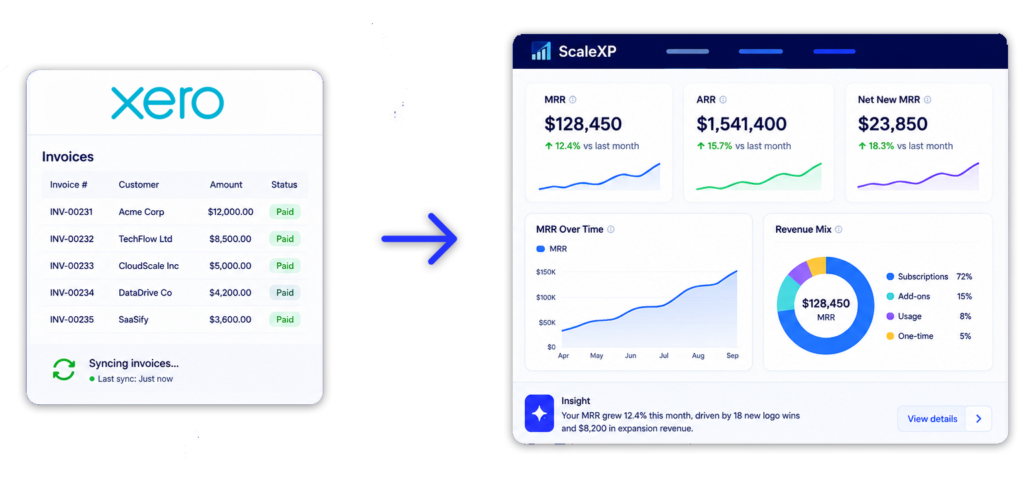
Recurring revenue and renewals dashboard connected to HubSpot and accounting

ScaleXP joins CRM and accounting data so teams can move from deal approval to billing, invoicing and reporting with more control.

Instead of manually rebuilding CRM deals in accounting systems, ScaleXP uses HubSpot, Salesforce or Pipedrive data to prepare finance-reviewed invoice outputs and connect billing to the wider revenue workflow.

For broader context, see CRM accounting integration.

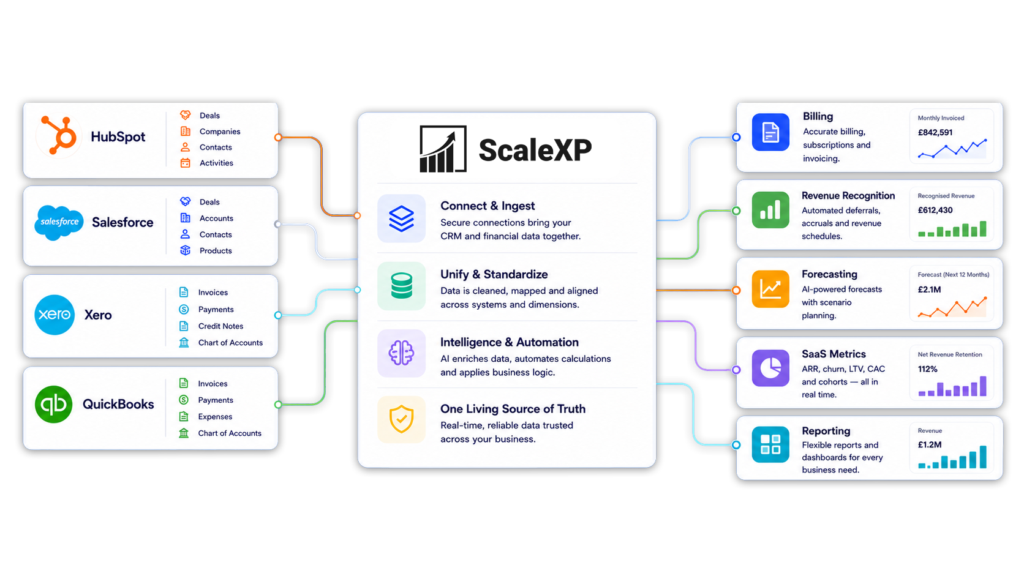
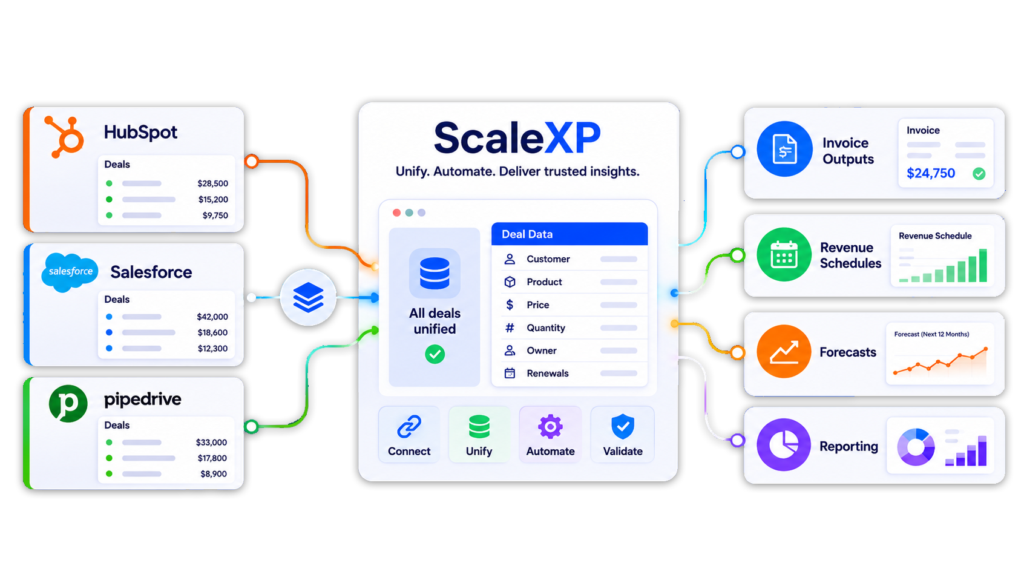
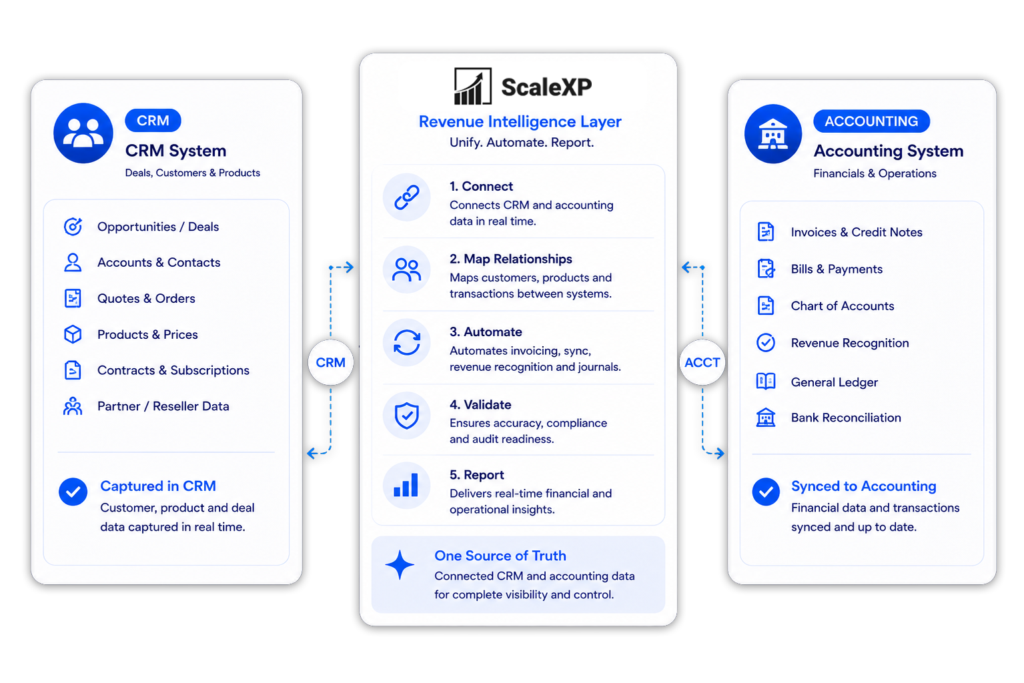
CRM accounting integration software showing CRM and accounting data joined into a revenue intelligence layer in ScaleXP

Billing and invoicing are part of the revenue intelligence layer

Shared operating dashboard across customer revenue and business performance data

CRM billing automation should not be treated as a standalone invoice task.

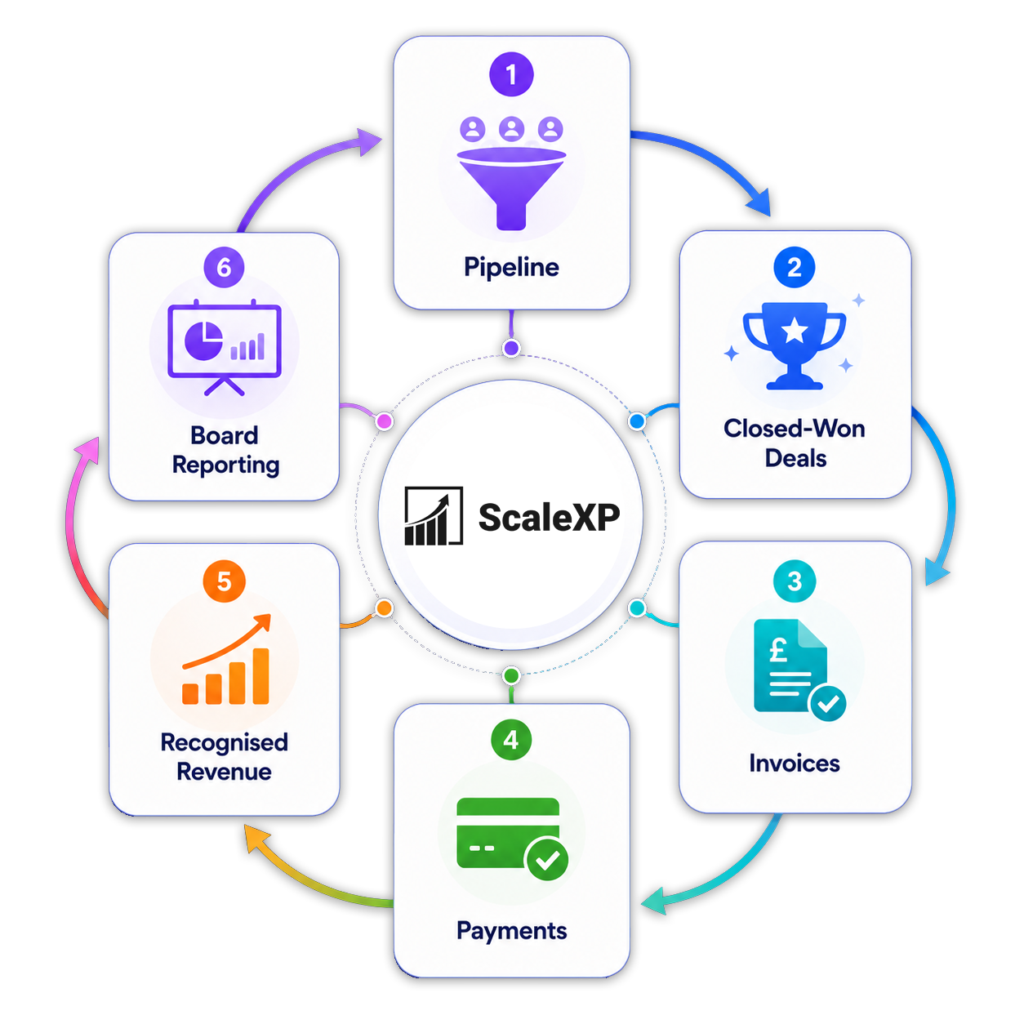
The real value comes when CRM data and accounting data are joined into one revenue intelligence layer. That layer connects what was sold, what should be billed, what has been invoiced, what has been collected and what revenue should be recognised.

Show HubSpot, Salesforce and Pipedrive deals flowing into ScaleXP, then invoice outputs, revenue schedules, forecasts and reporting.

How CRM billing automation works in ScaleXP

Recurring revenue and renewals dashboard connected to HubSpot and accounting
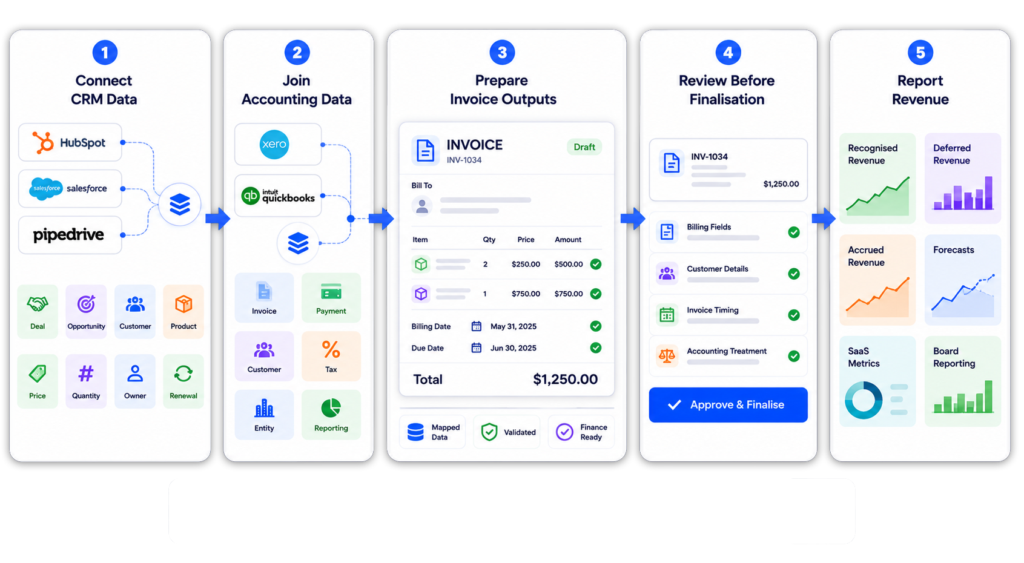
Five-step finance workflow showing CRM data from HubSpot, Salesforce, and Pipedrive connected with Xero and QuickBooks accounting data. Information flows through invoice preparation and finance review into revenue reporting dashboards covering recognised revenue, deferred revenue, accrued revenue, forecasts, SaaS metrics, and board reporting.

Automate deal-to-invoice workflows

Shared operating dashboard across customer revenue and business performance data

CRM systems often contain the data finance needs to bill customers.

This includes customer name, product, contract value, start date, end date, renewal term, billing frequency and owner.

ScaleXP helps turn that CRM data into invoice outputs, reducing manual handoffs between sales and finance.

For system-specific workflows, see HubSpot Xero integration and Salesforce Xero integration.

Support billing, invoicing and quote-to-cash

Recurring revenue and renewals dashboard connected to HubSpot and accounting

Billing is broader than invoicing.

Billing determines what should be charged, when it should be charged and which commercial terms apply. Invoicing is the creation of the invoice document and accounting record.

ScaleXP helps connect both steps as part of a wider quote-to-cash workflow.

This helps teams move from CRM activity to accounting outputs without rebuilding the same information in spreadsheets.

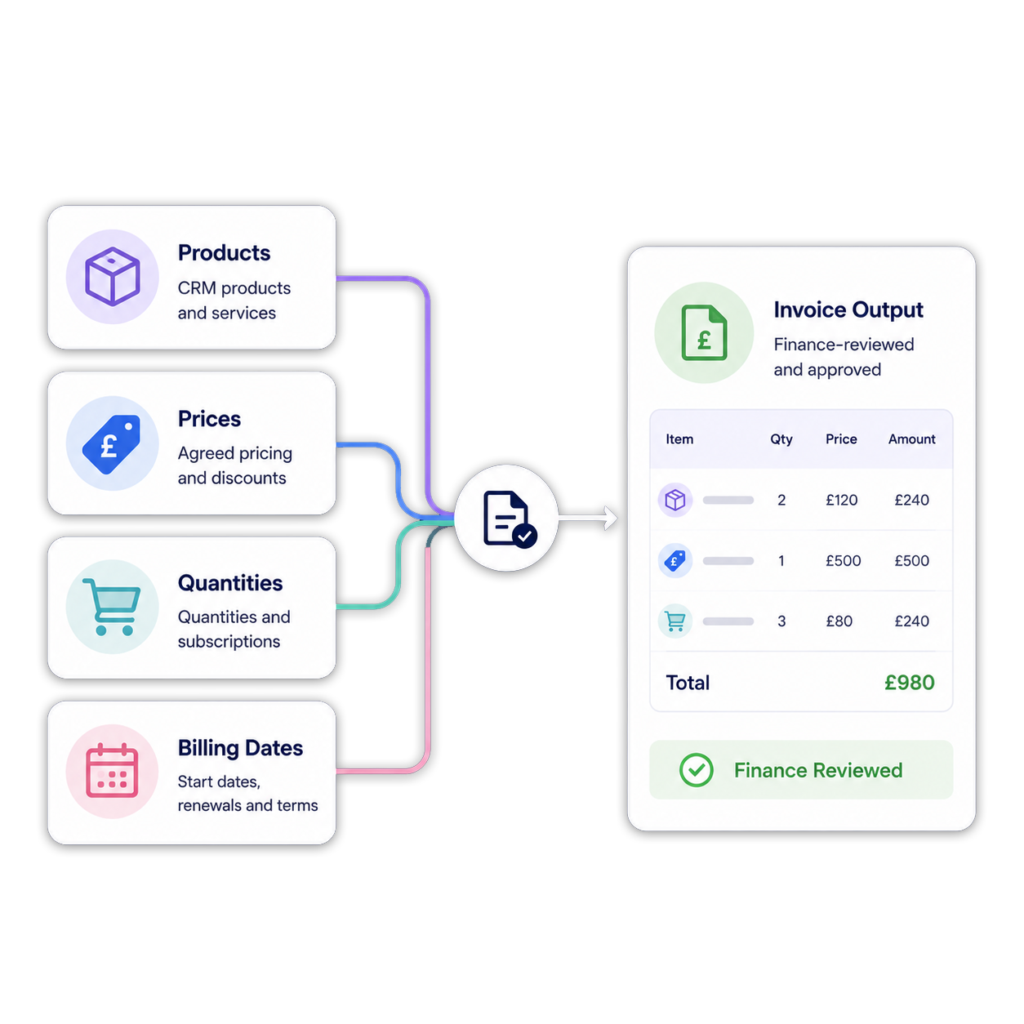
CRM billing automation showing deal data, products, prices and billing dates becoming finance-reviewed invoice outputs.

Create invoices from HubSpot, Salesforce and Pipedrive data

Shared operating dashboard across customer revenue and business performance data

ScaleXP can support workflows where CRM data from HubSpot, Salesforce or Pipedrive is used to prepare invoice outputs for accounting systems.

This is useful when the commercial data already lives in CRM, but finance needs control over invoice creation, timing and review.

Teams using HubSpot or Salesforce can explore their respective Xero integrations, while Pipedrive users can connect deal data to finance-reviewed billing, invoicing, revenue recognition, and reporting through an automated workflow.

Support subscription, project, milestone and usage-based billing

Recurring revenue and renewals dashboard connected to HubSpot and accounting

Different revenue models create different billing requirements.

ScaleXP helps teams use CRM data to support billing workflows across recurring and non-recurring revenue streams.

This is especially useful where billing, delivery and revenue recognition happen across different periods.

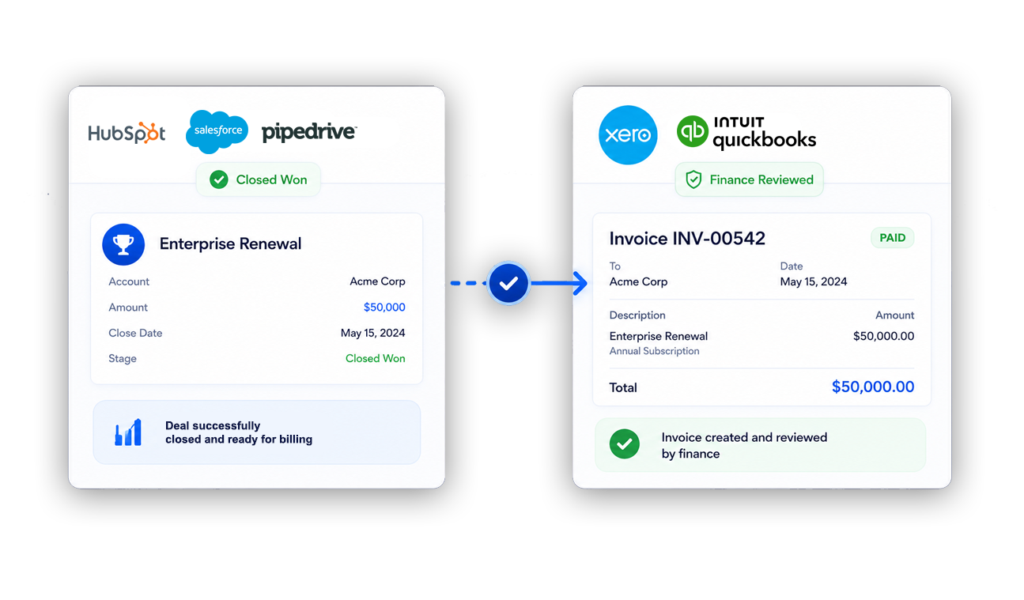
Automated invoicing screen showing CRM deal data converted into a accounting invoice

Connect billing to revenue recognition

Shared operating dashboard across customer revenue and business performance data

Billing automation should not stop at invoice creation.

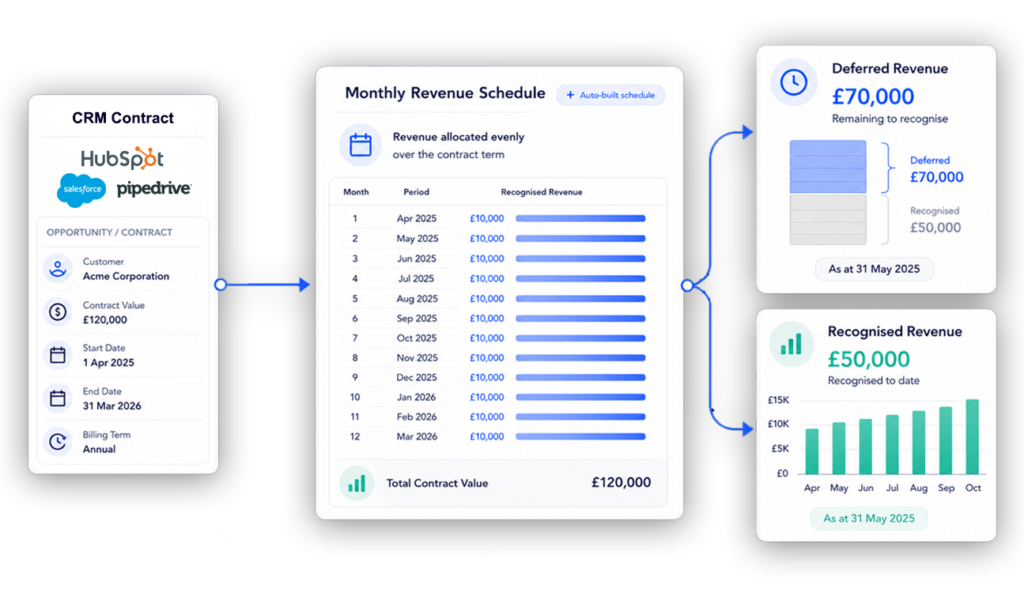
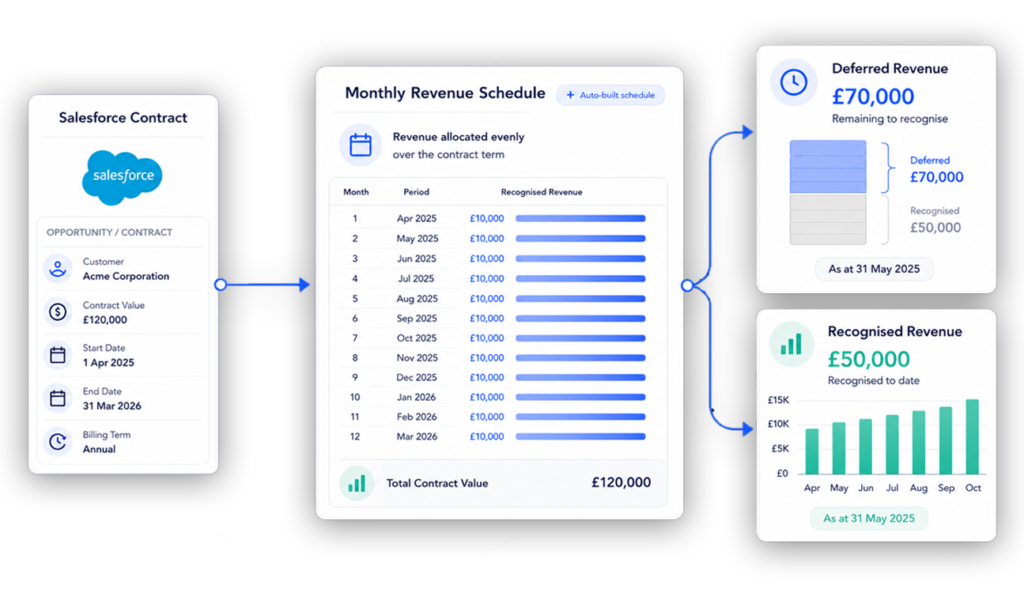
Finance teams also need to understand when revenue should be recognised, deferred or accrued.

ScaleXP can connect CRM billing data and accounting data to support revenue recognition schedules and month-end journal workflows.

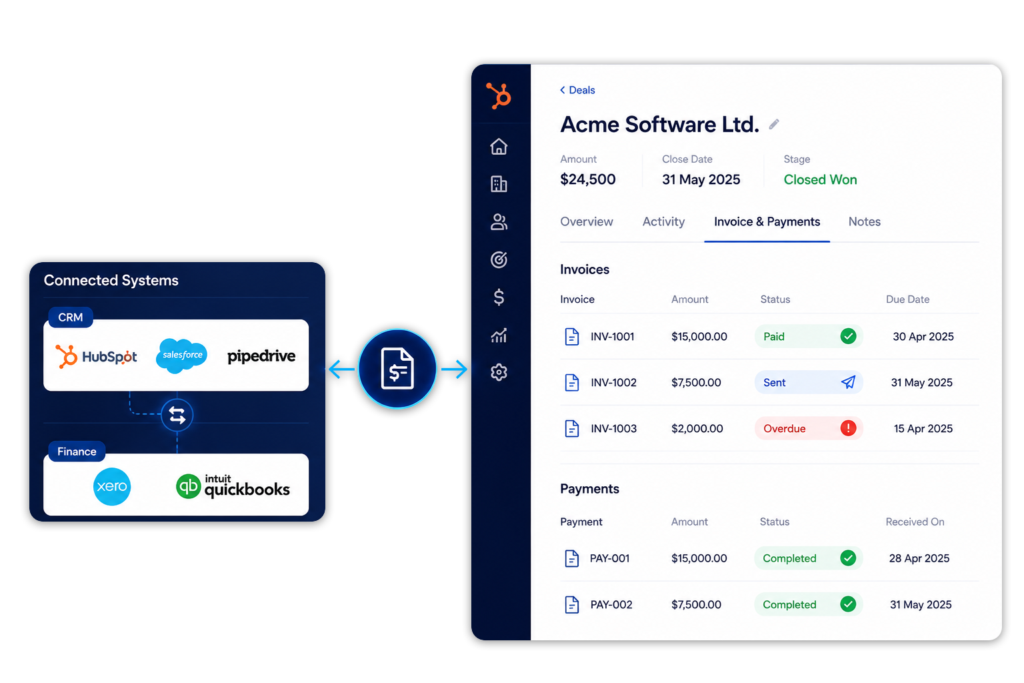
Keep invoice and payment status visible in CRM

Recurring revenue and renewals dashboard connected to HubSpot and accounting

Sales and customer success teams often need to know whether a customer has been invoiced or paid.

Without connected data, they ask finance for updates or rely on incomplete CRM notes.

ScaleXP can help connect finance status back to CRM workflows where configured.

This makes billing part of a shared revenue workflow, not a finance-only process.

A image showing CRM & accounting data with invoice data and payments being visible in the crm

Support multi-currency, multiple entities and consolidation

Shared operating dashboard across customer revenue and business performance data

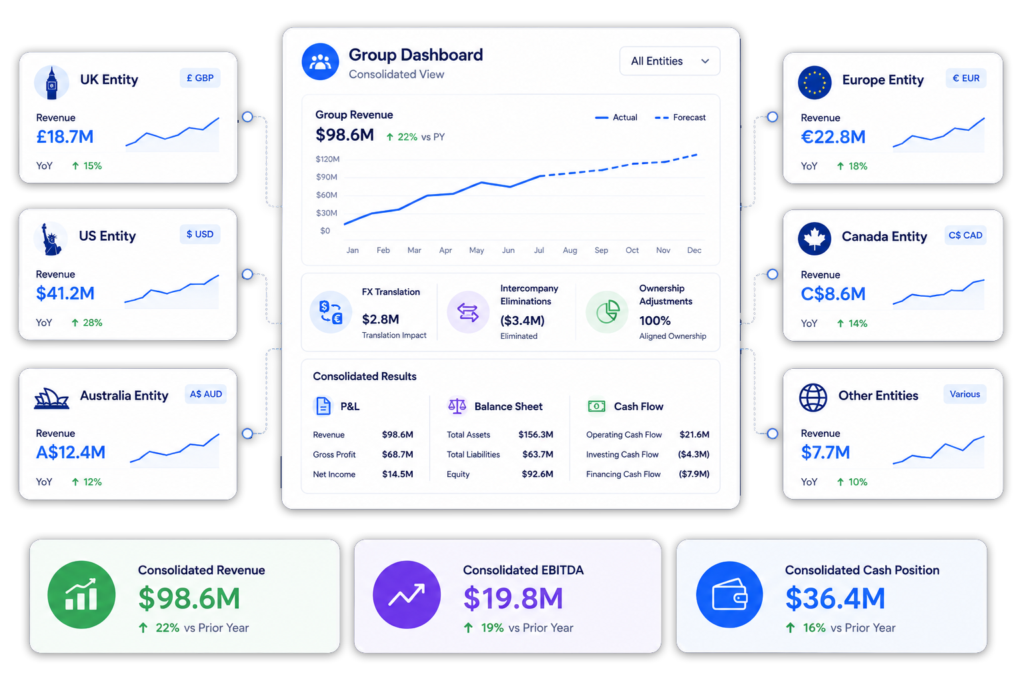
Many businesses sell through one CRM but bill and report through multiple accounting entities.

ScaleXP can help teams combine CRM billing data with accounting data across entities, currencies and reporting structures.

This helps teams move from local billing workflows to group-level revenue visibility.

Multi-entity consolidation dashboard showing multiple companies and currencies flowing into a single consolidated view with automated FX translation, eliminations, ownership adjustments, and group financial reporting.

What CRM billing and invoicing automation unlocks

Revenue workflow

With ScaleXP

Without ScaleXP

Turn CRM deals into invoice outputs

Yes

Limited

Reduce manual rekeying into accounting systems

Yes

Not included

Connect billing to revenue recognition

Yes

Not included

Forecast from pipeline, billing and actuals

Yes

Not included

Support multi-currency and multi-entity workflows

Yes

Limited

Build board-ready revenue intelligence dashboards

Yes

Not included

No credit card required

Ready to automate CRM billing workflows?

See how ScaleXP joins CRM and accounting data for billing, revenue recognition, forecasting, SaaS metrics and board reporting.

Recognised finance automation for Xero and QuickBooks users

HUBSPOT integration with xero and quickbooks

Integrate HubSpot and accounting data

Graphic showing HubSpot logo alongside icons for QuickBooks, Microsoft Dynamics 365, and Xero.
Logos of HubSpot, Stripe, Intuit QuickBooks, and Xero displayed on a laptop screen.

Integrate data across multiple platforms & systems

Laptop screen displaying an invoice report from Xero with financial data and graphs.

Close the month faster using automation

Reduce time spent manually tracking deferred revenue, income in advance and pre-paid expenses.  Eliminate tedious spreadsheet tracking and improve accuracy.

ScaleXP fully automates revenue recognition and prepayments using a sophisticated series of text recognition algorithms, which read and process all of the data and text on invoices. 

Read more about automating revenue recognition

Read more about automating prepaid expenses

Stop revenue leakage & get paid faster with integrated billing

Illustration of a blue faucet with dollar bills flowing out of the spout.
Financial reporting dashboard displaying various metrics such as MRR and ARR on a laptop screen.

Create a single source of truth for metrics

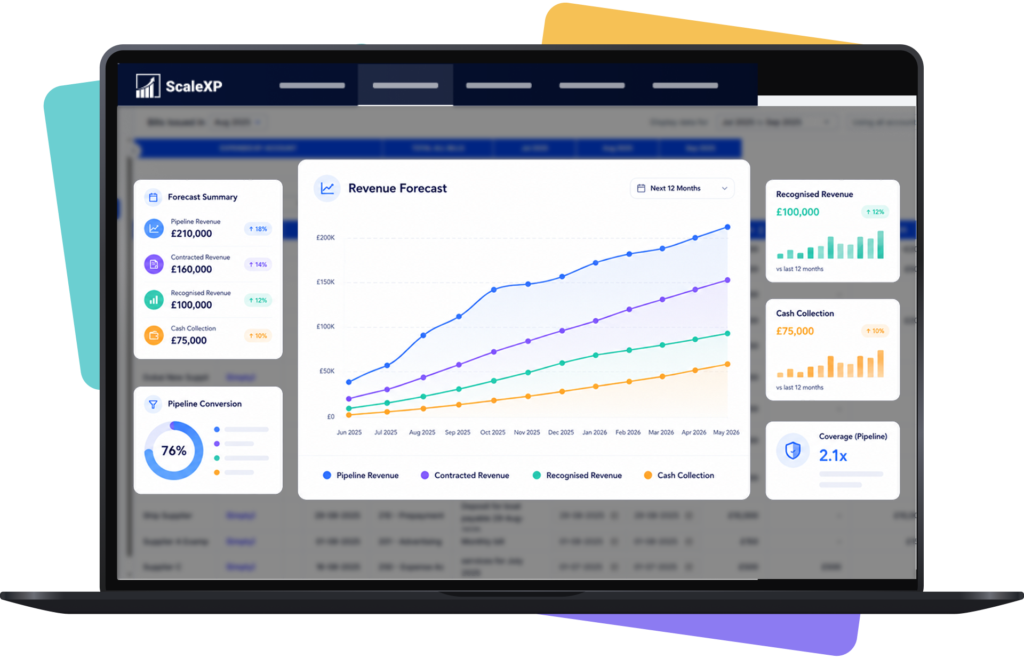
Easily forecast revenue or MRR

ScaleXP builds a forecast directly from HubSpot and QuickBooks or Xero

Hero product screenshot showing revenue forecast dashboard connected to CRM, billing, and accounting data
Graphic showing integration between Xero and QuickBooks with arrows indicating data flow.

Real-time 2-Way sync between HubSpot & your accounting system

Keep your teams aligned with a seamless sync between HubSpot and your accounting software (Xero, QuickBooks). 

ScaleXP automatically updates payment status and customer financial info in real time, so your sales and customer success teams can instantly see if a client is up to date or overdue, all within HubSpot. 

HubSpot + ScaleXP Delivers More

+ accounting data

+ accounting data

Fully integrate HubSpot and accounting data

Ensure all invoices are issued on time

In limited cases

Automatically track contract renewals  

In limited cases

Understand data using AI powered dashboards across integrated datasets 

Understand the highest growth customers, their channel, sector and geography

Automate business critical KPIs by fully integrated data sets

Automate sales forecasts

Woman in a yellow blazer holding an iPad displaying financial data, with logos of Xero and HubSpot in the corner.

Hubspot Contract Management FAQs

Invoicing and associated reporting can be fully automated in Xero and QuickBooks. 

ScaleXP will automatically provide a two way sync between HubSpot and your accounting system once daily.  You can also generate an immediate sync at any time, as often as you like.

Xero and QuickBooks can be automatically updated with draft revenue recognition journals. You simply review and click to approve. Journals can not be automatically passed to Zoho Books, but ScaleXP provides the full journal and a comprehensive CSV download. 

Yes.  ScaleXP provides full automation of all your sales revenue, past, current and future, including providing the associated accounting journals for accruals and deferrals in Xero and QuickBooks.

Further, ScaleXP provides a full breakdown of all revenue shown on your Income Statement as well as all deferred income and accrued revenue shown on your Balance Sheet. 

Revenue recognition schedules can be viewed by customer, by invoice, and by general ledger code. And, in case that’s not enough, all schedules can be downloaded to a spreadsheet or CSV.

By default, ScaleXP syncs daily between HubSpot and your accounting software. However, you can also trigger an immediate sync at any time. This ensures that new deals, invoices, and payments stay current across both systems on a daily basis.

Currently ScaleXP’s HubSpot invoicing automation works with Xero and QuickBooks. Invoices generated from HubSpot are posted directly into Xero or QuickBooks, where you can finalize and send them. (If you use other accounting software, ScaleXP can still produce the required journal entries for you to upload.)

CRM Billing and Invoicing Automation FAQs

CRM billing automation uses CRM data such as deals, opportunities, products, prices, quantities, billing dates and renewal terms to support billing workflows.

It helps reduce manual rekeying between sales and finance and creates a cleaner route from Closed Won deal to invoice output.

CRM invoicing automation uses CRM deal or opportunity data to prepare invoice outputs for finance review.

This can include customer details, product lines, pricing, quantities, billing dates, contract terms and reporting dimensions.

Billing is the broader process of determining what should be charged, when it should be charged and which commercial terms apply.

Invoicing is the creation of the invoice document and accounting record in the accounting system.


ScaleXP can use CRM deal or opportunity data to support finance-reviewed invoice outputs.

This can include customer, product, price, quantity, billing date and contract information. Finance keeps review control before invoices are finalised.

Yes, where configured. ScaleXP can use HubSpot deals, Salesforce opportunities or Pipedrive deals to support finance-reviewed invoice outputs.

CRM data can provide customer, product, price, quantity, billing date, contract terms, owner and renewal information. ScaleXP can use that data alongside accounting information to support billing, invoicing, revenue recognition, forecasting and reporting.

For system-specific workflows, see HubSpot Xero integration and Salesforce Xero integration.

Yes. ScaleXP can support quote-to-cash workflows by connecting CRM deal or opportunity data with billing, invoicing, revenue recognition, forecasting and reporting.

This helps teams move from deal data to billing and revenue outputs with more control.


Yes. ScaleXP can use CRM and accounting data to support revenue recognition software workflows, including deferred revenue, accrued revenue and month-end journals.

Finance keeps review control before journals are posted.


Yes, where configured. ScaleXP can help connect invoice and payment status back to CRM workflows.

This helps sales and customer success teams see billing progress, understand whether customers have paid and reduce finance status requests.


Yes. ScaleXP can support multi-currency workflows where CRM deals, accounting invoices or group reporting need to be analysed across different currencies.

ScaleXP supports major currencies including GBP, EUR, USD, AED, AUD, CAD, CHF, CNY, HKD, INR, JPY, NOK, NZD, PLN, QAR, SAR, SEK and SGD, as well as other major currencies where configured.


Yes, where configured. ScaleXP can support teams working across more than one accounting entity.

This is useful for groups that use one CRM but invoice, report and consolidate revenue across multiple accounting organisations.


No. Your CRM remains the commercial system and your accounting platform remains the accounting system.

ScaleXP joins the data and applies finance logic for billing, invoicing, revenue recognition, forecasting and reporting.


Most companies can be fully set up in 2–3 weeks.

Setup depends on CRM structure, accounting configuration, number of entities, required billing workflows and the fields that need to be mapped.