
See how ScaleXP works with Xero or QuickBooks.
In a 15- or 30-minute demo, we’ll show the relevant workflows using example data and discuss how they could apply to your finance process. Complex requirements? Discuss them with us first.
A step-by-step NetSuite to Xero migration plan that keeps your month-end automation, from deferred revenue to accruals, and cuts your software costs.
Key takeaways
To move from NetSuite to Xero without losing your month-end automation, pick a cutover date at the start of a period, bring your opening balances into Xero, set up your journals in ScaleXP, and run one month alongside NetSuite before you switch it off.
Moving the books is the familiar part. The risk sits in the work NetSuite automated: contracts still have months left to recognize, prepaid costs are partway through their schedules, and the deferred revenue balance has to carry across without a gap or a double count. This guide walks through the seven steps in order, with a checklist at the end.
If you are still deciding whether to leave, start with Leaving NetSuite? Keep your month-end automation in Xero.
Pick the first day of a month, ideally the first day of a quarter or financial year. A clean period start means NetSuite owns everything before the date and Xero owns everything after it, which makes the audit trail simple.
Work back from your NetSuite renewal date and its notice period. Leave enough time to run one month in parallel before the subscription ends.
Decide how much history you need in the new setup. Some teams bring only open items and the opening balances; others want two or three years of invoices so year-on-year reporting keeps working. ScaleXP lets you choose your start date and how much history to import, from invoices and bills to credit notes and bank transactions.
Before the subscription ends, export and archive:
Keep the exports where your auditors can reach them. You may need them for the year in which you switch.
Enter the trial balance at the cutover date as Xero's conversion balances. Enter open invoices and bills individually rather than as one total, so aged receivables and payables work from day one.
Check that the deferred revenue account in Xero matches the deferred revenue balance by customer from your NetSuite export. That number is the starting point for the next step. For the day-to-day process after the move, see Deferred revenue in Xero.
Connect ScaleXP to Xero. It imports your invoices, bills and credit notes and builds the schedules for revenue recognition automation:
Close one month in both systems and compare the results line by line:
Differences usually come from three places: a different spreading method (by day or by month), credit notes, and contracts that changed partway through their term. Fix the cause in the setup, not by adjusting a journal, so the next month comes out right on its own.
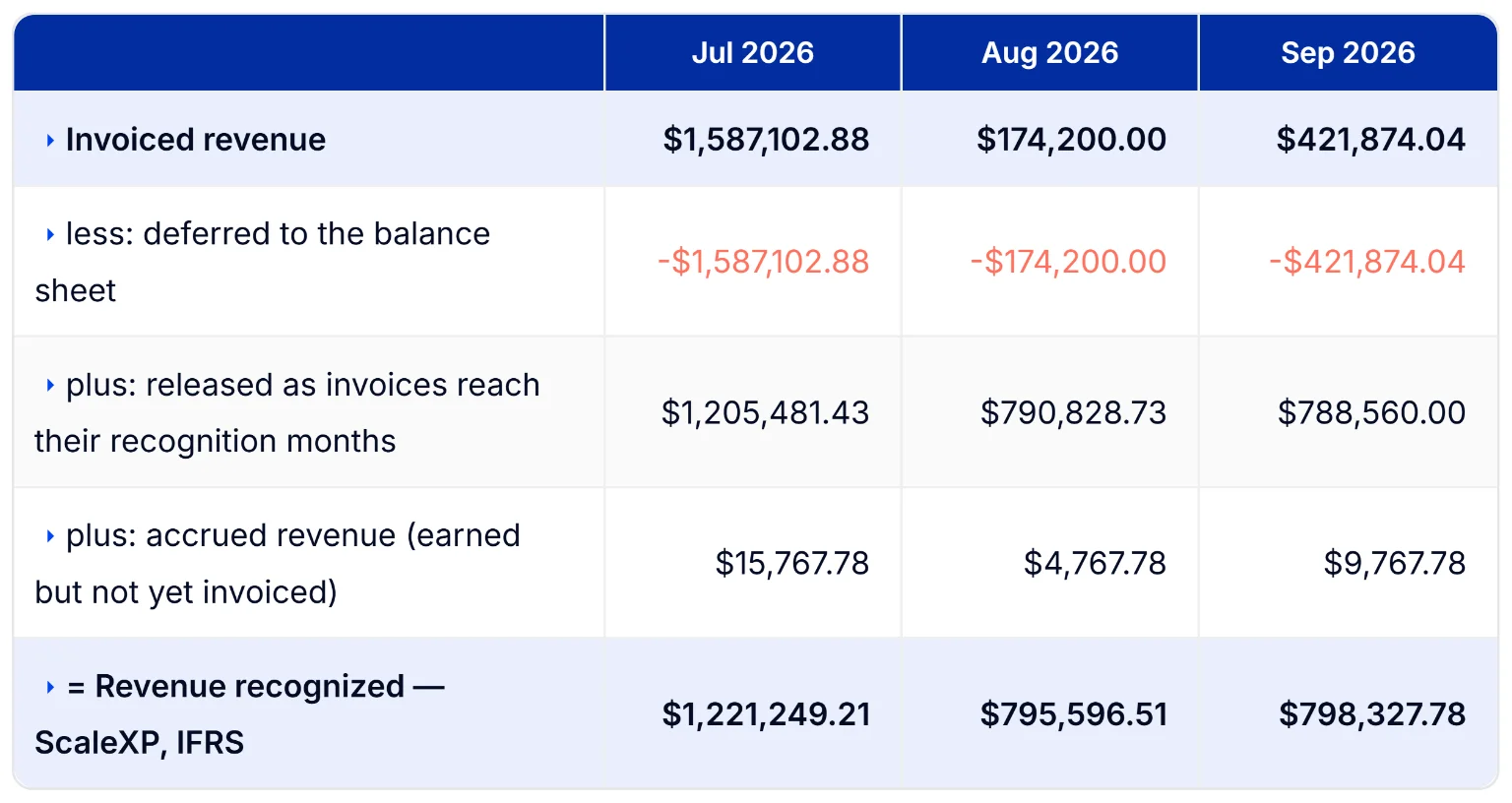
From the first full month after the parallel run, ScaleXP prepares the deferred revenue, accrued revenue, prepayments and accruals journals, and they post once finance approves. The month-end close checklist tracks each task's status, reviewer and approver.
When the month is signed off, lock the period in Xero. ScaleXP respects locked periods: anything that relates to a closed month is booked in the current month with a warning, so closed months stay closed. Every journal keeps a full audit trail you can download as a spreadsheet.
Xero plus ScaleXP comes to about 25% of the cost of NetSuite. The exact saving depends on the NetSuite package you are on. For the full comparison, see Leaving NetSuite? Keep your month-end automation in Xero.
The timeline depends mostly on how quickly Xero is set up and the opening balances are agreed. The ScaleXP part is quick: with only an accounting integration, ScaleXP customers are live within one week at most, and every plan includes tailored onboarding. Allow one month for the parallel run on top.
You can check the automation before you sign anything. Connect a Xero organization to a 7-day free trial of ScaleXP, load a few open contracts and compare the schedules with your NetSuite figures. To see everything ScaleXP automates at month-end, go to month-end close software.
Yes, if you bill recurring revenue and have up to $50M in revenue. ScaleXP is built for SaaS and recurring-revenue companies up to $50M in revenue, on Xero, QuickBooks or Zoho Books, including MSPs and IT services firms. Month-end close journals run on Xero and QuickBooks. If you depend on NetSuite for inventory, manufacturing or heavy customization, NetSuite is still the better fit.
With only an accounting integration, ScaleXP is live within one week at most once Xero is set up. Most of the timeline is setting up Xero and agreeing opening balances, plus one month running both systems side by side.
They should if the setup mirrors NetSuite's. Choose the same spreading method, by day or by whole month, and allocate bundles by standalone selling price. Then run one month in parallel; differences usually come from proration, credit notes or contracts that changed partway through their term.
No. Many teams bring only open items and opening balances, and archive the rest. If you want trend reporting across the switch, ScaleXP can import history back to January 1, 2018, and you choose how much.
Yes. ScaleXP can load the deferred revenue balance at your cutover date as the opening position and post a true-up journal, so you don't have to wait for a new year.
Choose a Xero plan that includes multi-currency. ScaleXP also provides multi-currency consolidation across Xero and QuickBooks Online.
ScaleXP consolidates up to 50 entities across Xero and QuickBooks Online, and eliminates intercompany balances using accounts you designate.
Yes. ScaleXP works the same way with QuickBooks Online: it reads every invoice and bill, builds the schedules and prepares the deferred revenue, accruals and prepayments journals, which post once finance approves.
Close-time estimator
How long does your close take today? Working days, roughly
Which of these do you still do manually? Select all that apply
Which of these takes the most time? Pick one
Your estimate
Your 3–5 day Xero close could be closer to 2 days
Accruals is where you would feel it first. ScaleXP prepares the schedules and journals for each task you selected from your live Xero data. What stays with your team is the review and the posting decision.