See how ScaleXP works with Xero or QuickBooks.
In a 15- or 30-minute demo, we’ll show the relevant workflows using example data and discuss how they could apply to your finance process. Complex requirements? Discuss them with us first.
Seamlessly integrated with Xero and QuickBooks Online
Automate revenue recognition from Pipedrive through a connected workflow with Xero or QuickBooks. ScaleXP prepares your revenue schedules and sends approved journals back to your accounting system, keeping your accounts up to date and finance in control.

ScaleXP is an approved app for leading accounting & CRM systems







Pipedrive holds the deal. Your accounting system holds the invoice. Finance needs to know how much revenue belongs in each month.
For SaaS businesses and service providers using Pipedrive, annual prepayments, multi-year agreements and earned but unbilled revenue can make monthly reporting more complex. ScaleXP connects commercial records with accounting detail so your team can follow revenue from the agreement to the monthly schedule.
Explore the wider CRM accounting integration workflow, or read our customer case studies.
Bring relevant deals, products, values and service dates together with customer and invoice records from Xero or QuickBooks Online.
Configure product mappings and recognition rules. AI-assisted processing reads invoice descriptions, line items and service periods to help prepare the calculations.
ScaleXP prepares recognized, deferred and accrued revenue schedules using the available deal and accounting data.
Review invoice-level schedules, reconcile amounts and resolve missing or inconsistent information.
Review the proposed journals before approved entries are posted to Xero or QuickBooks. Your accounting system remains your financial ledger.
Connected inputs
An annual invoice does not necessarily mean all the revenue belongs in the month it is issued.
ScaleXP uses service periods and configured recognition rules to spread revenue across the relevant months, including annual and multi-year Pipedrive deals.
Illustrative example: a $12,000 contract is invoiced upfront for 12 equal full months of service, with straight-line recognition. Tax and contract changes are excluded.
| At the end of the first service month | Amount |
|---|---|
| Invoiced upfront | $12,000 |
| Revenue recognized for the first month | $1,000 |
| Deferred revenue for the remaining 11 months | $11,000 |
The schedule shows what belongs in the current period and what remains for future months, with the invoice detail behind each amount.
When service has been delivered but an invoice has not yet been issued, ScaleXP can calculate accrued revenue using the required deal values, service dates and recognition rules.
See earned but unbilled revenue alongside deferred revenue as part of the monthly close.
A won deal, an issued invoice and recognized revenue answer different questions. ScaleXP brings them together so finance can investigate the differences.
Identify deals that need a billing check.
See the amounts remaining in deferred revenue.
Review accrued revenue before invoicing.
Trace the amount back to the supporting records.
Explain the monthly revenue position without rebuilding a separate reconciliation spreadsheet.
ScaleXP reduces the repeated preparation behind the revenue close.
Investigate missing service dates, explain monthly movements and trace amounts to invoice-level supporting detail.
Talk through your service periods, billing arrangements and month-end process.
Customer result
4 days a month saved on the month-end close
Nomadic came to ScaleXP for revenue recognition in Xero. It now runs consolidated reporting, key metrics and pipeline tracking from the same platform.
 Nomadic Learning
“We save 4 days each month through ScaleXP. I simply would not be able to deliver as much to the business without it.”

Michele
Nomadic Learning
Connect Pipedrive deals with Xero customers, invoices and accounting balances to calculate deferred and accrued revenue.
Automate Xero invoice creation from approved Pipedrive deal data, then use the connected deal and invoice records to prepare revenue schedules and journals. Reduce re-keying between sales and finance, and track invoice and payment status alongside revenue.
Pipedrive-driven invoice creation is available for Xero only; it is not currently available for QuickBooks Online.
Connect Pipedrive deals with QuickBooks customers and invoices to reconcile revenue, prepare schedules and support forecasting and reporting.
Revenue recognition uses the connected deal data and accounting records.
Use Pipedrive deal data alongside accounting actuals to understand recurring revenue and what comes next.
Bring a clearer view of customer revenue into your monthly reporting and board discussions.
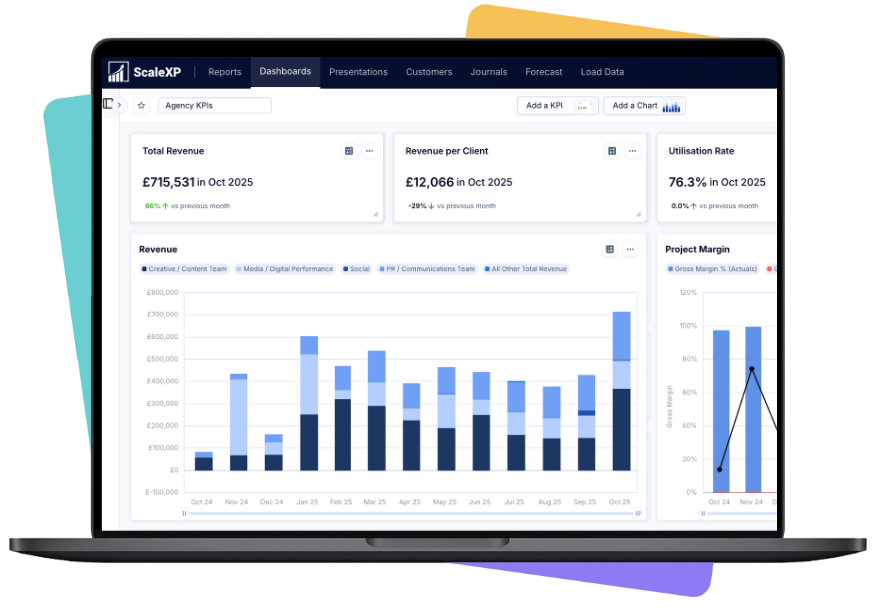
Revenue and project-margin reporting in ScaleXP.
ScaleXP combines Pipedrive deal data with invoices and accounting records from Xero or QuickBooks. It prepares revenue schedules and proposed journals for finance review, then sends approved journals back to the accounting system. Xero or QuickBooks remains your financial ledger.
Pipedrive records commercial information such as deals, products, values and dates. Finance also needs accounting invoices, service periods and recognition rules to determine the monthly revenue position.
ScaleXP combines those inputs with Xero or QuickBooks records to prepare revenue schedules and proposed journals.
Relevant inputs include deals, products, values, currencies, organizations and service dates. ScaleXP combines them with customer and invoice records from your accounting system. The available fields and configured mappings determine how the data is used.
Pipedrive revenue recognition software connects deal information with accounting invoices to calculate revenue for each reporting period. ScaleXP integrates Pipedrive with Xero or QuickBooks to prepare revenue schedules, deferred and accrued revenue calculations, and journals.
AI-assisted processing reads invoice descriptions, line items, dates and service-period information to help prepare revenue calculations. ScaleXP combines this information with relevant Pipedrive data. Finance reviews the schedules and resolves missing or inconsistent details.
Yes. ScaleXP can spread revenue across the relevant service periods when the required values, dates and recognition rules are available. The schedules distinguish revenue recognized in each period from amounts deferred to future periods.
Yes. ScaleXP can calculate earned but unbilled revenue where the required deal, product and service-period information is available. Finance reviews the accrued revenue schedule and associated journal treatment.
Yes. Products within a Pipedrive deal can be mapped to different revenue treatments where the necessary product values, dates and rules are available. Finance reviews the resulting schedules.
ScaleXP supports invoice creation in Xero from approved Pipedrive deal data.
Pipedrive-driven invoice creation is not currently available for QuickBooks Online. The QuickBooks connection supports revenue recognition, reconciliation, forecasting, SaaS metrics and reporting.
Yes. Finance reviews the revenue schedules and proposed journals before approved entries are posted to Xero or QuickBooks. Supporting invoice-level detail helps your team check and explain the amounts.
Yes. ScaleXP combines Pipedrive deal data with accounting information to support MRR, ARR, renewals, churn, expansion and revenue forecasts.
ScaleXP supports revenue schedules, calculations and journal workflows used by finance teams applying ASC 606 and IFRS 15. Your team determines the appropriate accounting policies, configures the revenue treatment and approves the resulting entries.
““challenging requirements ... tremendous help in making this happen”
Pipedrive revenue recognition
See how ScaleXP brings Pipedrive deal data alongside your Xero or QuickBooks invoices so sold and recognized revenue reconcile.
In a 15- or 30-minute demo, we’ll show the relevant workflows using example data and discuss how they could apply to your finance process. Complex requirements? Discuss them with us first.